Cross-project search (CPS) is now available in Elastic Cloud Serverless. With a single query like FROM logs*, you can search data across multiple isolated projects - no network peering, no certificate management, no data duplication. Projects stay in their own regions and clouds; only the results come back to you. For teams dealing with data residency requirements, tenant isolation, or high egress costs from copying logs, CPS means your data can live exactly where it belongs and still be queried as one.
Elastic Cloud Serverless already removes the headache of managing infrastructure and version upgrades. CPS takes that a step further. We've replaced complex network peering and manual certificate management with a simple linking model. Now, you can just treat your Elastic Cloud Serverless projects as simple namespaces for your data. Whether you're dealing with strict data residency laws, isolating tenant data, or just trying to avoid the massive network egress fees that come from duplicating logs, CPS lets you search your data exactly where it lives with a single query.
In this post, we’ll walk through how CPS works, how to control your searches using project tags, and how this new model differs from traditional cross-cluster search (CCS).
How to link projects for cross-project search
To get started with cross-project search, link projects in the Elastic Cloud Console or API. Linking is simple and unidirectional: you choose an origin project, then connect the projects it should search. Those links can span regions, cloud providers, and project types, so your data can stay where it belongs without giving up a unified search experience.
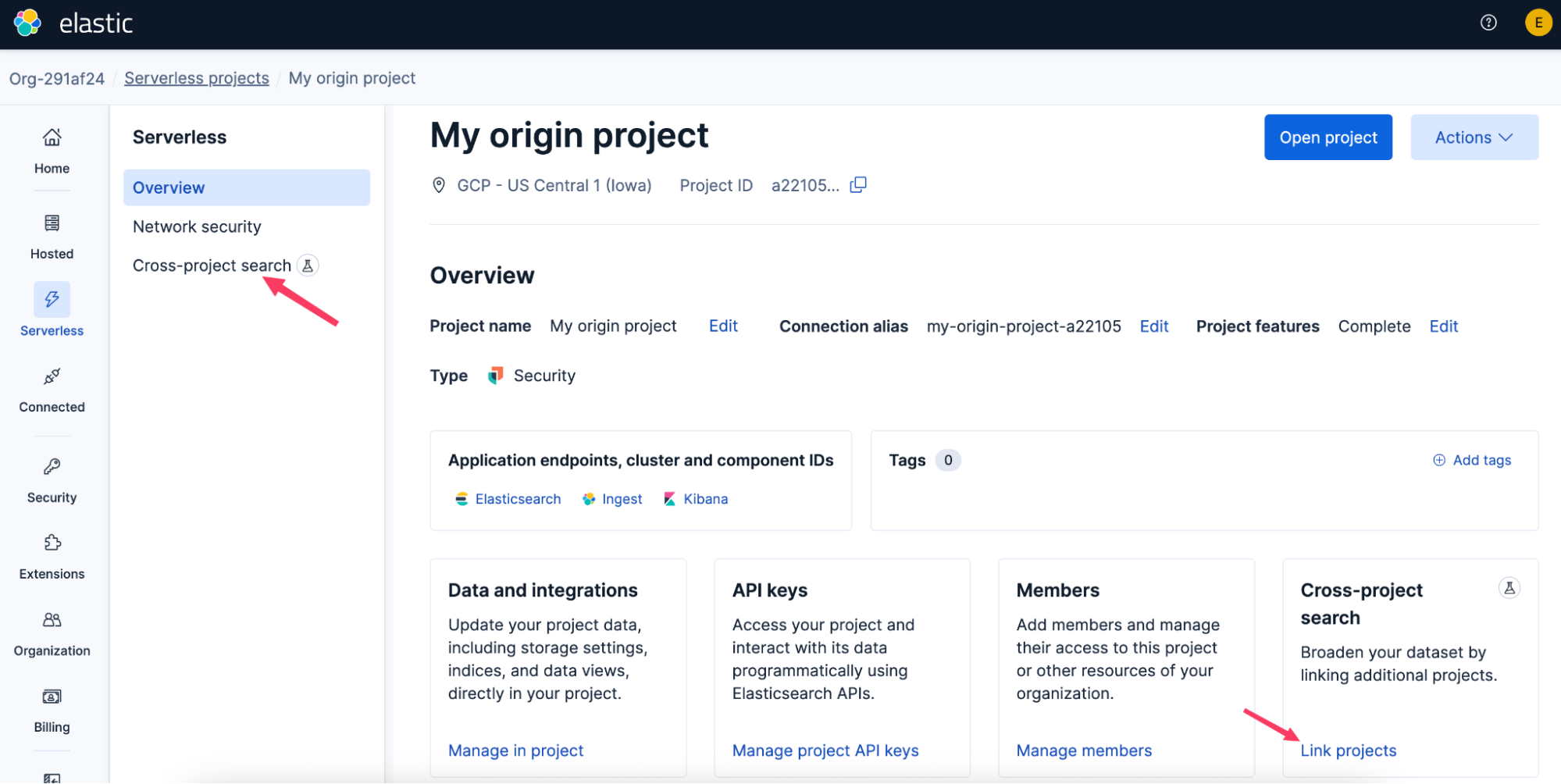
Once the link is created, it usually takes effect within about a minute. If you already have Kibana open, refresh to see the new cross-project search capabilities.
How cross-project search queries all linked projects by default
Once projects are linked, cross-project search turns separate projects into a single logical search surface. If your logs live across multiple projects, a query like FROM logs* searches the origin project and any linked project that has matching data. You do not need to name each remote target up front.
That is a major improvement over cross-cluster search. In CCS, reaching both local and remote data often means writing something like FROM logs*,*:logs*. For users, that means less query complexity. For teams, it moves us closer to a true single pane of glass across distributed data.
For more information on this, see the CPS search model docs.
If you're interested in learning about technical details on how we built this, see How cross-project search (CPS) works in Elasticsearch Serverless.
Control of searches via Project Routing
Searching across every linked project by default is convenient and useful for many workflows, but not every search should go everywhere. Cross-project search introduces project routing, a way to limit a query to a specific subset of projects.
It works through project tags defined in Elastic Cloud. Every project has built-in attributes such as its alias, cloud provider, and region. You can also add your own tags to reflect how your organization thinks about its estate, such as environment:prod, environment:test, a business unit, or a customer name. Elasticsearch can then use that metadata to decide which linked projects should participate in a search.
All Elasticsearch endpoints that support cross-project search accept a project_routing parameter. In the technical preview, routing is limited to using project alias. For example, setting project_routing to _alias:my-linked-project sends the query only to that linked project, while _alias:_origin keeps the query on the origin project. Over time, this model opens the door to much richer routing, where search scope can follow the logical structure of your organization instead of the physical layout of your infrastructure.
See the project routing documents for examples and more details about how they work.
Kibana Space-level default project routing
As an example of where more precision is needed for your search routing, searching all linked projects might trigger a flood of false positives in your Kibana rules or confusing results in your existing dashboards. To fix this, you can set a Space-level default project scope in Kibana. This acts as a safe preset for that specific Space—meaning all dashboards, Discover sessions, and alerting rules automatically respect it. Analysts can still override the scope manually during an investigation if they need a broader view.
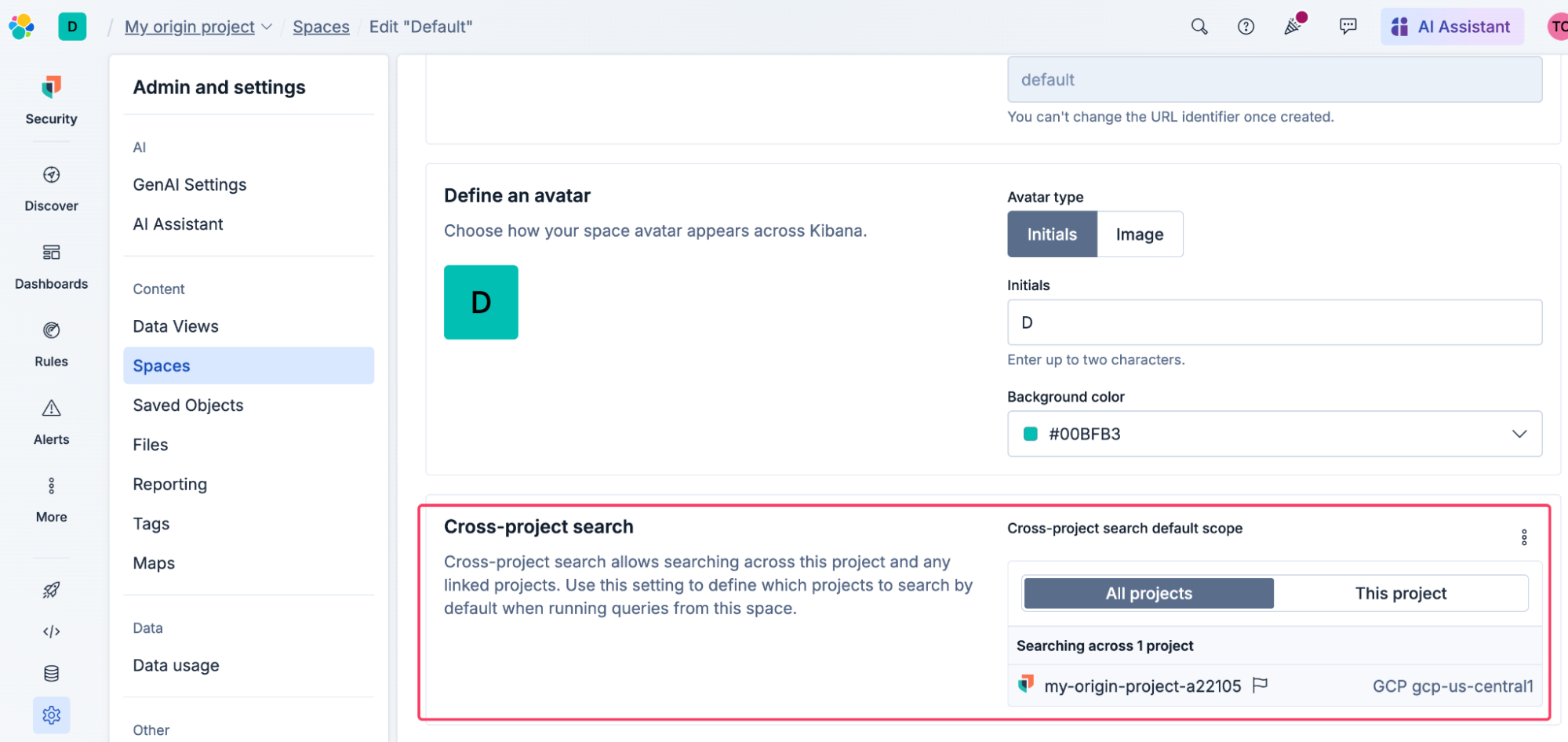
This matters for teams sharing a central project, such as MSPs, MSSPs, and centers of excellence: you can assign each team their own Kibana space and restrict it to only query their specific customer projects, guaranteeing tenant-specific experiences. Analysts can still override the scope manually during an investigation if they need a broader view.
You can configure this Space default before or after you actually link your projects in the Cloud UI. But because CPS immediately turns on the "search all" behavior the second a link is made, setting your Kibana defaults first ensures your existing detection rules don't suddenly run against a massive global dataset and overwhelm your team.
Using tags in searches
In addition to using tags for project routing, you can also use tags in your ES|QL and _search queries. This can be useful to identify where each record or row in a result set came from, or to sort, filter or aggregate by those tags.
For example, if you want to see which project every row in an ES|QL response came from, you can add the _project._alias tag to the ES|QL query:
FROM logs* METADATA _project._alias | ...and this allows you to use _project._alias in other parts of the query including KEEP clauses in order to see it in the final result:
FROM logs* METADATA _project._alias | ... | KEEP @timestamp, message, _project._alias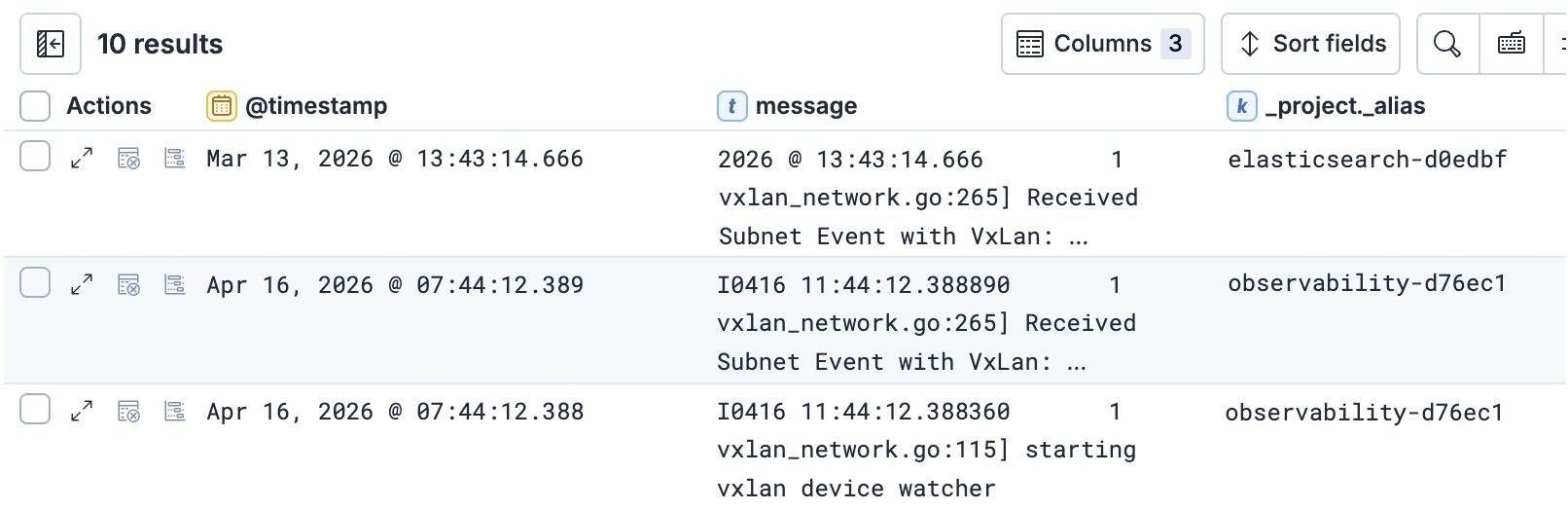
For more examples of using tags in queries see this doc that describes how to use them both in Search APIs and in ES|QL.
If you're interested in learning about technical details on how we added tags to Search and ES|QL queries, see Faster cross-project search in Elasticsearch Serverless with project tags and routing.
How cross-project search handles origin and linked projects equally
If you have used CCS, you might be aware that the local cluster is treated differently from remote clusters in a few ways.
- Errors from the local cluster are handled differently than errors from remote clusters. In particular, CCS uses the skip_unavailable setting to control how errors from remote clusters behave, but that setting does not exist for the local cluster.
- The local cluster has no "cluster alias", so the index expression
*:logs*searches all the remote projects, but skips the local cluster. To search both, you have to use the index expressionlogs*,*:logs*.
In CPS, we have changed both of these behaviors to put the origin project and linked projects on a more even footing.
First, the skip_unavailable setting is not used in Elastic Cloud Serverless. Instead, you control whether you want partial results on a search via the allow_partial_search_results parameter in _search or _async_search or the allow_partial_results parameter in ES|QL.
Second, in Elastic Cloud Serverless, the origin project has a project alias. It is defined in Elastic cloud like all project tags. Thus, in CPS, all of the queries below are equivalent - they target all projects with a "logs" index:
POST logs/_search

POST *:logs/_search


POST logs/search
{
  "project_routing": "_alias:*"
}Note: there is an important difference between the qualified index expression *:logs and the unqualified expression logs in terms of how error handling around missing indices works. For details see Unqualified and qualified search expressions in the public documentation.
Access control and security model for cross-project search
Elastic has created a new cloud-based security model, Universal Identity and Access Management (UIAM), that enables a key principle for cross-project search: the projects and data you can access do not depend on where you access it from.
Whether you initiate a search from your primary observability project or an ad-hoc analytics project, your access to the linked data remains consistent, since the access rights were defined in a centralized location. The cloud-based authentication and authorization model uses the cloud UIAM service to ensure your access permissions are uniform regardless of the origin project.
Try Cross-project search
Ultimately, Elastic Cloud Serverless and CPS together reduce operational friction and give you additional options for organizing data based on logical considerations rather than physical or operational considerations. Cross-project search allows your users to focus purely on the logical organization of their data, delivering a unified search experience without the physical complexities of the past.
Ready to try this out on your own? Start a free trial.
Want to get Elastic certified? Find out when the next Elasticsearch Engineer training is running!
Related content

May 15, 2026
Faster cross-project search in Elasticsearch Serverless with project tags and routing
Scope cross-project search in Elasticsearch Serverless with project routing to skip non-matching projects entirely, or with project tag fields to filter, aggregate, and sort by tag inside the query.

April 20, 2026
Introducing unified API keys for Elastic Cloud Serverless and Elasticsearch
Learn how Elastic unified control plane and data plane authentication in Serverless with a globally distributed IAM architecture. Use one API key for Cloud and Elasticsearch APIs.

March 24, 2026
Elasticsearch replicas for load balancing in Serverless
Learn how Elastic Cloud Serverless automatically adjusts index replicas based on search load, ensuring optimal query performance without manual configuration.
March 12, 2026
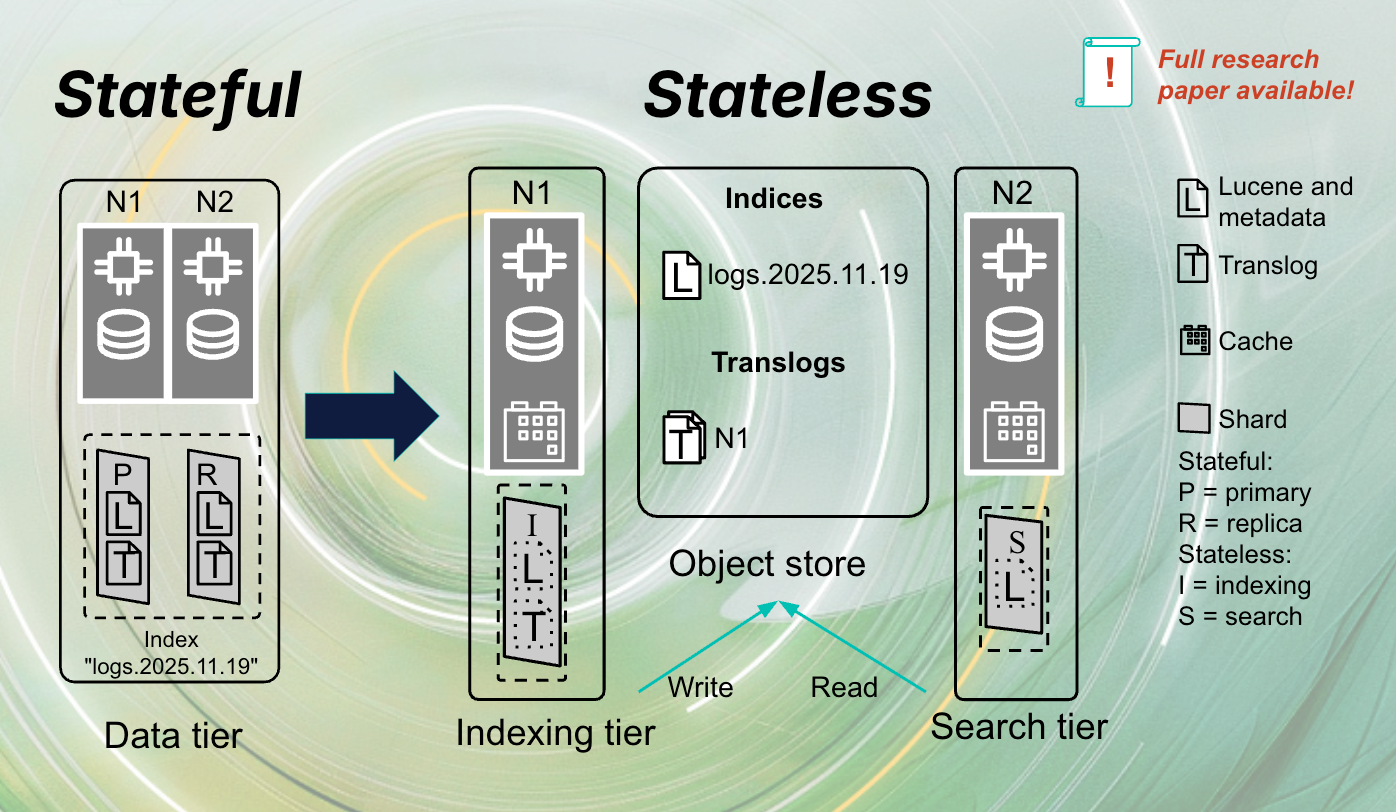
The stateless architecture of Elasticsearch Serverless
Exploring the stateless architecture of Elasticsearch Serverless. Learn how the stateful architecture was transformed into stateless for Serverless.
January 22, 2026
Agent Builder now GA: Ship context-driven agents in minutes
Agent Builder is now GA. Learn how it allows you to quickly develop context-driven AI agents.