We’re updating how Elasticsearch stores vector fields like dense_vector, sparse_vector, and rank_vector. Now, in Serverless and coming in v9.2, vector fields will be excluded from _source by default for newly created indices.
This change reduces storage overhead out of the box, improves indexing performance, and aligns Elasticsearch’s behavior with what users expect from a modern vector search engine.
Why change the default?
Until now, Elasticsearch has stored vectors in both doc_values (used for similarity search) and _source (used for retrieval). However, most vector workloads don’t need the original vector in the search response—just the top-k results and a few metadata fields.
Storing large vectors twice is wasteful. It increases index size, slows down indexing, and inflates search responses. In most cases, users don’t even realize they’re retrieving multi-kilobyte vectors per document.
This change avoids that duplication while preserving Elasticsearch’s strength: fast access to structured metadata stored in _source, such as titles and URLs.
A rare but necessary change
We don’t typically make breaking changes in minor versions or in Serverless environments. But in this case, we are confident that the benefits far outweigh the disruption.
We’ve seen many users hit performance issues or bloated responses due to vectors being stored and returned by default. Instead of requiring extra configuration, we’re making the efficient path the default:
"index.mapping.exclude_source_vectors": trueThis setting is now enabled by default for all newly created indices whether you're using Elasticsearch in Serverless, ESS, or self-managed deployments.
Existing indices are unaffected. For any index created prior to this change, the setting remains false, and vector fields will continue to be stored and returned in _source as before.
Rehydration: it just works
Rehydration means Elasticsearch can add the indexed vector back into _source when needed, even if it’s not stored there. This happens automatically for:
- Partial updates
- Reindex
- Recovery
These workflows continue to work seamlessly, even though the vector is no longer physically stored in _source.
You can also trigger it manually in a search request using the _source option (see below).
Precision trade-offs
Elasticsearch stores vectors internally as 32-bit floats, which is the format used during indexing and similarity search. However, vectors may be provided in JSON as higher-precision types like double or even long.
When _source no longer stores the original input, any rehydrated vector will reflect the float representation used for indexing. In nearly all use cases, this is what matters for search and scoring.
But if you need to preserve the exact input precision—for example, when you must retrieve the original double values instead of the indexed 32-bit floats—you must disable the setting at index creation time:
"index.mapping.exclude_source_vectors": falseThis ensures the original vector values are preserved in the original _source on disk.
Accessing vector fields when needed
If your application needs vector values in search responses, you can retrieve them explicitly.
- Use the
fieldsoption:
POST my-index/_search
{
  "fields": ["my_vector"]
}
Returns the indexed vector field alongside hits, outside of _source.
- Re-enable vector inclusion in
_source:
POST my-index/_search
{
  "_source": {
    "exclude_vectors": false
  }
}
This option rehydrates the indexed version of the vector fields back into _source for that response.
What’s the impact?
We benchmarked this change using the OpenAI Vector Rally track.
The standout result:
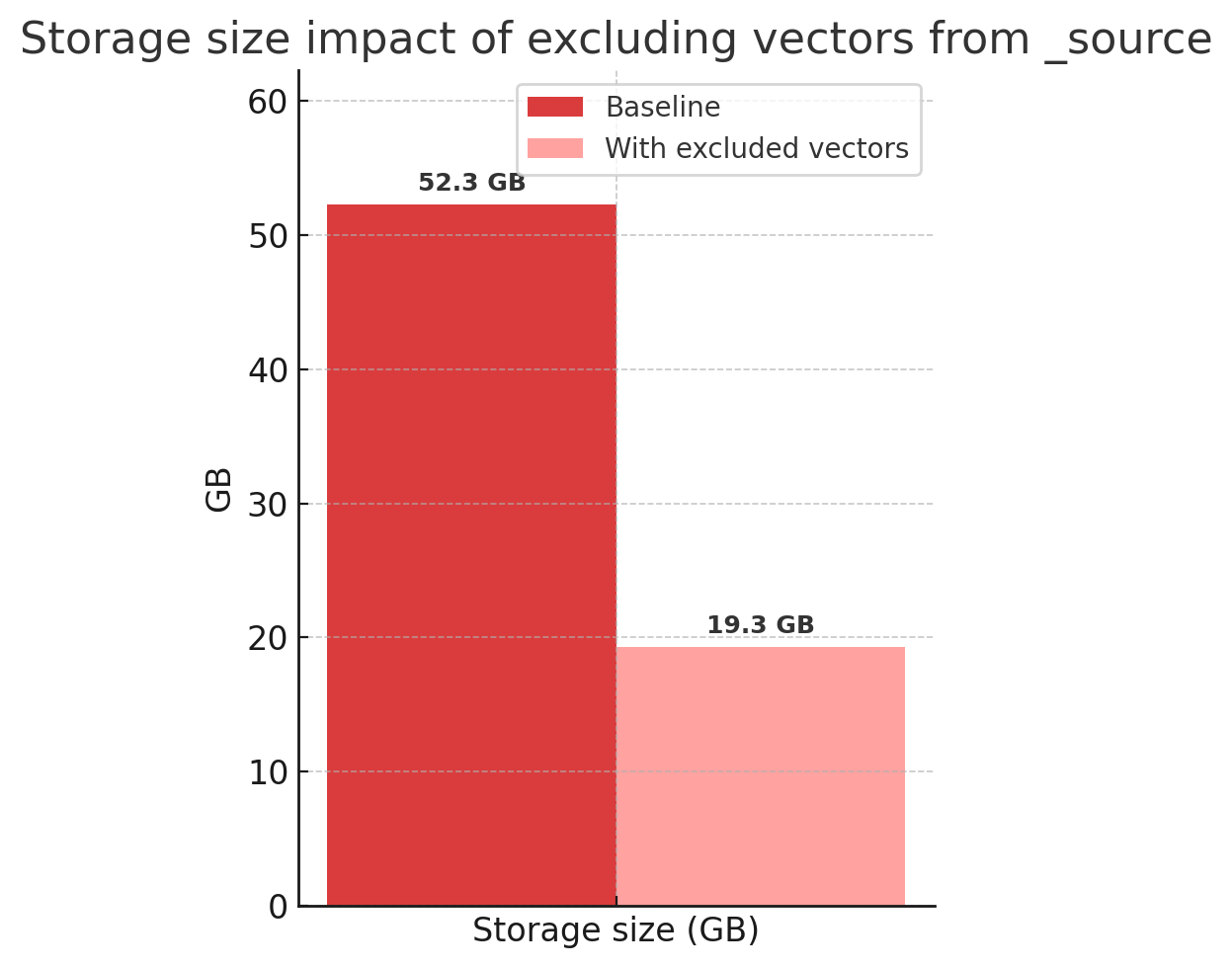
Impact of excluding vectors from _source.
This leads to:
- Faster indexing
- Less disk I/O
- Reduced resource usage
Especially in high-volume vector workloads.
Final thoughts
Elasticsearch is a full-featured vector search engine, and we are committed to ensuring it works well by default. This change removes inefficiencies that most users didn’t even know were there while preserving all functionality.
You still get fast metadata access via _source, seamless behavior for updates and recovery, and the ability to opt in to returning vector values when needed. If preserving the original vector exactly matters, that flexibility is still supported, you just need to opt in.
For most users, things just work better out of the box.
Ready to try this out on your own? Start a free trial.
Elasticsearch has integrations for tools from LangChain, Cohere and more. Join our advanced semantic search webinar to build your next GenAI app!
Related content
September 19, 2025
Using TwelveLabs’ Marengo video embedding model with Amazon Bedrock and Elasticsearch
Creating a small app to search video embeddings from TwelveLabs' Marengo model.

September 15, 2025
Balancing the scales: Making reciprocal rank fusion (RRF) smarter with weights
Exploring weighted reciprocal rank fusion (RRF) in Elasticsearch and how it works through practical examples.

September 8, 2025
MCP for intelligent search
Building an intelligent search system by integrating Elastic's intelligent query layer with MCP to enhance the generative efficacy of LLMs.

September 3, 2025
Vector search filtering: Keep it relevant
Performing vector search to find the most similar results to a query is not enough. Filtering is often needed to narrow down search results. This article explains how filtering works for vector search in Elasticsearch and Apache Lucene.

August 12, 2025
Beyond similar names: How Elasticsearch semantic text exceeds OpenSearch semantic field in simplicity, efficiency, and integration
Comparing Elasticsearch semantic text and OpenSearch semantic field in terms of simplicity, configurability, and efficiency.