Building AI search applications often involves coordinating multiple tasks, data retrieval, and data extraction into a seamless workflow. LangGraph simplifies this process by letting developers orchestrate AI agents using a node-based structure. In this article, we are going to build a financial solution using LangGraph.js
What is LangGraph
LangGraph is a framework for building AI agents and orchestrating them in a workflow to create AI-assisted applications. LangGraph has a node architecture where we can declare functions that represent tasks and assign them as nodes of the workflow. The result of multiple nodes interacting together will be a graph. LangGraph is part of the broader LangChain ecosystem, which provides tools for building modular and composable AI systems.
For a better understanding of why LangGraph is useful, let's solve a problematic situation using it.
Overview of the solution
In a venture capital firm, investors have access to a large database with many filtering options, but when one wants to combine criteria, it becomes hard and slow. This may cause some relevant startups not to be found for investment. It results in spending a lot of hours trying to identify the best candidates, or even losing opportunities.
With LangGraph and Elasticsearch, we can perform filtered searches using natural language, eliminating the need for users to manually build complex requests with dozens of filters. To make it more flexible, the workflow automatically decides based on the user's input between two query types:
- Investment-focused queries: These target financial and funding aspects of startups, such as funding rounds, valuation, or revenue. Example: “Find startups with Series A or Series B funding between $8M–$25M and monthly revenue above $500K.”
- Market-focused queries: These concentrate on industry verticals, geographic markets, or business models, helping identify opportunities in specific sectors or regions. Example: “Find fintech and healthcare startups in San Francisco, New York, or Boston.”
To keep the queries robust, we will make the LLM build search templates instead of full DSL queries. This way, you always get the query you want, and the LLM just has to fill in the blanks and not carry the responsibility of building the query you need every time.
What you need to get started
- Elasticsearch APIKey
- OpenAPI APIKey
- Node 18 or newer
Step-by-step instructions
In this section, let’s see how the app will look. For that, we will use TypeScript, a superset of JavaScript that adds static types to make the code more reliable, easier to maintain, and safer by catching errors early while remaining fully compatible with existing JavaScript.
The nodes' flow will look as follows:
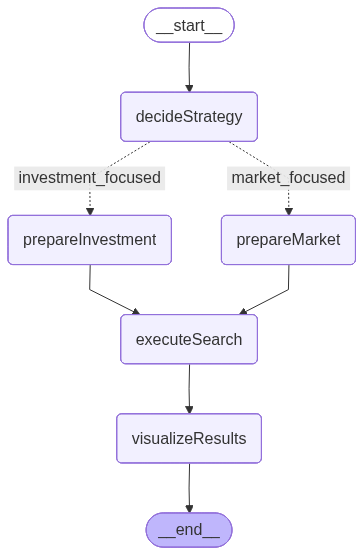
The image above is generated by LangGraph and represents the workflow that defines the execution order and conditional logic between nodes:
- decideStrategy: Uses an LLM to analyze the user’s query and decide between two specialized search strategies, investment-focused or market-focused.
- prepareInvestmentSearch: Extracts filter values from the query and builds a predefined template emphasizing financial and funding-related parameters.
- prepareMarketSearch: Extracts filter values as well, but dynamically builds parameters emphasizing market, industry, and geographic context.
- executeSearch: Sends the constructed query to Elasticsearch using a search template and retrieves the matching startup documents.
- visualizeResults: Formats the final results into a clear, readable summary showing key startup attributes such as funding, industry, and revenue.
This flow includes a conditional branching, working as an “if” statement, that determines whether to use the investment or market search path based on the user’s input. This decision logic, driven by the LLM, makes the workflow adaptive and context-aware, a mechanism we’ll explore in more detail in the next sections.
LangGraph State
Before seeing each node individually, we need to understand how the nodes communicate and share data. For that, LangGraph enables us to define the workflow state. This defines the shared state that will be passed between nodes.
The state acts as a shared container that stores intermediate data throughout the workflow: it begins with the user’s natural language query, then keeps the selected search strategy, the prepared parameters for Elasticsearch, the retrieved search results, and finally the formatted output.
This structure allows every node to read and update the state, ensuring a consistent flow of information from the user input to the final visualization.
const VCState = Annotation.Root({
  input: Annotation<string>(), // User's natural language query
  searchStrategy: Annotation<string>(), // Search strategy chosen by LLM
  searchParams: Annotation<any>(), // Prepared search parameters
  results: Annotation<any[]>(), // Search results
  final: Annotation<string>(), // Final formatted response
});
Set up the application
All the code on this section can be found in the elasticsearch-labs repository.
Open a terminal in the folder where the app will be located and Initialize a Node.js application with the command:
npm init -yNow we can install the necessary dependencies for this project:
npm install @elastic/elasticsearch @langchain/langgraph @langchain/openai @langchain/core dotenv zod && npm install --save-dev @types/node tsx typescript@elastic/elasticsearch: Helps us handle Elasticsearch requests such as data ingestion and retrieval.@langchain/langgraph: JS dependency to provide all LangGraph tools.@langchain/openai: OpenAI LLM client for LangChain.- @langchain/core: Provides the fundamental building blocks for LangChain apps, including prompt templates.
dotenv: Necessary dependency to use environment variables in JavaScript.zod: Dependency to type data.
@types/node tsx typescript allows us to write and run TypeScript code.
Now create the following files:
elasticsearchSetup.ts: Will create the index mappings, load the data set from a JSON file, and ingest the data to Elasticsearch.main.ts: will include the LangGraph application..env: file to store the environment variables
In the .env file, let’s add the following environment variables:
ELASTICSEARCH_ENDPOINT="your-endpoint-here"
ELASTICSEARCH_API_KEY="your-key-here"
OPENAI_API_KEY="your-key-here"
The OpenAPI APIKey will not be used directly on the code; instead, it will be used internally by the library @langchain/openai.
All the logic regarding mappings creation, search templates creation, and dataset ingestion can be found in the elasticsearchSetup.ts file. In the next steps, we will be focusing on the main.ts file. Also, you can check the dataset to better understand how the data looks in the dataset.json.
LangGraph app
In the main.ts file, let’s import some necessary dependencies to consolidate the LangGraph application. In this file, you must also include the node functions and the state declaration. The graph declaration will be done in a main method in the next steps. The elasticsearchSetup.ts file will contain Elasticsearch helpers we are going to use within the nodes in further steps.
import { writeFileSync } from "node:fs";
import { StateGraph, Annotation, START, END } from "@langchain/langgraph";
import { ChatOpenAI } from "@langchain/openai";
import { z } from "zod";
import {
  esClient,
  ingestDocuments,
  createSearchTemplates,
  INDEX_NAME,
  INVESTMENT_FOCUSED_TEMPLATE,
  MARKET_FOCUSED_TEMPLATE,
  createIndex,
} from "./elasticsearchSetup.js";

const llm = new ChatOpenAI({ model: "gpt-4o-mini" });
As mentioned before, the LLM client will be used to generate the Elasticsearch search template parameters based on the user's question.
async function saveGraphImage(app: any): Promise<void> {
  try {
    const drawableGraph = app.getGraph();
    const image = await drawableGraph.drawMermaidPng();
    const arrayBuffer = await image.arrayBuffer();

    const filePath = "./workflow_graph.png";
    writeFileSync(filePath, new Uint8Array(arrayBuffer));
    console.log(`📊 Workflow graph saved as: ${filePath}`);
  } catch (error: any) {
    console.log("⚠️  Could not save graph image:", error.message);
  }
}
The method above generates the graph image in png format and uses the Mermaid.INK API behind the scenes. This is useful if you want to see how the app nodes interact together with a styled visualization.
LangGraph nodes
Now lets see each node detailed:
decideSearchStrategy node
The decideSearchStrategy node analyzes the user input and determines whether to perform an investment focused or market focused search. It uses an LLM with a structured output schema (defined with Zod) to classify the query type. Before making the decision, it retrieves the available filters from the index using an aggregation, ensuring the model has up to date context about industries, locations, and funding data.
To extract the filters possible values and send them to the LLM, let’s use an aggregation query to retrieve them directly from the Elasticsearch index. This logic is allocated in a method called getAvailableFilters:
async function getAvailableFilters() {
  try {
    const response = await esClient.search({
      index: INDEX_NAME,
      size: 0,
      aggs: {
        industries: {
          terms: { field: "industry", size: 100 },
        },
        locations: {
          terms: { field: "location", size: 100 },
        },
        funding_stages: {
          terms: { field: "funding_stage", size: 20 },
        },
        business_models: {
          terms: { field: "business_model", size: 10 },
        },
        lead_investors: {
          terms: { field: "lead_investor", size: 100 },
        },
        funding_amount_stats: {
          stats: { field: "funding_amount" },
        },
      },
    });

    return response.aggregations;
  } catch (error) {
    console.error("❌ Error getting available filters:", error);
    return {};
  }
}
With the aggregation query above, we have the following results:
{
  "industries": {
    "doc_count_error_upper_bound": 0,
    "sum_other_doc_count": 0,
    "buckets": [
      {
        "key": "logistics",
        "doc_count": 5
      },
      ...
    ]
  },
  "locations": {
    "doc_count_error_upper_bound": 0,
    "sum_other_doc_count": 0,
    "buckets": [
      {
        "key": "San Francisco, CA",
        "doc_count": 4
      },
      {
        "key": "New York, NY",
        "doc_count": 3
      },
      ...
    ]
  },
  "funding_stages": {
    "doc_count_error_upper_bound": 0,
    "sum_other_doc_count": 0,
    "buckets": [
      {
        "key": "Series A",
        "doc_count": 8
      },
      ...
    ]
  },
  "business_models": {
    "doc_count_error_upper_bound": 0,
    "sum_other_doc_count": 0,
    "buckets": [
      {
        "key": "B2B",
        "doc_count": 13
      },
      ...
    ]
  },
  "lead_investors": {
    "doc_count_error_upper_bound": 0,
    "sum_other_doc_count": 0,
    "buckets": [
      {
        "key": "Battery Ventures",
        "doc_count": 1
      },
      {
        "key": "Benchmark Capital",
        "doc_count": 1
      },
      ...
    ]
  },
  "funding_amount_stats": {
    "count": 20,
    "min": 4500000,
    "max": 35000000,
    "avg": 14075000,
    "sum": 281500000
  }
}
See all the results here.
For both strategies, we are going to use hybrid search to detect both the structured part of the question (filters) and the more subjective parts (semantics). Here is an example of both queries using search templates:
await esClient.putScript({
      id: INVESTMENT_FOCUSED_TEMPLATE,
      script: {
        lang: "mustache",
        source: `{
          "size": 5,
          "retriever": {
            "rrf": {
              "retrievers": [
                {
                  "standard": {
                    "query": {
                      "semantic": {
                        "field": "semantic_field",
                        "query": "{{query_text}}"
                      }
                    }
                  }
                },
                {
                  "standard": {
                    "query": {
                      "bool": {
                        "filter": [
                          {"terms": {"funding_stage": {{#join}}{{#toJson}}funding_stage{{/toJson}}{{/join}}}},
                          {"range": {"funding_amount": {"gte": {{funding_amount_gte}}{{#funding_amount_lte}},"lte": {{funding_amount_lte}}{{/funding_amount_lte}}}}},
                          {"terms": {"lead_investor": {{#join}}{{#toJson}}lead_investor{{/toJson}}{{/join}}}},
                          {"range": {"monthly_revenue": {"gte": {{monthly_revenue_gte}}{{#monthly_revenue_lte}},"lte": {{monthly_revenue_lte}}{{/monthly_revenue_lte}}}}}
                        ]
                      }
                    }
                  }
                }
              ],
              "rank_window_size": 100,
              "rank_constant": 20
            }
          }
        }`,
      },
    });
Look at queries detailed in the elasticsearchSetup.ts file. In the following node, it will be decided which of the two queries will be used:
// Node 1: Decide search strategy using LLM
async function decideSearchStrategy(state: typeof VCState.State) {
  // Zod schema for specialized search strategy decision
  const SearchDecisionSchema = z.object({
    search_type: z
      .enum(["investment_focused", "market_focused"])
      .describe("Type of specialized search strategy to use"),
    reasoning: z
      .string()
      .describe("Brief explanation of why this search strategy was chosen"),
  });

  const decisionLLM = llm.withStructuredOutput(SearchDecisionSchema);

  // Get dynamic filters from Elasticsearch
  const availableFilters = await getAvailableFilters();

  const prompt = `Query: "${state.input}"
    Available filters: ${JSON.stringify(availableFilters, null, 2)}

    Choose between two specialized search strategies:

    - investment_focused: For queries about funding stages, funding amounts, monthly revenue, lead investors, financial performance

    - market_focused: For queries about industries, locations, business models, market segments, geographic markets

    Analyze the query intent and choose the most appropriate strategy.
  `;

  try {
    const result = await decisionLLM.invoke(prompt);
    console.log(
      `🤔 Search strategy: ${result.search_type} - ${result.reasoning}`
    );

    return {
      searchStrategy: result.search_type,
    };
  } catch (error: any) {
    console.error("❌ Error in decideSearchStrategy:", error.message);
    return {
      searchStrategy: "investment_focused",
    };
  }
}
prepareInvestmentSearch and prepareMarketSearch nodes
Both nodes use a shared helper function, extractFilterValues, which leverages the LLM to identify relevant filters mentioned in the user’s input, such as industry, location, funding stage, business model, etc. We are using this schema to build our search template.
// Extract all possible filter values from user input
async function extractFilterValues(input: string) {
  const FilterValuesSchema = z.object({
    // Investment-focused filters
    funding_stage: z
      .array(z.string())
      .default([])
      .describe("Funding stage values mentioned in query"),
    funding_amount_gte: z
      .number()
      .default(0)
      .describe("Minimum funding amount in USD"),
    funding_amount_lte: z
      .number()
      .default(100000000)
      .describe("Maximum funding amount in USD"),
    lead_investor: z
      .array(z.string())
      .default([])
      .describe("Lead investor values mentioned in query"),
    monthly_revenue_gte: z
      .number()
      .default(0)
      .describe("Minimum monthly revenue in USD"),
    monthly_revenue_lte: z
      .number()
      .default(10000000)
      .describe("Maximum monthly revenue in USD"),
    industry: z
      .array(z.string())
      .default([])
      .describe("Industry values mentioned in query"),
    location: z
      .array(z.string())
      .default([])
      .describe("Location values mentioned in query"),
    business_model: z
      .array(z.string())
      .default([])
      .describe("Business model values mentioned in query"),
  });

  const extractorLLM = llm.withStructuredOutput(FilterValuesSchema);
  const availableFilters = await getAvailableFilters();

  const extractPrompt = `Extract ALL relevant filter values from: "${input}"
    Available options: ${JSON.stringify(availableFilters, null, 2)}
    Extract only values explicitly mentioned in the query. Leave fields empty if not mentioned.`;

  return await extractorLLM.invoke(extractPrompt);
}
Depending on the detected intent, the workflow selects one of two paths:
prepareInvestmentSearch: builds financially oriented search parameters, including funding stage, funding amount, investor, and renew information. You can find the entire query template in the elasticsearchSetup.ts file:
// Node 2A: Prepare Investment-Focused Search Parameters
async function prepareInvestmentSearch(state: typeof VCState.State) {
  console.log(
    "💰 Preparing INVESTMENT-FOCUSED search parameters with financial emphasis..."
  );

  try {
    // Extract all filter values from input
    const values = await extractFilterValues(state.input);

    let searchParams: any = {
      template_id: INVESTMENT_FOCUSED_TEMPLATE,
      query_text: state.input,
      ...values,
    };

    return { searchParams };
  } catch (error) {
    console.error("❌ Error preparing investment-focused params:", error);
    return {
      searchParams: {},
    };
  }
}
prepareMarketSearch: creates market-driven parameters focused on industries, geographies, and business models. See the entire query in the elasticsearchSetup.ts file:
// Node 2B: Prepare Market-Focused Search Parameters
async function prepareMarketSearch(state: typeof VCState.State) {
  console.log(
    "🔍 Preparing MARKET-FOCUSED search parameters with market emphasis..."
  );

  try {
    // Extract all filter values from input
    const values = await extractFilterValues(state.input);

    let searchParams: any = {
      template_id: MARKET_FOCUSED_TEMPLATE,
      query_text: state.input,
      ...values,
    };

    return { searchParams };
  } catch (error) {
    console.error("❌ Error preparing market-focused params:", error);
    return {};
  }
}
executeSearch node
This node takes the generated search parameters from the state and sends them to Elasticsearch first, using the _render API to visualize the query for debugging purposes, and then sends a request to retrieve the results.
// Node 3: Execute Search
async function executeSearch(state: typeof VCState.State) {
  const { searchParams } = state;

  try {
    // getting formed query from template for debugging
    const renderedTemplate = await esClient.renderSearchTemplate({
      id: searchParams.template_id,
      params: searchParams,
    });

    console.log(
      "📋 Complete query:",
      JSON.stringify(renderedTemplate.template_output, null, 2)
    );

    const results = await esClient.searchTemplate({
      index: INDEX_NAME,
      id: searchParams.template_id,
      params: searchParams,
    });

    return {
      results: results.hits.hits.map((hit: any) => hit._source),
    };
  } catch (error: any) {
    console.error(`❌ ${state.searchParams.search_type} search error:`, error);
    return { results: [] };
  }
}
visualizeResults node
Finally, this node displays the Elasticsearch results.
// Node 4: Visualize results
async function visualizeResults(state: typeof VCState.State) {
  const results = state.results || [];

  let formattedResults = `🎯 Found ${results.length} startups matching your criteria:\n\n`;

  results.forEach((startup: any, index: number) => {
    formattedResults += `${index + 1}. **${startup.company_name}**\n`;
    formattedResults += `   📍 ${startup.location} | 🏢 ${startup.industry} | 💼 ${startup.business_model}\n`;
    formattedResults += `   💰 ${startup.funding_stage} - $${(
      startup.funding_amount / 1000000
    ).toFixed(1)}M\n`;
    formattedResults += `   👥 ${startup.employee_count} employees | 📈 $${(
      startup.monthly_revenue / 1000
    ).toFixed(0)}K MRR\n`;
    formattedResults += `   🏦 Lead: ${startup.lead_investor}\n`;
    formattedResults += `   📝 ${startup.description}\n\n`;
  });

  return {
    final: formattedResults,
  };
}
Programmatically, the entire graph looks like this:
  const workflow = new StateGraph(VCState)
    // Register nodes - these are the processing functions
    .addNode("decideStrategy", decideSearchStrategy)
    .addNode("prepareInvestment", prepareInvestmentSearch)
    .addNode("prepareMarket", prepareMarketSearch)
    .addNode("executeSearch", executeSearch)
    .addNode("visualizeResults", visualizeResults)
    // Define execution flow with conditional branching
    .addEdge(START, "decideStrategy") // Start with strategy decision
    .addConditionalEdges(
      "decideStrategy",
      (state: typeof VCState.State) => state.searchStrategy, // Conditional function
      {
        investment_focused: "prepareInvestment", // If investment focused -> RRF template preparation
        market_focused: "prepareMarket", // If market focused -> dynamic query preparation
      }
    )
    .addEdge("prepareInvestment", "executeSearch") // Investment prep -> execute
    .addEdge("prepareMarket", "executeSearch") // Market prep -> execute
    .addEdge("executeSearch", "visualizeResults") // Execute -> visualize
    .addEdge("visualizeResults", END); // End workflow
As you can see, we have a conditional edge where the app decides which “path” or node will run next. This feature is useful when workflows need branching logic, such as choosing between multiple tools or including a human-in-the-loop step.
With the core LangGraph features understood, we can set up the application where the code will be running:
Put everything together in a main method, here we declare the graph with all the elements under the variable workflow:
async function main() {
  await createIndex();
  await createSearchTemplates();
  await ingestDocuments();

  // Create the workflow graph with shared state
  const workflow = new StateGraph(VCState)
    // Register nodes - these are the processing functions
    .addNode("decideStrategy", decideSearchStrategy)
    .addNode("prepareInvestment", prepareInvestmentSearch)
    .addNode("prepareMarket", prepareMarketSearch)
    .addNode("executeSearch", executeSearch)
    .addNode("visualizeResults", visualizeResults)
    // Define execution flow with conditional branching
    .addEdge(START, "decideStrategy") // Start with strategy decision
    .addConditionalEdges(
      "decideStrategy",
      (state: typeof VCState.State) => state.searchStrategy, // Conditional function
      {
        investment_focused: "prepareInvestment", // If investment focused -> RRF template preparation
        market_focused: "prepareMarket", // If market focused -> dynamic query preparation
      }
    )
    .addEdge("prepareInvestment", "executeSearch") // Investment prep -> execute
    .addEdge("prepareMarket", "executeSearch") // Market prep -> execute
    .addEdge("executeSearch", "visualizeResults") // Execute -> visualize
    .addEdge("visualizeResults", END); // End workflow


  const app = workflow.compile();

  await saveGraphImage(app);

  const query =
    "Find startups with Series A or Series B funding between $8M-$25M and monthly revenue above $500K";

  const marketResult = await app.invoke({ input: query });
  console.log(marketResult.final);
}
The query variable simulates the user input entered in a hypothetical search bar:

From the natural language phrase “Find startups with Series A or Series B funding between $8M-$25M and monthly revenue above $500K”, all the filters will be extracted.
Finally, invoke the main method:
main().catch(console.error);Results
🔍 Checking if index exists...
🏗️ Creating index...
✅ Index created successfully!
Ingesting documents...
✅ Documents ingested successfully!
✅ Investment-focused template created successfully!
✅ Market-focused template created successfully!

📊 Workflow graph saved as: ./workflow_graph.png

🔍 Query: "Find startups with Series A or Series B funding between $8M-$25M and monthly revenue above $500K"

🤔 Search strategy: investment_focused - The query specifically seeks profitable fintech startups with defined funding amounts and high monthly revenue, which aligns closely with financial performance metrics and investment-related criteria.

💰 Preparing INVESTMENT-FOCUSED search parameters with financial emphasis...

📋 Complete query: {
  "size": 5,
  "retriever": {
    "rrf": {
      "retrievers": [
        {
          "standard": {
            "query": {
              "semantic": {
                "field": "semantic_field",
                "query": "Find startups with Series A or Series B funding between $8M-$25M and monthly revenue above $500K"
              }
            }
          }
        },
        {
          "standard": {
            "query": {
              "bool": {
                "filter": [
                  {
                    "terms": {
                      "funding_stage": [
                        "Series A",
                        "Series B"
                      ]
                    }
                  },
                  {
                    "range": {
                      "funding_amount": {
                        "gte": 8000000,
                        "lte": 25000000
                      }
                    }
                  },
                  {
                    "terms": {
                      "lead_investor": []
                    }
                  },
                  {
                    "range": {
                      "monthly_revenue": {
                        "gte": 500000,
                        "lte": 0
                      }
                    }
                  }
                ]
              }
            }
          }
        }
      ],
      "rank_window_size": 100,
      "rank_constant": 20
    }
  }
}
🎯 Found 5 startups matching your criteria:

1. **TechFlow**
   📍 San Francisco, CA | 🏢 logistics | 💼 B2B
   💰 Series A - $8.0M
   👥 45 employees | 📈 $500K MRR
   🏦 Lead: Sequoia Capital
   📝 TechFlow optimizes supply chain operations using AI-powered route optimization and real-time tracking. Founded in 2023, shows remarkable growth with $500K monthly revenue.

2. **DataViz**
   📍 New York, NY | 🏢 enterprise software | 💼 B2B
   💰 Series A - $10.0M
   👥 42 employees | 📈 $450K MRR
   🏦 Lead: Battery Ventures
   📝 DataViz creates intuitive data visualization tools for enterprise customers. No-code platform allows business users to create dashboards without technical expertise.

3. **FinanceAI**
   📍 San Francisco, CA | 🏢 fintech | 💼 B2C
   💰 Series C - $25.0M
   👥 120 employees | 📈 $1200K MRR
   🏦 Lead: Tiger Global Management
   📝 FinanceAI provides AI-powered investment advisory services to retail investors. Uses machine learning to analyze market trends with over 100,000 active users.

4. **UrbanMobility**
   📍 New York, NY | 🏢 logistics | 💼 B2B2C
   💰 Series B - $15.0M
   👥 78 employees | 📈 $750K MRR
   🏦 Lead: Kleiner Perkins
   📝 UrbanMobility revolutionizes urban transportation through autonomous delivery drones and smart logistics hubs. Partners with major retailers for same-day delivery across Manhattan and Brooklyn.

5. **HealthTech Solutions**
   📍 Boston, MA | 🏢 healthcare | 💼 B2B
   💰 Series B - $18.0M
   👥 95 employees | 📈 $900K MRR
   🏦 Lead: General Catalyst
   📝 HealthTech Solutions develops medical devices and software for remote patient monitoring. Comprehensive telehealth platform reducing hospital readmissions by 30%.

✨  Done in 18.80s.
For the input sent, the application chooses the investment-focused path, and as a result, we can see the Elasticsearch query generated by the LangGraph workflow, which extracts the values and ranges from the user input. We can also see the query sent to Elasticsearch with the extracted values applied, and finally, the results formatted by the visualizeResults node with the results.
Now let's test the market-focused node using the query “Find fintech and healthcare startups in San Francisco, New York, or Boston”:
...

🔍 Query: Find fintech and healthcare startups in San Francisco, New York, or Boston

🤔 Search strategy: market_focused - The query is focused on finding fintech startups in San Francisco that are disrupting traditional banking and payment systems, which pertains to specific industries (fintech) and locations (San Francisco). Thus, a market-focused strategy is more appropriate.

🔍 Preparing MARKET-FOCUSED search parameters with market emphasis...

📋 Complete query: {
  "size": 5,
  "retriever": {
    "rrf": {
      "retrievers": [
        {
          "standard": {
            "query": {
              "semantic": {
                "field": "semantic_field",
                "query": "Find fintech and healthcare startups in San Francisco, New York, or Boston"
              }
            }
          }
        },
        {
          "standard": {
            "query": {
              "bool": {
                "filter": [
                  {
                    "terms": {
                      "industry": [
                        "fintech",
                        "healthcare"
                      ]
                    }
                  },
                  {
                    "terms": {
                      "location": [
                        "San Francisco, CA",
                        "New York, NY",
                        "Boston, MA"
                      ]
                    }
                  },
                  {
                    "terms": {
                      "business_model": []
                    }
                  }
                ]
              }
            }
          }
        }
      ],
      "rank_window_size": 50,
      "rank_constant": 10
    }
  }
}
🎯 Found 5 startups matching your criteria:

1. **FinanceAI**
   📍 San Francisco, CA | 🏢 fintech | 💼 B2C
   💰 Series C - $25.0M
   👥 120 employees | 📈 $1200K MRR
   🏦 Lead: Tiger Global Management
   📝 FinanceAI provides AI-powered investment advisory services to retail investors. Uses machine learning to analyze market trends with over 100,000 active users.

2. **CryptoWallet**
   📍 Miami, FL | 🏢 fintech | 💼 B2C
   💰 Series B - $16.0M
   👥 73 employees | 📈 $820K MRR
   🏦 Lead: Coinbase Ventures
   📝 CryptoWallet provides secure digital wallet solutions for cryptocurrency trading and storage. Multi-chain support with enterprise-grade security features.

...

✨  Done in 7.41s.
Learnings
During the writing process I learned:
- We must show the LLM the exact values of filters, otherwise we rely on the user typing the exact values of things. For low cardinality this approach is fine, but when the cardinality is high we need some mechanism to filter results out
- Using search templates makes the results much more consistent than letting the LLMwrite the Elasticsearch query, and it's also faster
- Conditional edges are a powerful mechanism to build applications with multiple variants and branching paths.
- Structured output is extremely useful when generating information with LLMs because it enforces predictable, type-safe responses. This improves reliability and reduces prompt misinterpretations.
Combining semantic and structured search through hybrid retrieval produces better and more relevant results, balancing precision and context understanding.
Conclusion
In this example, we combine LangGraph.js with Elasticsearch to create a dynamic workflow capable of interpreting natural language queries and deciding between financial or market-focused search strategies. This approach reduces the complexity of crafting manual queries while improving flexibility and accuracy for venture capital analysts.
Ready to try this out on your own? Start a free trial.
Want to get Elastic certified? Find out when the next Elasticsearch Engineer training is running!
Related content
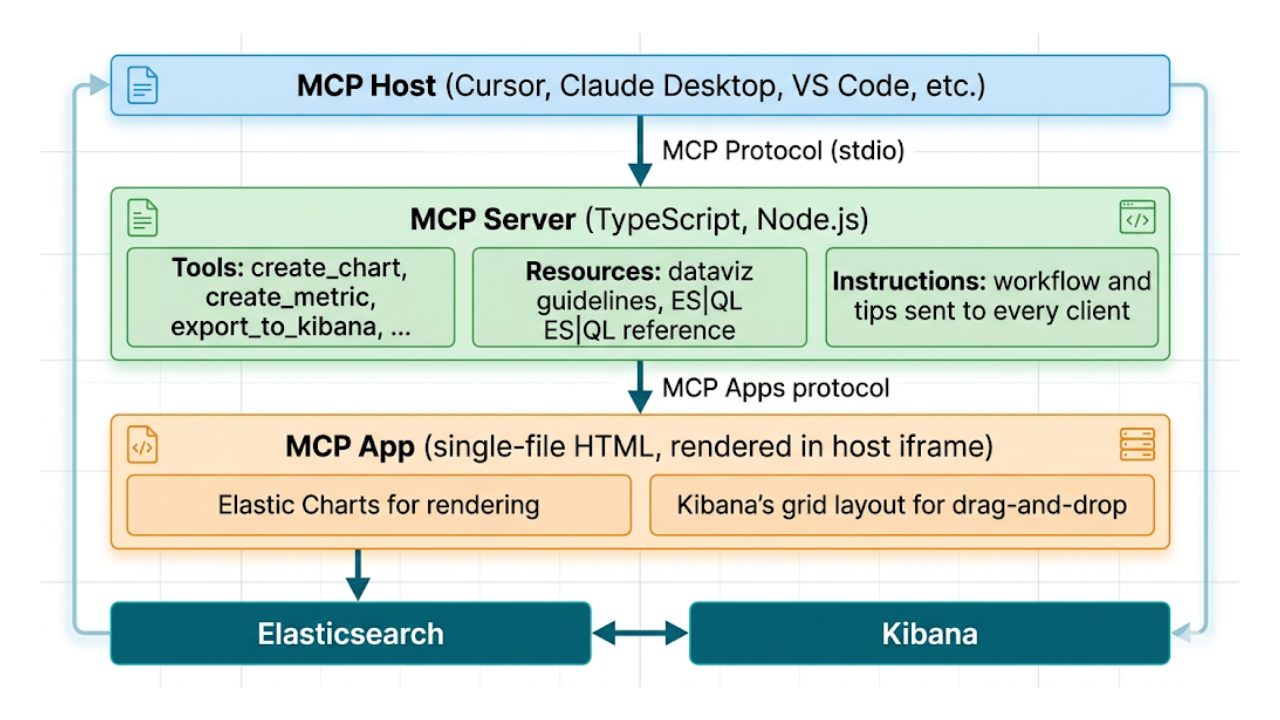
Describe it, don't draw it: AI-native Kibana dashboards via MCP and ES|QL
From prompt to dashboard. Learn how to build Kibana dashboards with natural language, using example-mcp-dashbuilder: an open source MCP application that writes ES|QL queries, creates interactive charts and exports fully functional dashboards directly to Kibana.

March 13, 2026
Entity resolution with Elasticsearch, part 4: The ultimate challenge
Solving and evaluating entity resolution challenges in a highly diverse “ultimate challenge” dataset designed to prevent shortcuts.

March 4, 2026
Entity resolution with Elasticsearch, part 3: Optimizing LLM integration with function calling
Learn how function calling enhances LLM integration, enabling a reliable and cost-efficient entity resolution pipeline in Elasticsearch.

February 26, 2026
Entity resolution with Elasticsearch & LLMs, Part 2: Matching entities with LLM judgment and semantic search
Using semantic search and transparent LLM judgment for entity resolution in Elasticsearch.
February 18, 2026
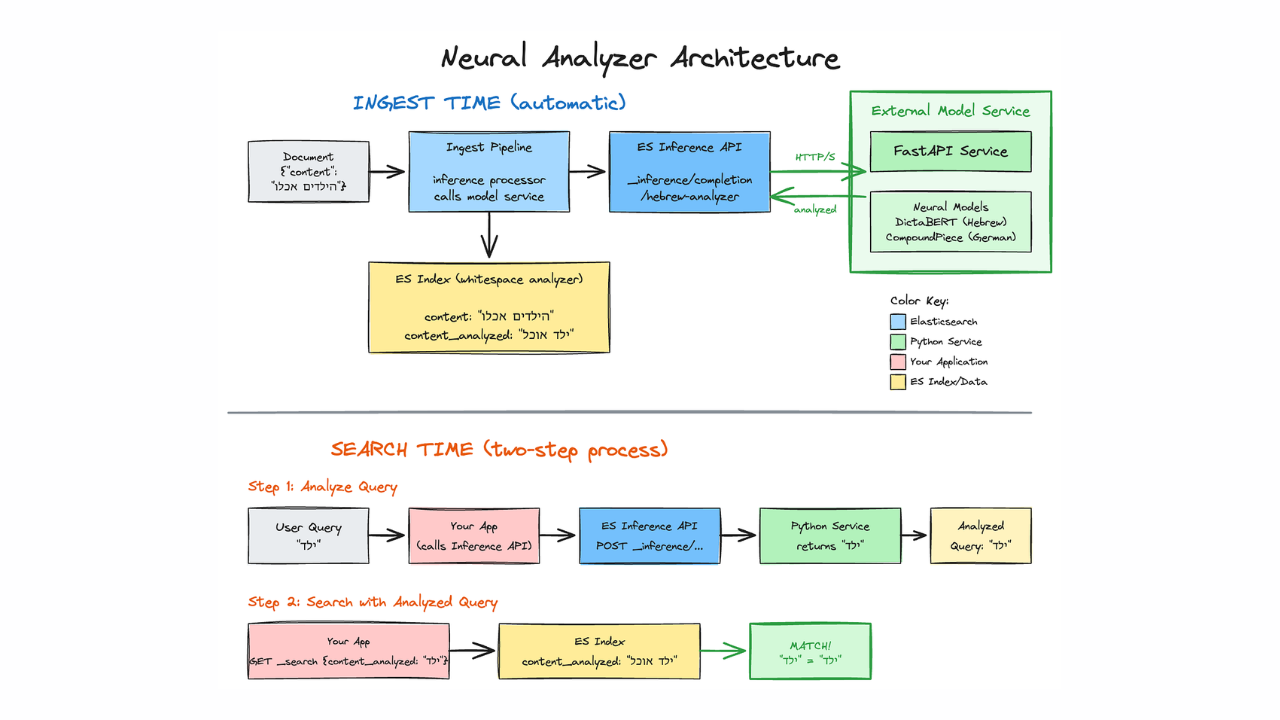
Better text analysis for complex languages with Elasticsearch and neural models
Using neural models and the Elasticsearch inference API to improve search in Hebrew, German, Arabic, and other morphologically complex languages.