Elasticsearch hybrid search is available for LangChain across our Python and JavaScript integrations. Here we’ll discuss what hybrid search is, when it can be useful and we’ll run through some simple examples to get started.
We’re also planning to support hybrid search in the community-driven Java integration very soon.
What is hybrid search?
Hybrid search is an information retrieval approach that combines keyword-based full-text search (lexical matching) with semantic search (vector similarity). Practically, it means a query can match documents because they contain the right terms and/or because they express the right meaning (even if the wording differs).In simple terms, you can think of it like this:
- Lexical retrieval: “Do these documents contain the words I typed (or related words)?”
- Semantic retrieval: “Do these documents mean something similar to what I typed?”
These two retrieval methods produce scores on different scales, so hybrid search systems typically use a fusion strategy to merge them into one ranking, for example, using reciprocal rank fusion (RRF).
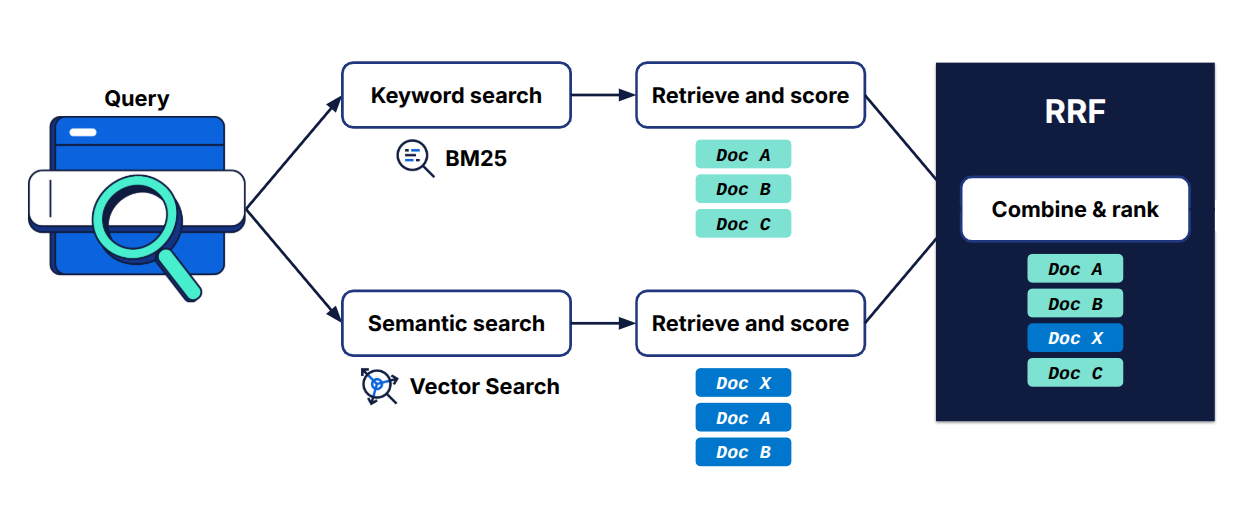
In the figure above, we show an example: BM25 (keyword search) returns Docs A, B, and C, while semantic search returns Docs X, A, and B. The RRF algorithm then combines these two result lists into the final ranking: Doc A, Doc B, Doc X, and Doc C. With hybrid search, Doc C is included in the results thanks to BM25.
Why hybrid search matters
If you’ve built search or retrieval-augmented generation (RAG) features in production, you’ve probably seen the same failure modes show up again and again:
- Keyword search can be too literal. If the user doesn’t use the exact terms that appear in your documents, relevant content gets buried or missed.
- Semantic search can be too fuzzy. It’s great at meaning, but it can also return results that feel related while missing a critical constraint, like a product name, an error code, or a specific phrase the user actually typed.
Hybrid search exists because real user queries in production environments usually need both.
Next we’ll dive into how you get started with hybrid search in the LangChain integration for Python and JavaScript. If you want to read more about hybrid search, check out What is hybrid search? and When hybrid search truly shines.
Setting up a local Elasticsearch instance
Before running the examples, you'll need Elasticsearch running locally. The easiest way is using the start-local script:
curl -fsSL https://elastic.co/start-local | shAfter starting, you'll have:
- Elasticsearch at http://localhost:9200.
- Kibana at http://localhost:5601.
Your API key is stored in the .env file (under the elastic-start-local folder) as ES_LOCAL_API_KEY.
Note: This script is for local testing only. Do not use it in production. For production installations, refer to the official documentation for Elasticsearch.
Getting started with hybrid search in LangChain (Python and JavaScript)
The dataset is a CSV with information on 1,000 science fiction movies, taken from an IMDb dataset on Kaggle. This demo uses a subset of the data, which has been cleaned. You can download the dataset used for this article from our GitHub gist, along with the full code for this demo.
Step 1: Install what you need.
First you’ll need the LangChain Elasticsearch integration and Ollama for embeddings. (You can also use some other embedding model if you wish.)
In Python:
pip install langchain-elasticsearch langchain-ollamaIn JavaScript:
npm install @langchain/community @langchain/ollama @elastic/elasticsearch csv-parseStep 2: Configure your connection and dataset path.
In Python:
At the top of the script, we set:
- Where Elasticsearch is
(ES_LOCAL_URL). - How to authenticate
(ES_LOCAL_API_KEY). - Which demo index name to use
(INDEX_NAME). - Which CSV file we’ll ingest
(scifi_1000.csv).
ES_URL = os.getenv("ES_LOCAL_URL", "http://localhost:9200")
ES_API_KEY = os.getenv("ES_LOCAL_API_KEY")
INDEX_NAME = "scifi-movies-hybrid-demo"
CSV_PATH = Path(__file__).with_name("scifi_1000.csv")
In JavaScript:
Notes for JavaScript:
- JavaScript uses
process.envinstead ofos.getenv. - Path resolution requires
fileURLToPathanddirnamefor Elasticsearch modules. - The class is called
ElasticVectorSearch(notElasticsearchStoreas in Python).
import { Client } from "@elastic/elasticsearch";
import { OllamaEmbeddings } from "@langchain/ollama";
import {
  ElasticVectorSearch,
  HybridRetrievalStrategy,
} from "@langchain/community/vectorstores/elasticsearch";
import { parse } from "csv-parse/sync";
import { readFileSync } from "fs";
import { dirname, join } from "path";
import { fileURLToPath } from "url";

const __dirname = dirname(fileURLToPath(import.meta.url));

const ES_URL = process.env.ES_LOCAL_URL || "http://localhost:9200";
const ES_API_KEY = process.env.ES_LOCAL_API_KEY;
const INDEX_NAME = "scifi-movies-hybrid-demo";
const CSV_PATH = join(__dirname, "scifi_1000.csv");
We can now also create the client.
In Python:
es = Elasticsearch(ES_URL, api_key=ES_LOCAL_API_KEY)In JavaScript:
const client = new Client({
  node: ES_URL,
  auth: ES_API_KEY ? { apiKey: ES_LOCAL_API_KEY } : undefined,
});
Step 3: Ingest the dataset, and then compare vector-only vs. hybrid.
Step 3a: Read the CSV and build what we index.
We build three lists:
texts: The actual text that will be embedded + searched.metadata: Structured fields stored alongside the document.ids: Stable IDs (so Elasticsearch can dedupe if needed).
In Python:
# --- Ingest dataset ---
texts: list[str] = []
metadatas: list[dict] = []
ids: list[str] = []

with CSV_PATH.open(newline="", encoding="utf-8") as f:
    for row in csv.DictReader(f):
        movie_id = (row.get("movie_id") or "").strip()
        movie_name = (row.get("movie_name") or "").strip()
        year = (row.get("year") or "").strip()
        genre = (row.get("genre") or "").strip()
        description = (row.get("description") or "").strip()
        director = (row.get("director") or "").strip()

        # This text is both:
        #  - embedded (vector search)
        #  - keyword-matched (BM25 in hybrid mode)
        text = "\n".join(
            [
                f"{movie_name} ({year})" if year else movie_name,
                f"Director: {director}" if director else "Director: (unknown)",
                f"Genres: {genre}" if genre else "Genres: (unknown)",
                f"Description: {description}" if description else "Description: (missing)",
            ]
        )
        texts.append(text)
        metadatas.append(
            {
                "movie_id": movie_id or None,
                "movie_name": movie_name or None,
                "year": year or None,
                "genre": genre or None,
                "director": director or None,
            }
        )
        ids.append(movie_id or movie_name)
In JavaScript:
async function main() {
  // --- Ingest dataset ---
  const texts = [];
  const metadatas = [];
  const ids = [];

  const csvContent = readFileSync(CSV_PATH, "utf-8");
  const records = parse(csvContent, {
    columns: true,
    skip_empty_lines: true,
  });

  for (const row of records) {
    const movieId = (row.movie_id || "").trim();
    const movieName = (row.movie_name || "").trim();
    const year = (row.year || "").trim();
    const genre = (row.genre || "").trim();
    const description = (row.description || "").trim();
    const director = (row.director || "").trim();

    // This text is both:
    //  - embedded (vector search)
    //  - keyword-matched (BM25 in hybrid mode)
    const text = [
      year ? `${movieName} (${year})` : movieName,
      director ? `Director: ${director}` : "Director: (unknown)",
      genre ? `Genres: ${genre}` : "Genres: (unknown)",
      description ? `Description: ${description}` : "Description: (missing)",
    ].join("\n");

    texts.push(text);
    metadatas.push({
      movie_id: movieId || null,
      movie_name: movieName || null,
      year: year || null,
      genre: genre || null,
      director: director || null,
    });
    ids.push(movieId || movieName);
  }
What’s important here:
- We don’t embed only the description. We embed a combined text block (title/year + director + genre + description). That makes results easier to print and sometimes improves retrieval.
- The same text is what the lexical side uses, too (in hybrid mode), because it’s indexed as searchable text.
Step 3b: Add texts to Elasticsearch using LangChain.
This is the indexing step. Here we embed texts and write them to Elasticsearch.
For asynchronous applications, please use AsyncElasticsearchStore with the same API.
You can find our reference docs for both the sync and async versions of ElasticsearchStore, along with more parameters for advanced fine-tuning RRF.
In Python:
print(f"Ingesting {len(texts)} movies into '{INDEX_NAME}' from '{CSV_PATH.name}'...")

vector_store = ElasticsearchStore(
    index_name=INDEX_NAME,
    embedding=OllamaEmbeddings(model="llama3"),
    es_url=ES_LOCAL_URL,
    es_api_key=ES_LOCAL_API_KEY,
    strategy=ElasticsearchStore.ApproxRetrievalStrategy(hybrid=False),
)

#This is the indexing step. We embed the texts and add them to Elasticsearch
vectore_store.add_texts(texts=texts, metadatas=metadatas, ids=ids)
In JavaScript:
  console.log(
    `Ingesting ${texts.length} movies into '${INDEX_NAME}' from 'scifi_1000.csv'...`
  );

  const embeddings = new OllamaEmbeddings({ model: "llama3" });

  // Vector-only store (no hybrid)
  const vectorStore = new ElasticVectorSearch(embeddings, {
    client,
    indexName: INDEX_NAME,
  });

  // This is the indexing step. We embed the texts and add them to Elasticsearch
  await vectorStore.addDocuments(
    texts.map((text, i) => ({
      pageContent: text,
      metadata: metadatas[i],
    })),
    { ids }
  );
Step 3c: Create another store for hybrid search.
We create another ElasticsearchStore object pointing at the same index but with different retrieval behavior: hybrid=False is vector-only search and hybrid=True is hybrid search (BM25 + kNN, fused with RRF).
In Python:
# Since we are using the same INDEX_NAME we can avoid adding texts again
# This ElasticsearchStore will be used for hybrid search

hybrid_store = ElasticsearchStore(
    index_name=INDEX_NAME,
    embedding=OllamaEmbeddings(model="llama3"),
    es_url=ES_LOCAL_URL,
    es_api_key=ES_LOCAL_API_KEY,
    strategy=ElasticsearchStore.ApproxRetrievalStrategy(hybrid=True),
)
In JavaScript:
  // Since we are using the same INDEX_NAME we can avoid adding texts again
  // This ElasticVectorSearch will be used for hybrid search
  const hybridStore = new ElasticVectorSearch(embeddings, {
    client,
    indexName: INDEX_NAME,
    strategy: new HybridRetrievalStrategy(),
  });

  // With custom RRF parameters
  const hybridStoreCustom = new ElasticVectorSearch(embeddings, {
    client,
    indexName: INDEX_NAME,
    strategy: new HybridRetrievalStrategy({
      rankWindowSize: 100,  // default: 100
      rankConstant: 60,     // default: 60
      textField: "text",    // default: "text"
    }),
  });
Step 3d: Run the same query both ways, and print results.
As an example, let’s run the query “Find movies where the main character is stuck in a time loop and reliving the same day." and compare the results from hybrid search and vector search.
In Python:
query = "Find movies where the main character is stuck in a time loop and reliving the same day."
k = 5

print(f"\n=== Query: {query} ===")

vec_docs = vector_store.similarity_search(query, k=k)
hyb_docs = hybrid_store.similarity_search(query, k=k)

print("\nVector search (kNN) top results:")
for i, doc in enumerate(vec_docs, start=1):
    print(f"{i}. {(doc.page_content or '').splitlines()[0]}")

print("\nHybrid search (BM25 + kNN + RRF) top results:")
for i, doc in enumerate(hyb_docs, start=1):
    print(f"{i}. {(doc.page_content or '').splitlines()[0]}")
In JavaScript:
  const query =
    "Find movies where the main character is stuck in a time loop and reliving the same day.";
  const k = 5;

  console.log(`\n=== Query: ${query} ===`);

  const vecDocs = await vectorStore.similaritySearch(query, k);
  const hybDocs = await hybridStore.similaritySearch(query, k);

  console.log("\nVector search (kNN) top results:");
  vecDocs.forEach((doc, i) => {
    console.log(`${i + 1}. ${(doc.pageContent || "").split("\n")[0]}`);
  });

  console.log("\nHybrid search (BM25 + kNN + RRF) top results:");
  hybDocs.forEach((doc, i) => {
    console.log(`${i + 1}. ${(doc.pageContent || "").split("\n")[0]}`);
  });
}

main().catch(console.error);
Example output
Ingesting 1000 movies into 'scifi-movies-hybrid-demo' from 'scifi_1000.csv'...

=== Query: Find movies where main character is stuck in a time loop and reliving the same day. ===

Vector search (kNN) top results:
1. The Witch: Part 1 - The Subversion (20  18)
2. Divinity (2023)
3. The Maze Runner (2014)
4. Spider-Man (2002)
5. Spider-Man: Into the Spider-Verse (2018)

Hybrid search (BM25 + kNN + RRF) top results:
1. Edge of Tomorrow (2014)
2. The Witch: Part 1 - The Subversion (2018)
3. Boss Level (2020)
4. Divinity (2023)
5. The Maze Runner (2014)
Why these results?
This query (“time loop / reliving the same day”) is a great case where hybrid search tends to shine because the dataset contains literal phrases that BM25 can match and vectors can still capture meaning.
- Vector-only (kNN) embeds the query and tries to find semantically similar plots. Using a broad sci‑fi dataset, this can drift into “trapped / altered reality / memory loss / high-stakes sci‑fi” even when there’s no time-loop concept. That’s why results like “The Witch: Part 1 – The Subversion” (amnesia) and “The Maze Runner” (trapped/escape) can appear.
- Hybrid (BM25 + kNN + RRF) rewards documents that match both keywords and meaning. Movies whose descriptions explicitly mention “time loop” or “relive the same day” get a strong lexical boost, so titles like “Edge of Tomorrow” (relive the same day over and over again…) and “Boss Level” (trapped in a time loop that constantly repeats the day…) rise to the top.
Hybrid search doesn’t guarantee that every result is perfect. It balances lexical and semantic signals so you may still see some non-time-loop sci‑fi in the tail of the top‑k.
The main takeaway is that hybrid search helps anchor semantic retrieval with exact textual evidence when the dataset contains those keywords.
Full code example
You can find our full demo code in Python and JavaScript, as well as the dataset used, hosted on GitHub gist.
Conclusion
Hybrid search provides a pragmatic and powerful retrieval strategy by combining traditional BM25 keyword search with modern vector similarity into a single, unified ranking. Instead of choosing between lexical precision and semantic understanding, you get the best of both worlds, without adding significant complexity to your application.
In real-world datasets, this approach consistently yields results that feel more intuitively correct. Exact term matches help anchor results to the user’s explicit intent, while embeddings ensure robustness against paraphrasing, synonyms, and incomplete queries. This balance is especially valuable for noisy, heterogeneous, or user-generated content, where relying on only one retrieval method often falls short.
In this article, we demonstrated how to use hybrid search in LangChain through its Elasticsearch integrations, with complete examples in both Python and JavaScript. We’re also contributing to other open-source projects, such as LangChain4j, to extend hybrid search support with Elasticsearch.
We believe hybrid search will be a key capability for generative AI (GenAI) and agentic AI applications, and we plan to continue collaborating with libraries, frameworks, and programming languages across the ecosystem to make high-quality retrieval more accessible and robust.
Ready to try this out on your own? Start a free trial.
Want to get Elastic certified? Find out when the next Elasticsearch Engineer training is running!
Related content

March 13, 2026
Entity resolution with Elasticsearch, part 4: The ultimate challenge
Solving and evaluating entity resolution challenges in a highly diverse “ultimate challenge” dataset designed to prevent shortcuts.
March 11, 2026
Hybrid search with Java: LangChain4j Elasticsearch integration
Learn how to use hybrid search in LangChain4j via its Elasticsearch integrations, with a complete Java example.

March 4, 2026
Entity resolution with Elasticsearch, part 3: Optimizing LLM integration with function calling
Learn how function calling enhances LLM integration, enabling a reliable and cost-efficient entity resolution pipeline in Elasticsearch.

February 26, 2026
Entity resolution with Elasticsearch & LLMs, Part 2: Matching entities with LLM judgment and semantic search
Using semantic search and transparent LLM judgment for entity resolution in Elasticsearch.

February 20, 2026
Ensuring semantic precision with minimum score
Improve semantic precision by employing minimum score thresholds. The article includes concrete examples for semantic and hybrid search.