In this article, we’ll walk through how to use the Mastra TypeScript framework to build agentic applications that interact with Elasticsearch.
We recently contributed to the mastra-ai/mastra open source project by adding support for Elasticsearch as a vector database. With this new feature, you can use Elasticsearch natively in Mastra to store embeddings. In addition to vectors, Elasticsearch provides a suite of advanced features to address all your context engineering requirements. (for example, hybrid search and reranking).
This article details the creation of an agent to implement a retrieval augmented generation (RAG) architecture using Elasticsearch. We’ll showcase a demo project where an agentic approach is used to interact with a corpus of sci-fi movie data stored within Elasticsearch. The project is available at elastic/mastra-elasticsearch-example.
Mastra
Mastra is a TypeScript framework to create agentic AI applications.
A project structure in Mastra looks as follows:
src/
├── mastra/
│   ├── agents/
│   │   └── weather-agent.ts
│   ├── tools/
│   │   └── weather-tool.ts
│   ├── workflows/
│   │   └── weather-workflow.ts
│   ├── scorers/
│   │   └── weather-scorer.ts
│   └── index.ts
├── .env.example
├── package.json
└── tsconfig.json
In Mastra, you can build agents, tools, workflows, and scores.
An agent is a class that accepts a message in input and produces a response as output. An agent can use tools, large language models (LLMs), and a memory (figure 1).
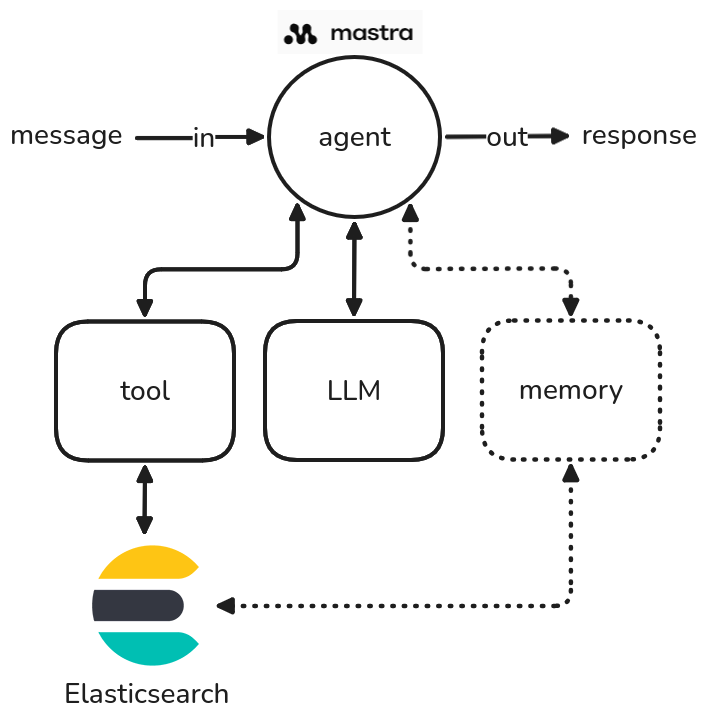
Figure 1: A diagram showing how an agent works in Mastra.
An agent's tools allow it to interact with the "external world," such as communicating with a web API or performing an internal operation, like querying Elasticsearch. The memory component is crucial for storing the history of conversations, including past inputs and outputs. This stored context enables the agent to provide more informed and relevant responses to future questions by using its past interactions.
Workflows let you define complex sequences of tasks using clear, structured steps rather than relying on the reasoning of a single agent (figure 2). They give you full control over how tasks are broken down, how data moves between them, and what gets executed when. Workflows run using the built-in execution engine by default or can be deployed to workflow runners.
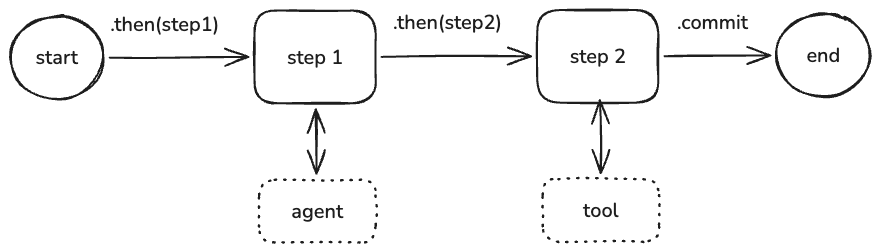
Figure 2: An example of workflow in Mastra.
In Mastra, you can also define scores, which are automated tests that evaluate agent outputs using model-graded, rule-based, and statistical methods. Scorers return scores: numerical values (typically between 0 and 1) that quantify how well an output meets your evaluation criteria. These scores enable you to objectively track performance, compare different approaches, and identify areas for improvement in your AI systems. Scorers can be customized with your own prompts and scoring functions.
Elasticsearch
For running the demo project, we need to have an Elasticsearch instance running. You can activate a free trial on Elastic Cloud or install it locally using the start-local script:
curl -fsSL https://elastic.co/start-local | shThis will install Elasticsearch and Kibana on your computer and generate an API key to be used for configuring the Mastra integration.
The API key will be shown as output of the previous command and stored in a .env file in the elastic-start-local folder.
Install and configure the demo
We created an elastic/mastra-elasticsearch-example repository containing the source code of the demo project. The example reported in the repository illustrates how to create an agent in Mastra that implements a RAG architecture for retrieving documents from Elasticsearch.
We provided a dataset for the demo about sci-fi movies. We extracted 500 movies from the IMDb dataset on Kaggle.
The first step is to install the dependencies of the project with npm, using the following command:
npm installThen we need to configure the .env file that will contain the settings. We can generate this file copying the structure from the .env.example file, using the following command:
cp .env.example .envNow we can edit the .env, adding the missing information:
OPENAI_API_KEY=
ELASTICSEARCH_URL=
ELASTICSEARCH_API_KEY=
ELASTICSEARCH_INDEX_NAME=scifi-movies
The name of the Elasticsearch index is scifi-movies. If you want, you can change it using the env variable ELASTICSEARCH_INDEX_NAME.
We used OpenAI as embedding service, which means that you need to provide an API key for OpenAI in the OPENAI_API_KEY env variable.
The embedding model used in the example is openai/text-embedding-3-small, with an embedding dimension of 1536.
To generate the final answer, we used the openai/gpt-5-nano model to reduce the costs.
The RAG architecture allows you to use a less powerful (and typically less expensive) final LLM model because the heavy lifting of grounding the answer is done by the retrieval component (Elasticsearch in this case).
The smaller LLM is only responsible for two main tasks:
- Rephrasing/embedding the query: Converting the user's natural language question into a vector embedding for semantic search.
- Synthesizing the answer: Taking the highly relevant, retrieved context chunks (documents/movies) and synthesizing them into a coherent, final, human-readable answer, following the provided prompt instructions.
Since the RAG process provides the exact factual context needed for the answer, the final LLM doesn't need to be massive or highly complex and it doesn’t need to possess all the required knowledge within its own parameters (which is where large, expensive models excel). It essentially acts as a sophisticated text summarizer and formatter for the context provided by Elasticsearch, rather than as a full-fledged knowledge base itself. This enables the use of models like gpt-5-nano for cost and latency optimization.
After the configuration of the .env file, you can ingest the movies to Elasticsearch using the following command:
npx tsx src/utility/store.tsYou should see an output as follows:
🚀 Starting ingestion of 500 movies from 500_scifi_movies.jsonl...
Ingesting ░░░░░░░░░░░░░░░░░░░░░░░░ 1/500 (0%) | ok:1 | fail:0 | chunks:1 | eta:19m 33s | current:Capricorn One
Ingesting ░░░░░░░░░░░░░░░░░░░░░░░░ 2/500 (0%) | ok:2 | fail:0 | chunks:2 | eta:10m 32s | current:Doghouse
Ingesting ░░░░░░░░░░░░░░░░░░░░░░░░ 3/500 (1%) | ok:3 | fail:0 | chunks:3 | eta:7m 33s | current:Dinocroc
Ingesting ░░░░░░░░░░░░░░░░░░░░░░░░ 4/500 (1%) | ok:4 | fail:0 | chunks:7 | eta:6m 10s | current:Back to the Future
Ingesting ░░░░░░░░░░░░░░░░░░░░░░░░ 5/500 (1%) | ok:5 | fail:0 | chunks:9 | eta:5m 14s | current:The Projected Man
Ingesting ░░░░░░░░░░░░░░░░░░░░░░░░ 6/500 (1%) | ok:6 | fail:0 | chunks:11 | eta:4m 41s | current:I, Robot
...
✅ Ingestion complete in 1m 46s. Success: 500, Failed: 0, Chunks: 693.
The mapping of the scifi-movies index contains the following fields:
- embedding, dense_vector with 1536 dimension, cosine similarity.
- description, text containing the description of the movie.
- director, text containing the name of the director.
- title, text containing the title of the movie.
We generated the embeddings using the title + description. Since the title and the description are two separate fields, the concatenation of both ensures that the resulting embedding vector captures both the specific, unique identity (title) and the rich, descriptive context (description) of the movie, leading to more accurate and comprehensive semantic search results. This combined input gives the embedding model a better single representation of the document's content for similarity matching.
Run the demo
You can run the demo with the following command:
npm run devThis command will start a web application at localhost:4111 to access Mastra Studio (figure 3).
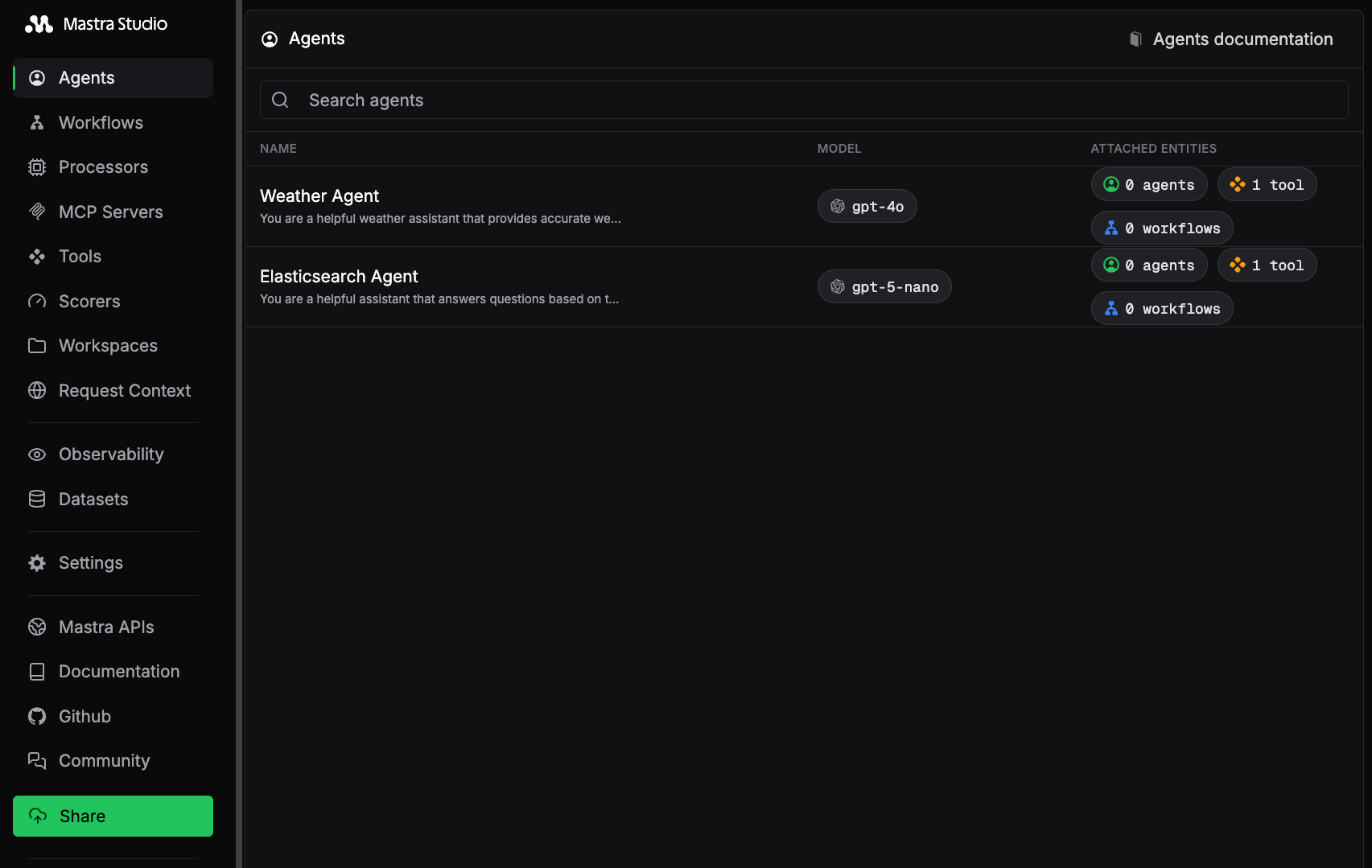
Figure 3: A screenshot of Mastra Studio with the Elasticsearch Agent example.
Mastra Studio offers an interactive UI for building and testing your agents, along with a REST API that exposes your Mastra application as a local service. This lets you start building right away without worrying about integration.
We provided an Elasticsearch Agent that uses the createVectorQueryTool by Mastra as a tool for executing semantic search using Elasticsearch. This agent uses the RAG approach to search for relevant documents (that is, movies) to answer the user’s question.
This agent uses the following prompt:
You are a helpful assistant that answers questions based on the provided context.
Follow these steps for each response:

1. First, carefully analyze the retrieved context chunks and identify key information.
2. Break down your thinking process about how the retrieved information relates to the query.
3. Draw conclusions based only on the evidence in the retrieved context.
4. If the retrieved chunks don't contain enough information, explicitly state what's missing.

Format your response as:
THOUGHT PROCESS:
- Step 1: [Initial analysis of retrieved chunks]
- Step 2: [Reasoning based on chunks]

FINAL ANSWER:
[Your concise answer based on the retrieved context]

Important: When asked to answer a question, please base your answer only on the context provided in the tool.
If the context doesn't contain enough information to fully answer the question, please state that explicitly and stop it.
Do not add more information than what is present in the retrieved chunks.
Remember: Explain how you're using the retrieved information to reach your conclusions.
If you click on the Mastra Studio > Agents menu and select Elasticsearch Agent, you can test the agent using a chat system. For instance, you can ask information regarding sci-fi movies with a question as follows:
Find 5 movies or TV series about UFOs.
You’ll notice that the agent will execute the vectorQueryTool. You can click on the invoked tool to have a look at the input and the output. At the end of execution, the LLM will reply to your question, given the context coming from the scifi-movies index of Elasticsearch (figure 4).
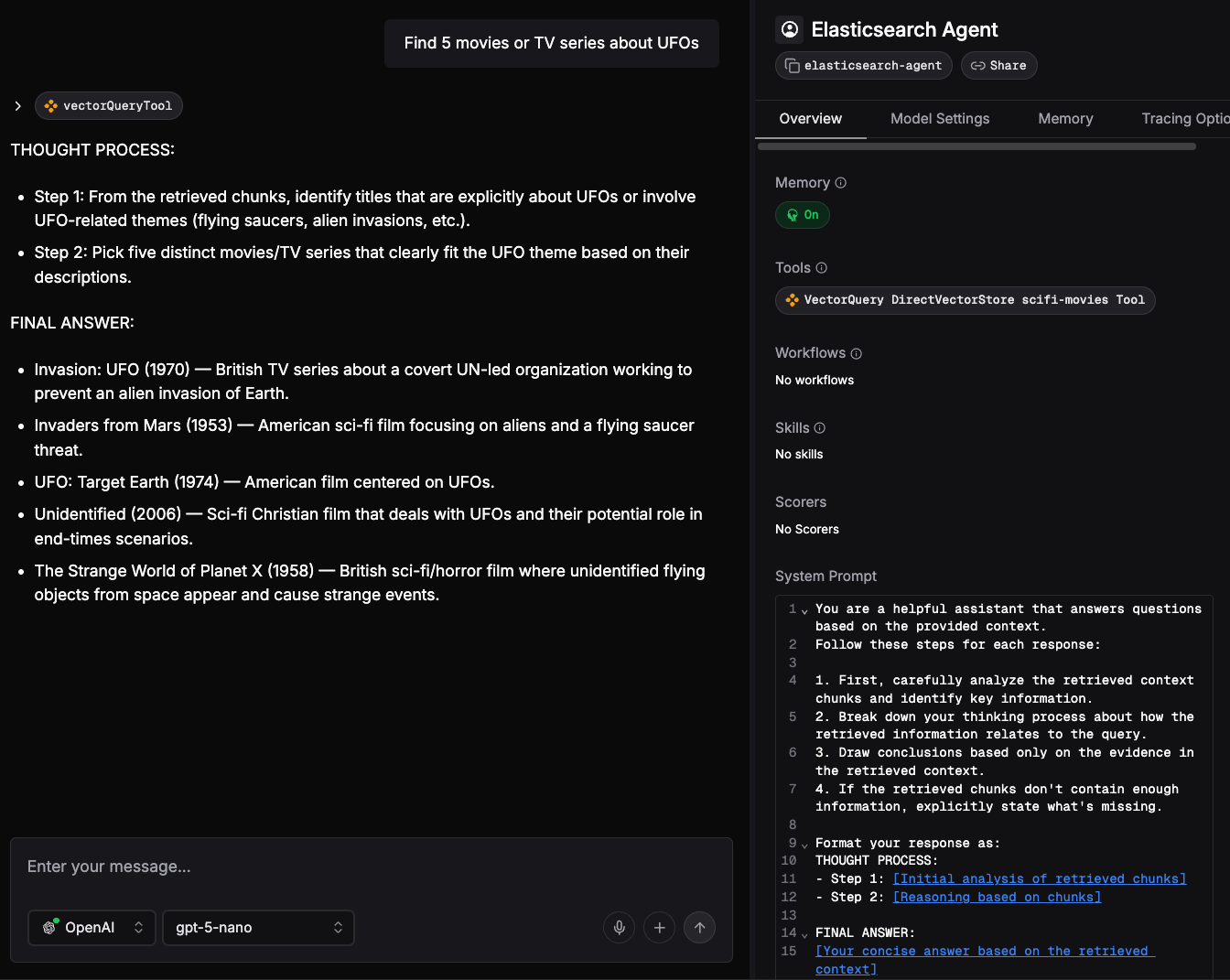
Figure 4: Response from LLM using the Elasticsearch Agent.
Mastra executes the following steps internally:
- Vector conversion: The user's question, Find 5 movies or TV series about UFOs, is converted into a vector embedding using OpenAI's
openai/text-embedding-3-smallmodel. - Vector search: This embedding is then used to query Elasticsearch via a vector search.
- Result retrieval: Elasticsearch returns a set of 10 movies highly relevant to the query (that is, those with vectors closest to the user's query vector).
- Answer generation: The retrieved movies and the original user question are sent to the LLM, specifically
openai/gpt-5-nano. The LLM processes this information and generates a final answer, ensuring that the user's request for five results is met.
The Elasticsearch Agent
Here we reported the source code of Elasticsearch Agent.
import { Agent } from "@mastra/core/agent";
import { ElasticSearchVector } from '@mastra/elasticsearch';
import { createVectorQueryTool } from '@mastra/rag';
import { ModelRouterEmbeddingModel } from "@mastra/core/llm";
import { Memory } from "@mastra/memory";

const es_url = process.env.ELASTICSEARCH_URL;
const es_apikey = process.env.ELASTICSEARCH_API_KEY;
const es_index_name = process.env.ELASTICSEARCH_INDEX_NAME;
const prompt = 'insert here the previous prompt';

const esVector = new ElasticSearchVector({
  id: 'elasticsearch-vector',
  url: es_url,
  auth: {
    apiKey : es_apikey
  }
});

const vectorQueryTool = createVectorQueryTool({
  vectorStore: esVector,
  indexName: es_index_name,
  model: new ModelRouterEmbeddingModel("openai/text-embedding-3-small")
});

export const elasticsearchAgent = new Agent({
  id: "elasticsearch-agent",
  name: "Elasticsearch Agent",
  instructions: prompt,
  model: 'openai/gpt-5-nano',
  tools: { vectorQueryTool },
  memory: new Memory(),
});
The vectorQueryTool is the tool that’s invoked to implement the retrieval part of the RAG example. It uses the ElasticSearchVector implementation that Elastic contributed to Mastra.
The agent is an object of the agent class that consumes the vectorQueryTool, the prompt, and a memory. As you can see, the code that we need to put in place for connecting Elasticsearch to an agent is very minimal.
Conclusion
This article demonstrated the simplicity and power of integrating Elasticsearch with the Mastra framework to build sophisticated agentic AI applications. Specifically, we walked through creating a RAG agent capable of performing semantic search over a corpus of sci-fi movie data indexed in Elasticsearch.
A key takeaway is the direct contribution by Elastic to the Mastra open source project, providing native support for Elasticsearch as a vector store. This integration significantly lowers the barrier to entry, as evidenced by the Elasticsearch Agent source code. Using the ElasticSearchVector and createVectorQueryTool, the complete setup for connecting Elasticsearch to your agent requires only a minimal number of lines of configuration code.
Elasticsearch provides several advanced features to enhance result relevance. For example, hybrid search significantly boosts accuracy by combining lexical search with vector search. Another interesting feature is reranking using the latest Jina models that can be applied at the end of hybrid search. To learn more about these techniques, consult the following articles from Elasticsearch Labs:
- Elasticsearch hybrid search by Valentin Crettaz
- An introduction to Jina models, their functionality, and uses in Elasticsearch by Scott Martens
We also encourage you to explore the provided example and begin building your own data-powered agents with Mastra and Elasticsearch. For more information about Mastra, you can have a look at the official documentation here.
Ready to try this out on your own? Start a free trial.
Want to get Elastic certified? Find out when the next Elasticsearch Engineer training is running!
Related content
May 26, 2026
Cutting agent costs with pre-computed context
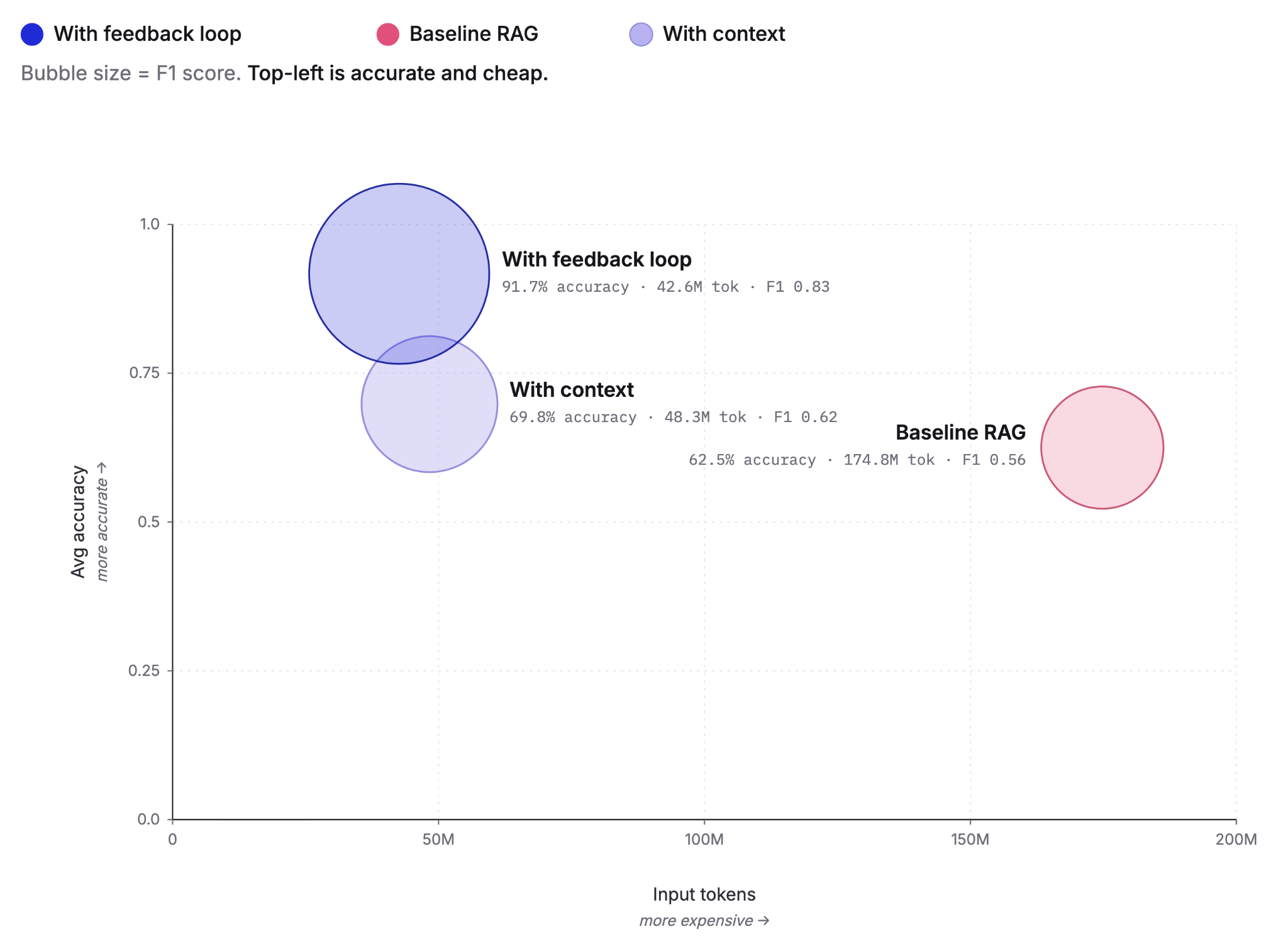
Pre-computing context as Knowledge Indicators reduces LLM agent token costs by up to 75% and improves answer accuracy from 60% to 92%. This post covers the extraction, retrieval and feedback loop that make it work, tested against the BrowseComp-Plus benchmark.
May 5, 2026
Elastic Agent Builder: How we taught AI agents to manage their own context
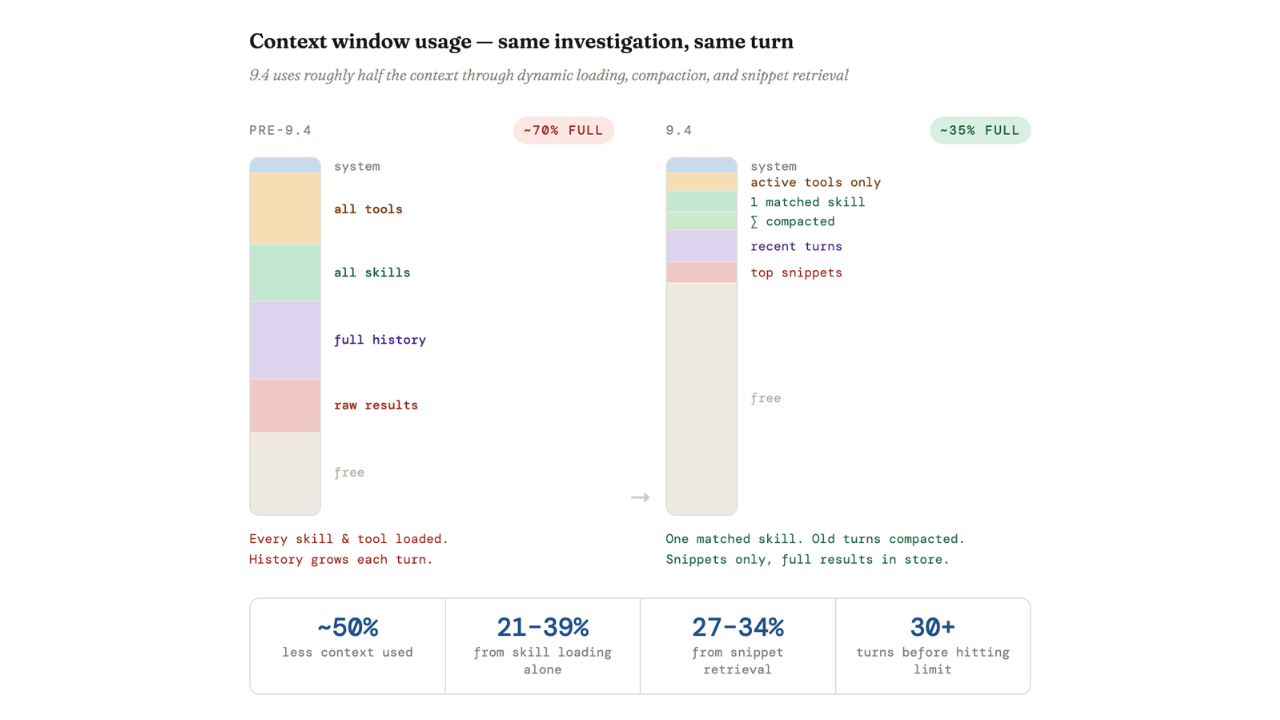
Agent Builder in Elasticsearch 9.4 ships dynamically loaded skills, a conversation context store, selective compaction, and external connectors to cut token costs by 40% and let agents handle their own context management.

April 29, 2026
Elastic-caveman: Cutting AI response tokens by 64% without losing the best of Elastic
Learn how to use elastic-caveman to cut AI response tokens while keeping the Elastic agentic brilliance.

March 23, 2026
Using Elasticsearch Inference API along with Hugging Face models
Learn how to connect Elasticsearch to Hugging Face models using inference endpoints, and build a multilingual blog recommendation system with semantic search and chat completions.
March 27, 2026
Creating an Elasticsearch MCP server with TypeScript
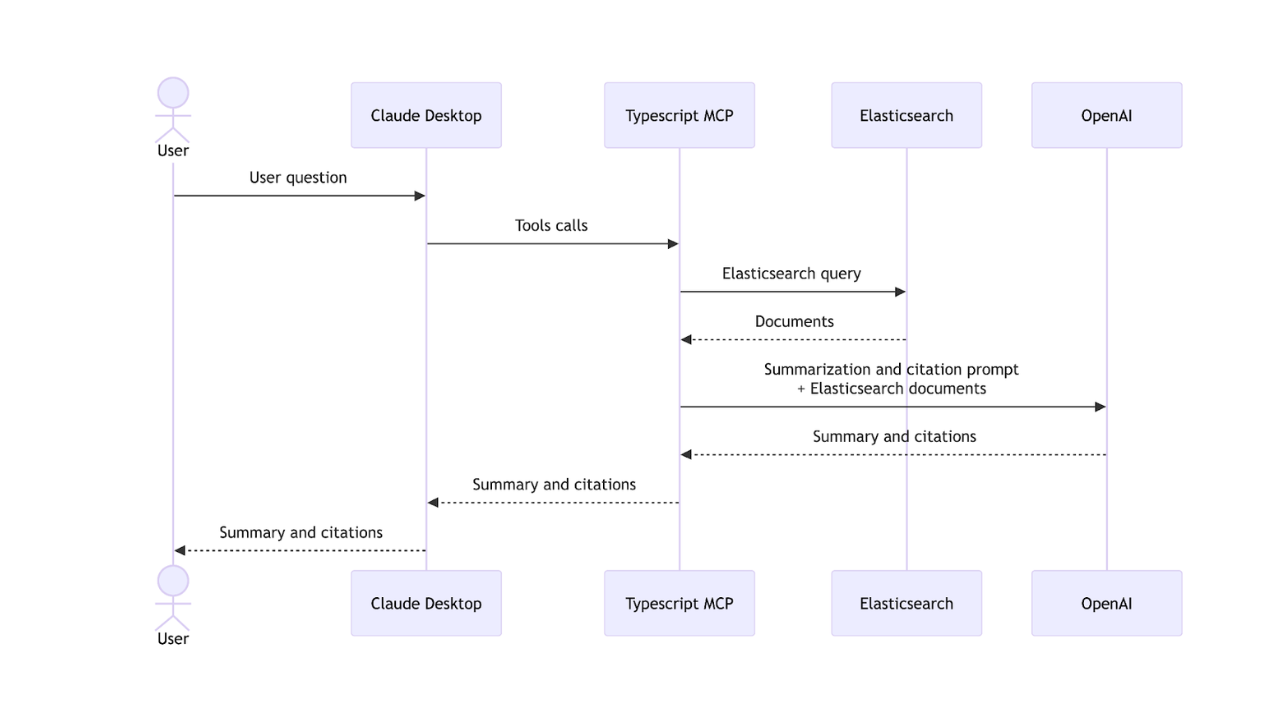
Learn how to create an Elasticsearch MCP server with TypeScript and Claude Desktop.