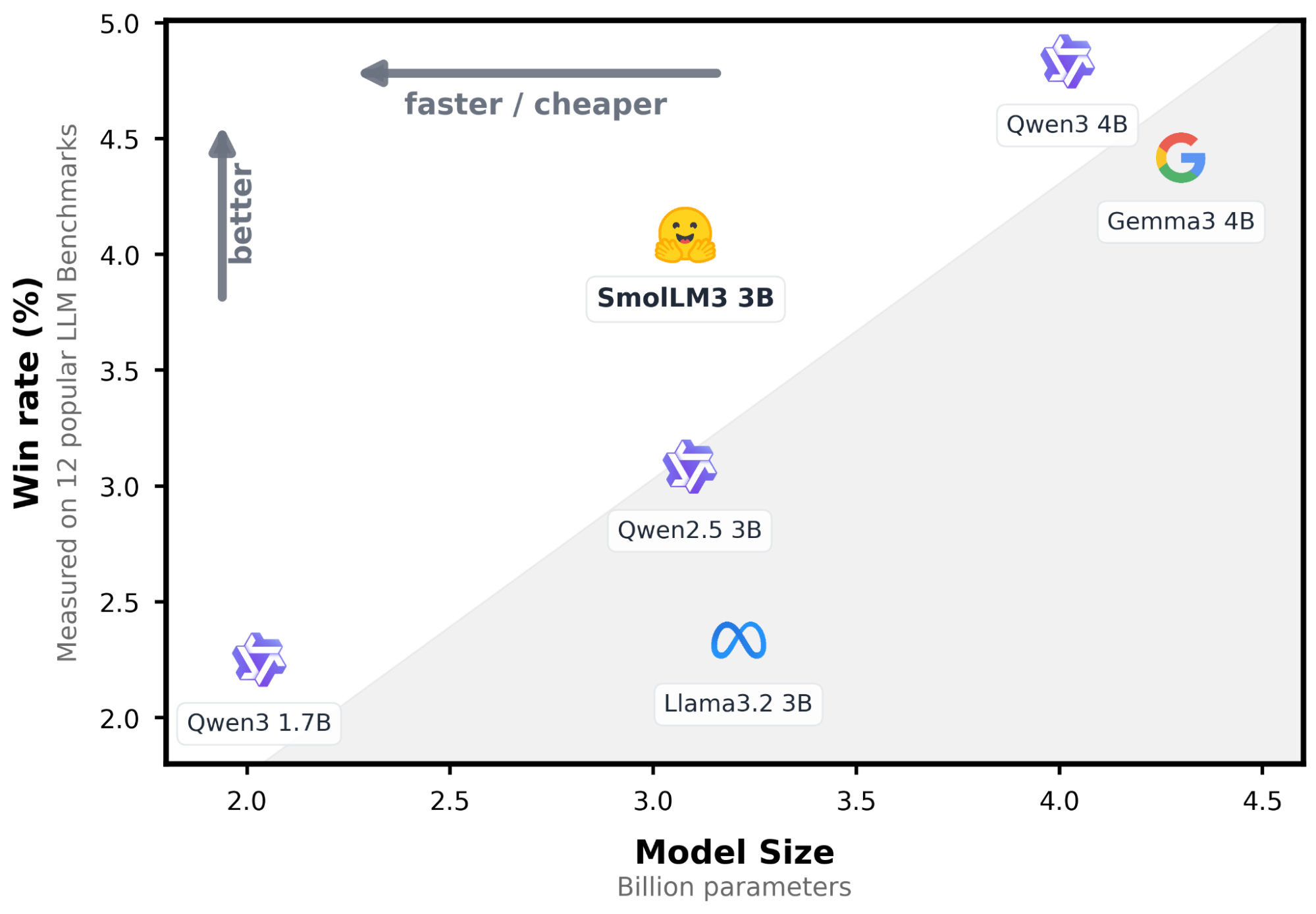
In recent updates, Elasticsearch introduced a native integration to connect to models hosted on the Hugging Face Inference Service. In this post, we’ll explore how to configure this integration and perform inference through simple API calls using a large language model (LLM). We’ll use SmolLM3-3B, a lightweight general-purpose model with a good balance between resource usage and answer quality.
Prerequisites
- Elasticsearch 9.3 or Elastic Cloud Serverless: You can create a cloud deployment following these instructions, or you can use the
start-localquickstart instead. - Python 3.12: Download Python here.
- Hugging Face access token.
Chat completions using a Hugging Face inference endpoint
First, we’ll build a practical example that connects Elasticsearch to a Hugging Face inference endpoint to generate AI-powered recommendations from a collection of blog posts. For the app knowledge base, we’ll use a dataset of company blog articles, which contains valuable but often hard-to-navigate information.
With this endpoint, semantic search retrieves the most relevant articles for a given query, and a Hugging Face LLM generates short, contextual recommendations based on those results.
Let’s take a look at a high-level overview of the information flow we’re going to build:
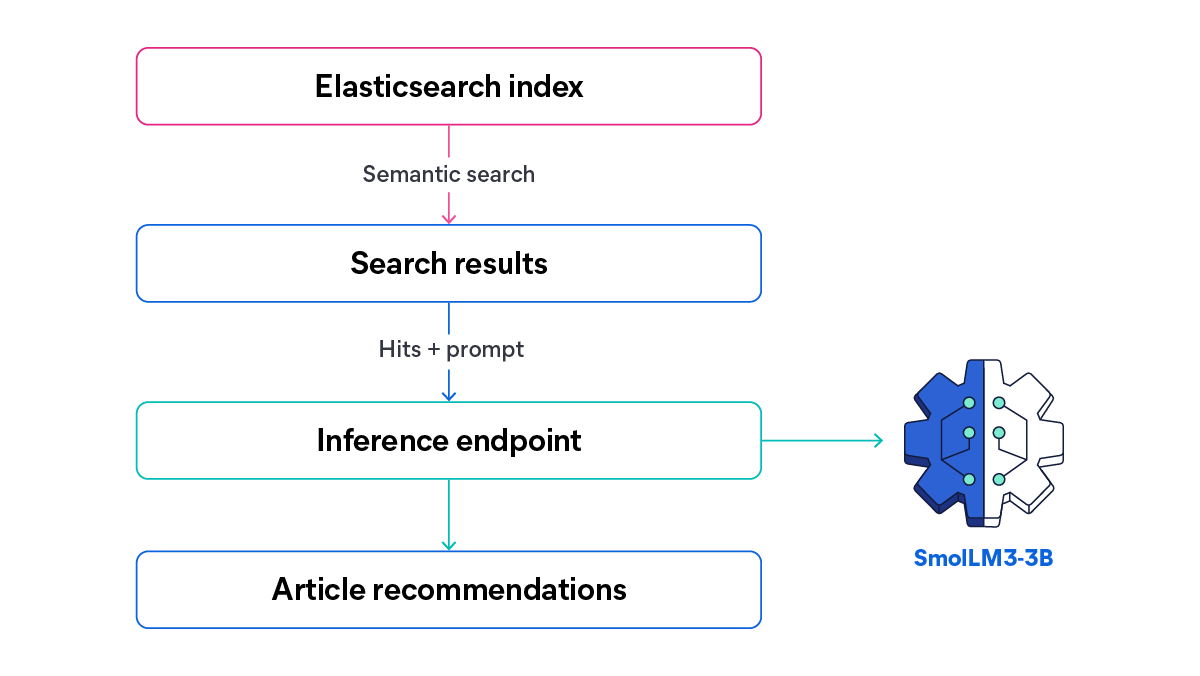
In this article, we’ll test SmolLM3-3B capacity to combine its compact size with strong multilingual reasoning and tool-calling capabilities. Based on a search query, we’ll send all the matching content (in English and Spanish) to the LLM to generate a list of recommended articles with a custom-made description based on the search query and results.
Here’s what the UI of an article site with an AI recommendations generation system could look like.
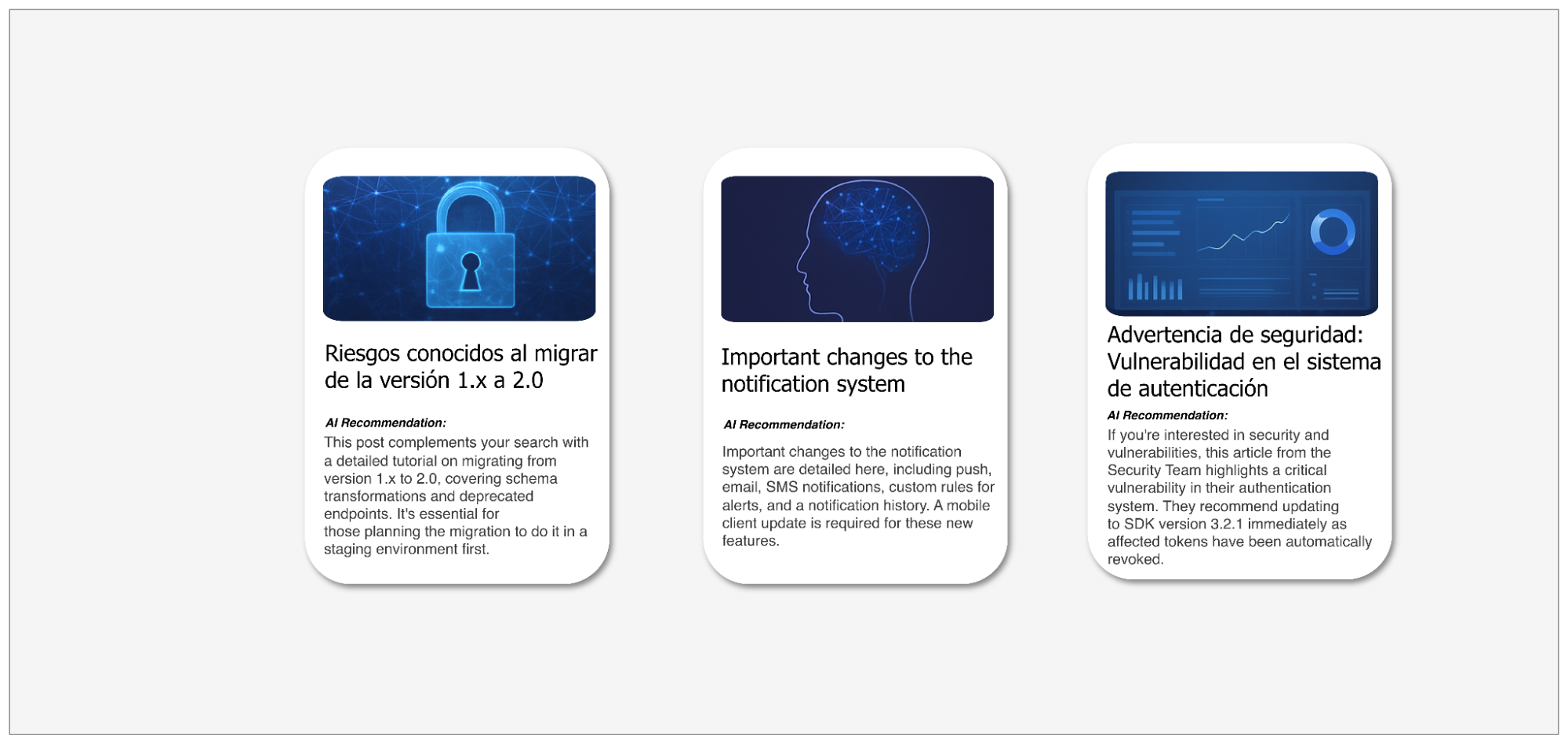
You can find the full implementation of this application in the linked notebook.
Configuring Elasticsearch inference endpoints
To use the Elasticsearch Hugging Face inference endpoint, we need two important elements: a Hugging Face API key and a running Hugging Face endpoint URL. It should look like this:
PUT _inference/chat_completions/hugging-face-smollm3-3b
{
    "service": "hugging_face",
    "service_settings": {
        "api_key": "hugging-face-access-token",
        "url": "url-endpoint"
    }
}
The Hugging Face inference endpoint in Elasticsearch supports different task types: text_embedding, completion, chat_completion, and rerank. In this blog post, we use chat_completion because we need the model to generate conversational recommendations based on the search results and a system prompt.This endpoint allows us to perform chat completions directly from Elasticsearch in a simple way using the Elasticsearch API:
POST _inference/chat_completion/hugging-face-smollm3-3b/_stream
{
  "messages": [
      { "role": "user", "content": "<user prompt>" }
  ]
}
This will serve as the core of the application, receiving the prompt and the search results that will pass through the model. With the theory covered, let’s start implementing the application.
Setting up inference endpoint on Hugging Face
To deploy the Hugging Face model, we’re going to use Hugging Face one-click deployments, an easy and fast service for deploying model endpoints. Keep in mind that this is a paid service, and using it may incur additional costs. This step will create the model instance that will be used to generate the recommendations of the articles.
You can pick a model from the one-click catalog:
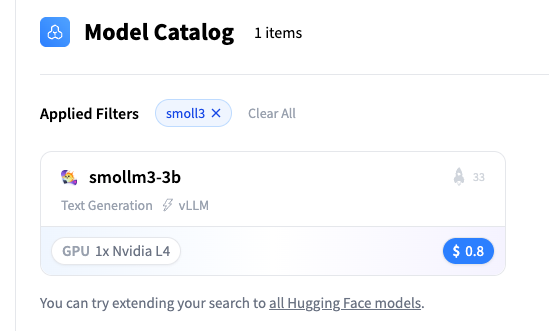
Let’s pick the SmolLM3-3B model:
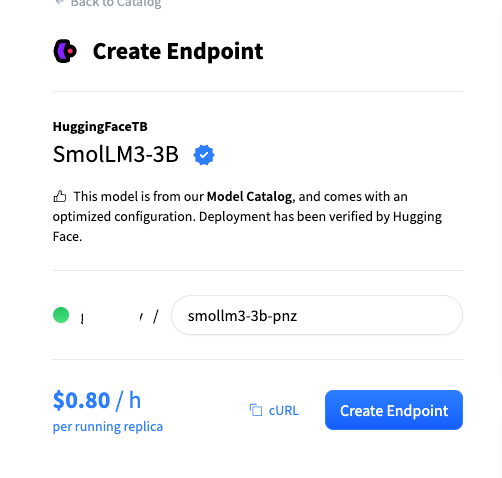
From here, grab the Hugging Face endpoint URL:
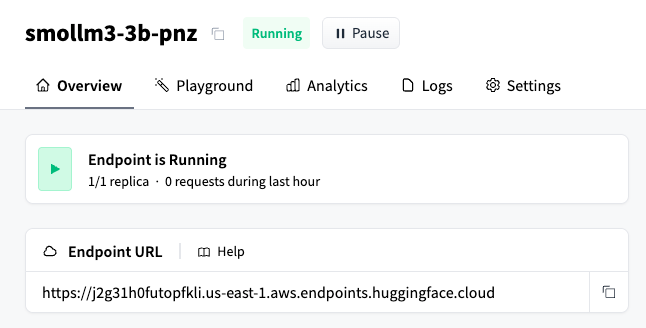
As mentioned in the Elasticsearch Hugging Face inference endpoints documentation, text generation requires a model that’s compatible with the OpenAI API. For that reason, we need to append the /v1/chat/completions subpath to the Hugging Face endpoint URL. The final result will look like this:
https://j2g31h0futopfkli.us-east-1.aws.endpoints.huggingface.cloud/v1/chat/completionsWith this in place, we can start coding in a Python notebook.
Generating Hugging Face API key
Create a Hugging Face account, and obtain an API token by following these instructions. You can choose between three token types: fine-grained (recommended for production, as it provides access only to specific resources); read (for read-only access); or write (for read and write access). For this tutorial, a read token is sufficient, since we only need to call the inference endpoint. Save this key for the next step.
Setting up Elasticsearch inference endpoint
First, let’s declare an Elasticsearch Python client:
os.environ["ELASTICSEARCH_API_KEY"] = "your-elasticsearch-api-key"
os.environ["ELASTICSEARCH_URL"] = "https://xxxx.us-central1.gcp.cloud.es.io:443"

es_client = Elasticsearch(
    os.environ["ELASTICSEARCH_URL"], api_key=os.environ["ELASTICSEARCH_API_KEY"]
)
Next, let’s create an Elasticsearch inference endpoint that uses the Hugging Face model. This endpoint will allow us to generate responses based on the blog posts and the prompt passed to the model.
INFERENCE_ENDPOINT_ID = "smollm3-3b-pnz"

os.environ["HUGGING_FACE_INFERENCE_ENDPOINT_URL"] = (
 "https://j2g31h0futopfkli.us-east-1.aws.endpoints.huggingface.cloud/v1/chat/completions"
)
os.environ["HUGGING_FACE_API_KEY"] = "hf_xxxxx"

resp = es_client.inference.put(
        task_type="chat_completion",
        inference_id=INFERENCE_ENDPOINT_ID,
        body={
            "service": "hugging_face",
            "service_settings": {
                "api_key": os.environ["HUGGING_FACE_API_KEY"],
                "url": os.environ["HUGGING_FACE_INFERENCE_ENDPOINT_URL"],
            },
        },
    )
Dataset
The dataset contains the blog posts that will be queried, representing a multilingual content set used throughout the workflow:
// Articles dataset document example:
{
    "id": "6",
    "title": "Complete guide to the new API: Endpoints and examples",
    "author": "Tomas Hernandez",
    "date": "2025-11-06",
    "category": "tutorial",
    "content": "This guide describes in detail all endpoints of the new API v2. It includes code examples in Python, JavaScript, and cURL for each endpoint. We cover authentication, resource creation, queries, updates, and deletion. We also explain error handling, rate limiting, and best practices. Complete documentation is available on our developer portal."
  }
Elasticsearch mappings
With the dataset defined, we need to create a data schema that properly fits the blog post structure. The following index mappings will be used to store the data in Elasticsearch:
INDEX_NAME = "blog-posts"

mapping = {
    "mappings": {
        "properties": {
            "id": {"type": "keyword"},
            "title": {
                "type": "object",
                "properties": {
                    "original": {
                        "type": "text",
                        "copy_to": "semantic_field",
                        "fields": {"keyword": {"type": "keyword"}},
                    },
                    "translated_title": {
                        "type": "text",
                        "fields": {"keyword": {"type": "keyword"}},
                    },
                },
            },
            "author": {"type": "keyword", "copy_to": "semantic_field"},
            "category": {"type": "keyword", "copy_to": "semantic_field"},
            "content": {"type": "text", "copy_to": "semantic_field"},
            "date": {"type": "date"},
            "semantic_field": {"type": "semantic_text"},
        }
    }
}


es_client.indices.create(index=INDEX_NAME, body=mapping)
Here, we can see more clearly how the data is structured. We’ll use semantic search to retrieve results based on natural language, along with the copy_to property to copy the field contents into the semantic_text field. Additionally, the title field contains two subfields: the original subfield stores the title in either English or Spanish, depending on the original language of the article; and the translated_title subfield is present only for Spanish articles and contains the English translation of the original title.
Ingesting data
The following code snippet ingests the blog posts dataset into Elasticsearch using the bulk API:
def build_data(json_file, index_name):
    with open(json_file, "r") as f:
        data = json.load(f)

    for doc in data:
        action = {"_index": index_name, "_source": doc}
        yield action


try:
    success, failed = helpers.bulk(
        es_client,
        build_data("dataset.json", INDEX_NAME),
    )
    print(f"{success} documents indexed successfully")

    if failed:
        print(f"Errors: {failed}")
except Exception as e:
    print(f"Error: {str(e)}")
Now that we have the articles ingested into Elasticsearch, we need to create a function capable of searching against the semantic_text field:
def perform_semantic_search(query_text, index_name=INDEX_NAME, size=5):
    try:
        query = {
            "query": {
                "match": {
                    "semantic_field": {
                        "query": query_text,
                    }
                }
            },
            "size": size,
        }

        response = es_client.search(index=index_name, body=query)
        hits = response["hits"]["hits"]

        return hits
    except Exception as e:
        print(f"Semantic search error: {str(e)}")
        return []
We also need a function that calls the inference endpoint. In this case, we’ll call the endpoint using the chat_completion task type to get streaming responses:
def stream_chat_completion(messages: list, inference_id: str = INFERENCE_ENDPOINT_ID):
    url = f"{ELASTICSEARCH_URL}/_inference/chat_completion/{inference_id}/_stream"
    payload = {"messages": messages}
    headers = {
        "Authorization": f"ApiKey {ELASTICSEARCH_API_KEY}",
        "Content-Type": "application/json",
    }

    try:
        response = requests.post(url, json=payload, headers=headers, stream=True)
        response.raise_for_status()

        for line in response.iter_lines(decode_unicode=True):
            if line:
                line = line.strip()

                if line.startswith("event:"):
                    continue

                if line.startswith("data: "):
                    data_content = line[6:]

                    if not data_content.strip() or data_content.strip() == "[DONE]":
                        continue

                    try:
                        chunk_data = json.loads(data_content)

                        if "choices" in chunk_data and len(chunk_data["choices"]) > 0:
                            choice = chunk_data["choices"][0]
                            if "delta" in choice and "content" in choice["delta"]:
                                content = choice["delta"]["content"]
                                if content:
                                    yield content

                    except json.JSONDecodeError as json_err:
                        print(f"\nJSON decode error: {json_err}")
                        print(f"Problematic data: {data_content}")
                        continue

    except requests.exceptions.RequestException as e:
        yield f"Error: {str(e)}"
Now we can write a function that calls the semantic search function, along with the chat_completions inference endpoint and the recommendations endpoint, to generate the data that will be allocated in the cards:
def recommend_articles(search_query, index_name=INDEX_NAME, max_articles=5):
    print(f"\n{'='*80}")
    print(f"🔍 Search Query: {search_query}")
    print(f"{'='*80}\n")

    articles = perform_semantic_search(search_query, index_name, size=max_articles)

    if not articles:
        print("❌ No relevant articles found.")
        return None, None

    print(f"✅ Found {len(articles)} relevant articles\n")

    # Build context with found articles
    context = "Available blog articles:\n\n"
    for i, article in enumerate(articles, 1):
        source = article.get("_source", article)
        context += f"Article {i}:\n"
        context += f"- Title: {source.get('title', 'N/A')}\n"
        context += f"- Author: {source.get('author', 'N/A')}\n"
        context += f"- Category: {source.get('category', 'N/A')}\n"
        context += f"- Date: {source.get('date', 'N/A')}\n"
        context += f"- Content: {source.get('content', 'N/A')}\n\n"

    system_prompt = """You are an expert content curator that recommends blog articles.

    Write recommendations in a conversational style starting with phrases like:
    - "If you're interested in [topic], this article..."
    - "This post complements your search with..."
    - "For those looking into [topic], this article provides..."


    FORMAT REQUIREMENTS:
    - Return ONLY a JSON array
    - Each element must have EXACTLY these three fields: "article_number", "title", "recommendation"
    - If the original title is in spanish, use the "translated_title" subfield in the "title" field

    Keep each recommendation concise (2-3 sentences max) and focused on VALUE to the reader.

    EXAMPLE OF CORRECT FORMAT:
    [
        {"article_number": 1, "title": "Article title in english", "recommendation": "If you are interested in [topic], this article provides..."},
        {"article_number": 2, "title": "Article title in english", "recommendation": " for those looking into [topic], this article provides..."}
    ]

    Return ONLY the JSON array following this exact structure."""

    user_prompt = f"""Search query: "{search_query}"

    Generate recommendations for the following articles: {context}
    """

    messages = [
        {"role": "system", "content": "/no_think"},
        {"role": "system", "content": system_prompt},
        {"role": "user", "content": user_prompt},
    ]

    # LLM generation
    print(f"{'='*80}")
    print("🤖 Generating personalized recommendations...\n")

    full_response = ""

    for chunk in stream_chat_completion(messages):
        print(chunk, end="", flush=True)
        full_response += chunk

    return context, articles, full_response
Finally, we need to extract the information and format it to be printed:
def display_recommendation_cards(articles, recommendations_text):
    print("\n" + "=" * 100)
    print("📇 RECOMMENDED ARTICLES".center(100))
    print("=" * 100 + "\n")

    # Parse JSON recommendations - clean tags and extract JSON
    recommendations_list = []
    try:

        # Clean up <think> tags
        cleaned_text = re.sub(
            r"<think>.*?</think>", "", recommendations_text, flags=re.DOTALL
        )
        # Remove markdown code blocks ( ... ``` or ``` ... ```)
        cleaned_text = re.sub(r"```(?:json)?", "", cleaned_text)
        cleaned_text = cleaned_text.strip()

        parsed = json.loads(cleaned_text)

        # Extract recommendations from list format
        for item in parsed:
            article_number = item.get("article_number")
            title = item.get("title", "")
            rec_text = item.get("recommendation", "")

            if article_number and rec_text:
                recommendations_list.append(
                    {
                        "article_number": article_number,
                        "title": title,
                        "recommendation": rec_text,
                    }
                )
    except json.JSONDecodeError as e:
        print(f"⚠️  Could not parse recommendations as JSON: {e}")
        return

    for i, article in enumerate(articles, 1):
        source = article.get("_source", article)

        # Card border
        print("┌" + "─" * 98 + "┐")

        # Find recommendation and title for this article number
        recommendation = None
        title = None
        for rec in recommendations_list:
            if rec.get("article_number") == i:
                recommendation = rec.get("recommendation")
                title = rec.get("title")
                break

        # Print title
        title_lines = textwrap.wrap(f"📌 {title}", width=94)
        for line in title_lines:
            print(f"│  {line}".ljust(99) + "│")

        # Card border
        print("├" + "─" * 98 + "┤")

        # Print recommendation
        if recommendation:
            recommendation_lines = textwrap.wrap(recommendation, width=94)
            for line in recommendation_lines:
                print(f"│  {line}".ljust(99) + "│")

        # Card bottom
        print("└" + "─" * 98 + "┘")
Let’s test this by asking a question about the security blog posts:
search_query = "Security and vulnerabilities"

context, articles, recommendations = recommend_articles(search_query)

print("\nElasticsearch context:\n", context)

# Display visual cards
display_recommendation_cards(articles, recommendations)
Here we can see the cards in the console generated by the workflow:
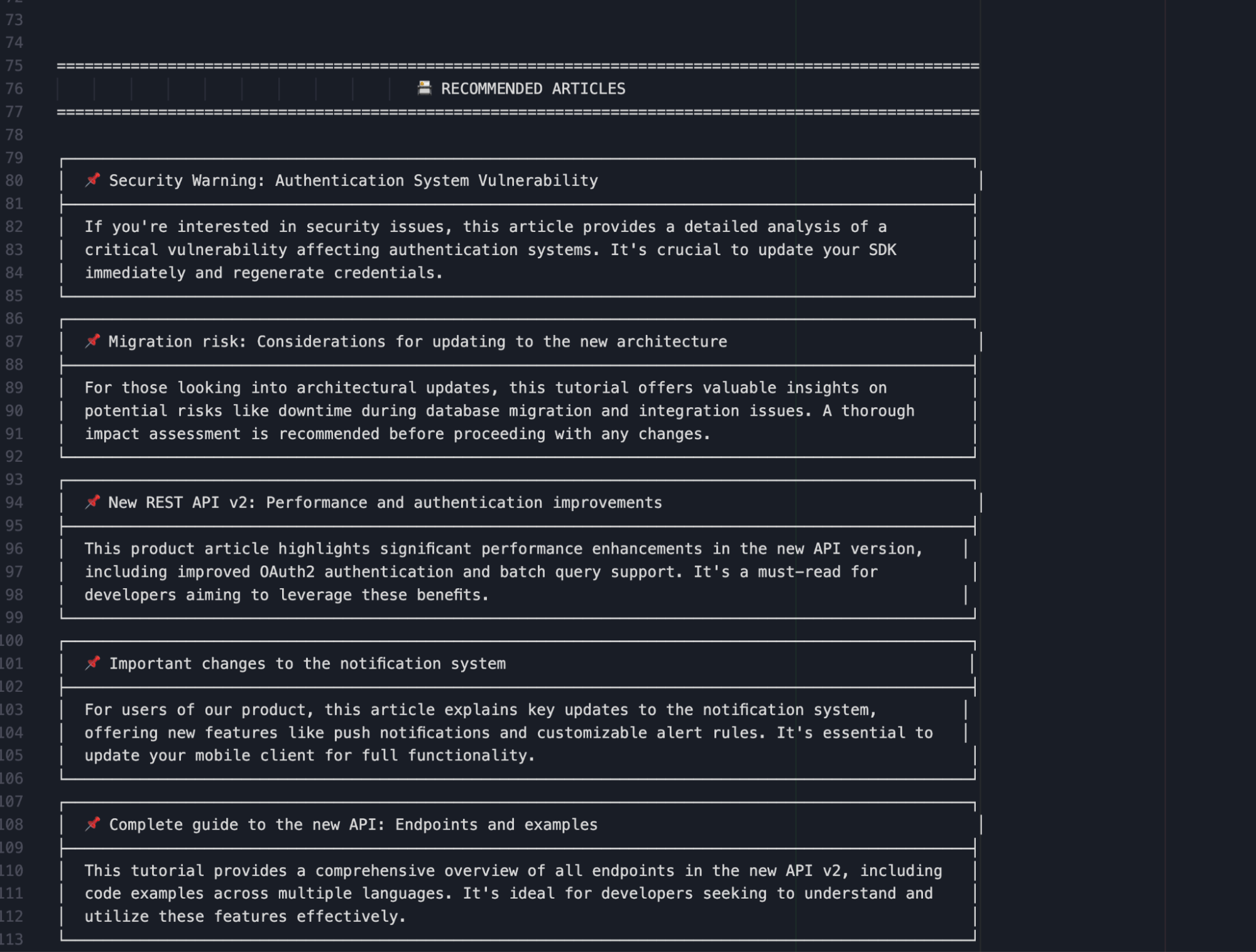
You can see the full results, including all hits and the LLM response, in this file.
We’re asking for articles related to: “Security and vulnerabilities.” This question is used as the search query against the documents stored in Elasticsearch. The retrieved results are then passed to the model, which generates recommendations based on their content. As we can see, the model did a great job generating engaging short text that can motivate the reader to click on it.
Conclusion
This example shows how Elasticsearch and Hugging Face can be combined to create a fast and efficient centralized system for AI applications. This approach reduces manual effort and provides flexibility, thanks to Hugging Face’s extensive model catalog. Using SmolLM3-3B, in particular, shows how compact, multilingual models can still deliver meaningful reasoning and content generation when paired with semantic search. Together, these tools offer a scalable and effective foundation for building intelligent content analysis and multilingual applications.
Ready to try this out on your own? Start a free trial.
Want to get Elastic certified? Find out when the next Elasticsearch Engineer training is running!
Related content
May 26, 2026
Cutting agent costs with pre-computed context
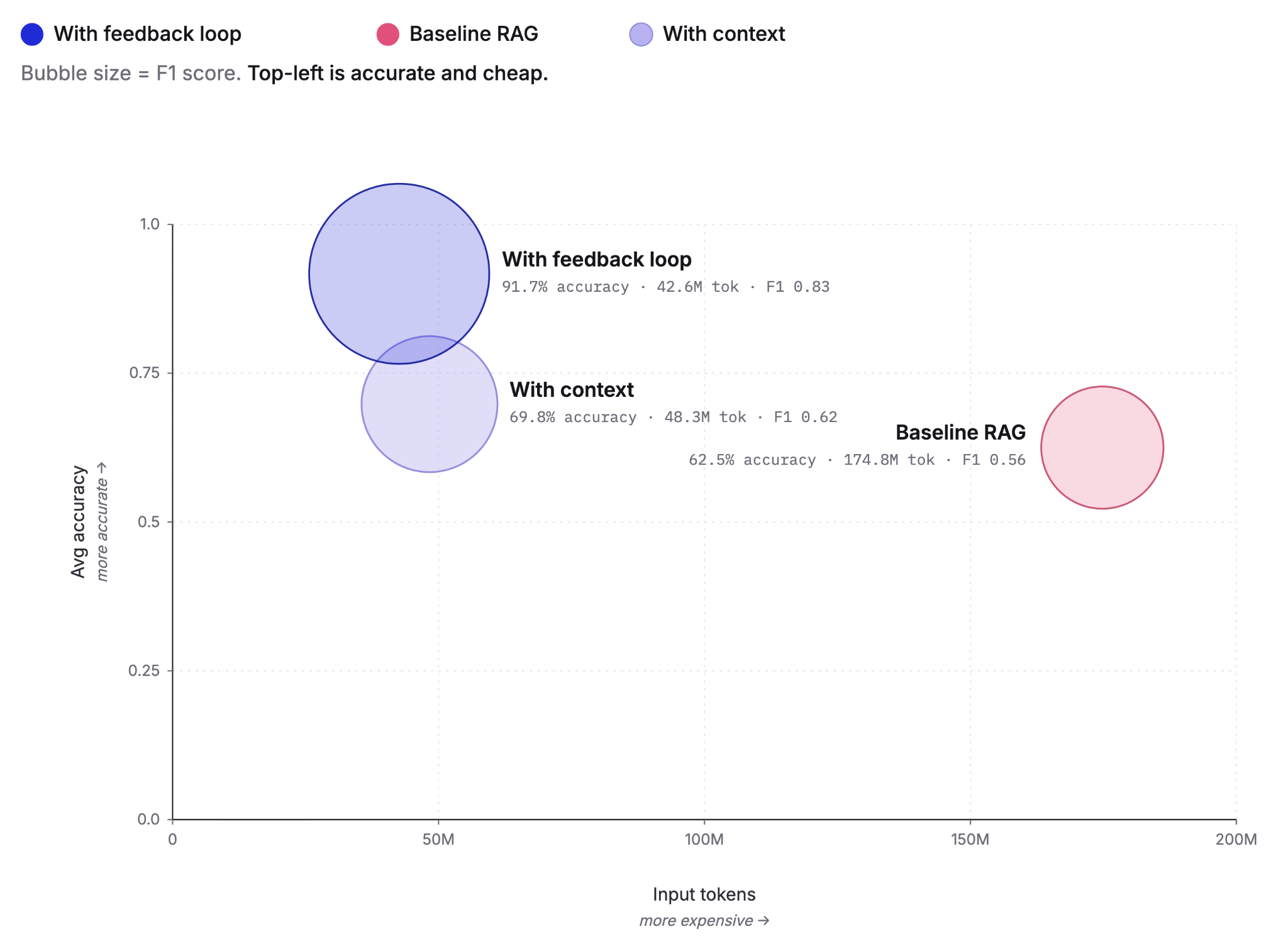
Pre-computing context as Knowledge Indicators reduces LLM agent token costs by up to 75% and improves answer accuracy from 60% to 92%. This post covers the extraction, retrieval and feedback loop that make it work, tested against the BrowseComp-Plus benchmark.
May 5, 2026
Elastic Agent Builder: How we taught AI agents to manage their own context
Agent Builder in Elasticsearch 9.4 ships dynamically loaded skills, a conversation context store, selective compaction, and external connectors to cut token costs by 40% and let agents handle their own context management.

April 29, 2026
Elastic-caveman: Cutting AI response tokens by 64% without losing the best of Elastic
Learn how to use elastic-caveman to cut AI response tokens while keeping the Elastic agentic brilliance.
April 8, 2026
How to build agentic AI applications with Mastra and Elasticsearch
Learn how to build agentic AI applications using Mastra and Elasticsearch through a practical example.
March 27, 2026
Creating an Elasticsearch MCP server with TypeScript
Learn how to create an Elasticsearch MCP server with TypeScript and Claude Desktop.