Introduction
Orchestrating multiple AI agents is the current challenge in production LLM systems. Just as an orchestra needs a conductor to coordinate musicians, multi-agent systems need intelligent orchestration to ensure specialized agents collaborate cohesively, learn from mistakes, and continuously improve.
We will build a multi-agent system that implements the reflection pattern, an emerging pattern where agents collaborate in structured feedback loops to iteratively improve the quality of their responses. By the end, we will have built a demo that analyzes IT incidents, performing semantic search on logs, generating root cause analyses, and self-correcting until a defined quality threshold is met.
The architecture combines three complementary technologies.
- LangGraph orchestrates cyclical workflows that allow agents to critique and improve their own outputs, something impossible in traditional DAG-based engines.
- Elasticsearch acts as the data backbone, providing hybrid search through the ELSER model (combining semantic and keyword), storing long-term memory for continuous learning.
- Ollama provides local LLM models for development, but the system is designed to work with major providers that expose their models via API (OpenAI, Anthropic, etc.).
Prerequisites
To follow this tutorial and run the demo, you will need:
Software and tools:
- Python 3.10 or higher
- Elasticsearch (any version: Serverless, Cloud, or local - free trial at https://cloud.elastic.co)
- Ollama installed for local LLM models (https://ollama.ai)
Setting up the Python environment:
After installing, verify it's running and download the model:
# Check Ollama is active
ollama list
# Download the required model (~4.7 GB)
ollama pull llama3.1:8b
All code is available in the GitHub repository below:
git clone https://github.com/salgado/blog-elastic-orchestration.git
cd blog-elastic-orchestration
We recommend using a virtual environment to avoid dependency conflicts:
# Create virtual environment
python3 -m venv venv

# Activate virtual environment
source venv/bin/activate # Linux/Mac
# venv\Scripts\\activate # Windows

# Install dependencies
pip install langgraph langchain langchain-ollama elasticsearch python-dotenv
Configure environment variables (.env):
Create a .env file in the project root with the following variables:
# Required
ELASTIC_ENDPOINT=https://your-deployment.es.region.gcp.elastic-cloud.com:443
ELASTIC_API_KEY=your-base64-api-key
OLLAMA_MODEL=llama3.1:8b

# Optional (with default values - adjust if necessary)
ELASTIC_INDEX_LOGS=incident-logs
ELASTIC_INDEX_MEMORY=agent-memory

MAX_REFLECTION_ITERATIONS=3
QUALITY_THRESHOLD=0.8
How to get Elasticsearch credentials:
1. Access Elastic Cloud Console
2. Create a Deployment or Project
a. For the serverless model, create a Project (a free trial is available).
b. For the managed model, create a Deployment.
3. Copy the Endpoint (ex, https://xxx.es.region.gcp.elastic-cloud.com:443)
4. Create an API Key in Security → API Keys
Deploying ELSER in Kibana
Deploy the ELSER Model in Kibana
Before running the Python script, you need to manually deploy the ELSER model in Kibana:
Step 1: Access Trained Models
- Open your Kibana
- Navigate to: Menu (☰) → Machine Learning → Trained Models
Step 2: Find and Deploy ELSER
3. Search for .elser_model_2_linux-x86_64 or .elser_model_2
4. Click "Deploy" (or "Start deployment")
Step 3: Configure Deployment
5. Deployment name: Leave default or use "elser-incident-analysis"
6. Optimize for: Select "Search" (important!)
7. Number of allocations: 1 (sufficient for development)
8. Threads per allocation: 1 9. Click "Start"
Step 4: Wait for Deployment
Deployment takes approximately 2-3 minutes. Monitor the status:
- downloading → starting → started
When the status is "started" (green), the model is ready for use.
Initialize indices and example data
Now run the setup script:
python setup_elser.pyExpected output:
======================================================================
ELSER SETUP FOR ELASTICSEARCH
======================================================================

INFO:__main__:Connected to Elasticsearch

INFO:__main__:==========================================================
INFO:__main__:STEP 1: Creating Inference Endpoint
INFO:__main__:==========================================================
....
....

======================================================================
SETUP COMPLETE!
======================================================================

What was configured:
  1. Inference Endpoint: 'elser-incident-analysis'
  2. Index: 'incident-logs' with semantic_text field
  3. Sample data: 15 incident logs
  4. Semantic search: Tested and working
  5. Hybrid search: Tested and working

Next steps:
  → Run the POC: python elastic_reflection_poc.py
======================================================================
The tutorial is designed to be progressive. We start by explaining why multi-agent systems are needed, then detail the reflection pattern and its orchestration with LangGraph, explore how Elasticsearch provides essential data capabilities, and finally execute the POC step by step with detailed output explanations.
Architecture overview
Before diving into implementation details, it's important to understand how the components connect. The diagram below shows the complete system flow, from the initial user query to finalization and saving to long-term memory.
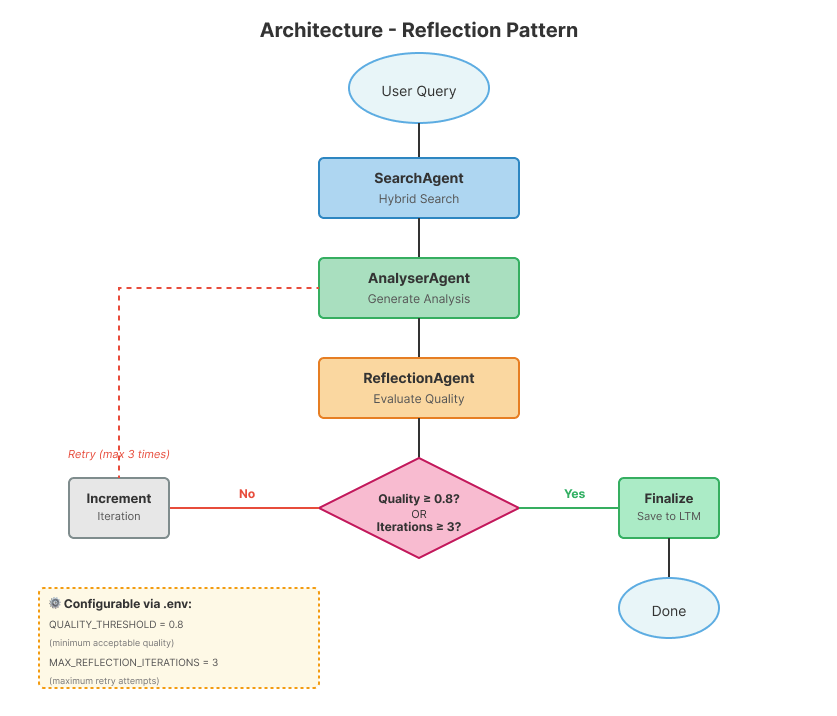
The workflow implements a cyclical pattern where output quality is continuously evaluated. The flow begins with the user's query and sequentially passes through the SearchAgent (hybrid search in Elasticsearch), AnalyserAgent (analysis generation), and ReflectionAgent (quality evaluation). The crucial point is the Router: if the quality reaches the 0.8 threshold, the system finalizes and saves the result; otherwise, the iteration counter is incremented and the flow returns to the AnalyserAgent, this time incorporating feedback from the previous reflection. This cycle repeats until quality is satisfactory or the maximum number of iterations (3 by default) is reached.
Agent specialization in our system:
1. SearchAgent: Queries Elasticsearch with hybrid search (semantic + keyword)
2. AnalyserAgent: Reasons about logs and generates root cause analysis
3. ReflectionAgent: Evaluates output quality and provides feedback
Why 3 iterations? This limit was chosen as a reasonable standard based on observations during the development of this demo:
- Protects against infinite loops when the model cannot improve
- We rarely saw significant improvements after 3 attempts
- You can adjust via the
MAX_REFLECTION_ITERATIONSenvironment variable leveraged by LangGraph
Elasticsearch acts as the data backbone, providing not only hybrid search for the SearchAgent, but also storing long-term memory (agent-memory index). LangGraph manages orchestration, ensuring the state is shared correctly between agents and that the cyclical flow works deterministically. Let's now explore each component in detail.
1. Why do we need multi-agents?
The problem with single LLM calls
A single API call to an LLM is powerful for simple tasks, but fails in complex workflows. Let's look at two real scenarios:
Scenario 1: Root Cause Analysis (RCA)
Task: Analyze 10,000+ log entries across 50 microservices to discover why the database is timing outLimitations of a single LLM:
- Context window too small (cannot fit all logs)
- No access to tools (cannot query, cannot fetch logs from Elasticsearch, query CPU/memory usage, check service status)
- No quality control (can hallucinate causes)
- No memory (repeats analysis if the incident occurs again)
Scenario 2: Security Incident Triage
Task: Correlate 50+ Indicators of Compromise (IOCs) across firewalls, IDS, endpoint agentsLimitations of a single LLM:
- Cannot search threat intelligence databases
- No structured investigation workflow
- No audit trail (compliance requirement)
- Does not learn from past incidents
The central limitation of single LLM calls: While modern LLMs can access external data through function calling and tools, a single request-response interaction cannot orchestrate complex multi-step workflows with feedback loops, maintain long-term memory across sessions, or coordinate specialized agents critiquing each other's outputs.
Multi-agent systems: specialization and coordination
Multi-agent architectures solve these problems by dividing responsibilities. Instead of a single LLM trying to do everything, each agent specializes in a specific task: one agent searches for data in external sources (solving the context window limit), another analyzes and reasons, and a third validates quality (eliminating hallucinations). The shared state between agents is persisted in a database, creating long-term memory that survives between executions.
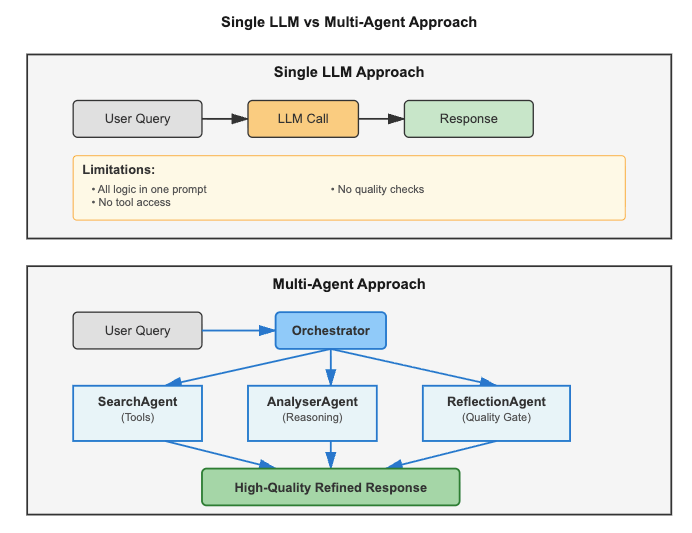
Note on Architectural Patterns: This tutorial focuses on the Reflection Pattern, but production multi-agent systems often combine multiple patterns:
- Planning Agents: Divide complex tasks into executable subtasks (consult RAG for plan templates)
- Tool-Use Agents: Execute real-world actions (restart services, deploy, etc.)
- Reflection Agents: Evaluate quality and provide feedback (our focus)
We chose Reflection because it is the most critical pattern for ensuring quality and reliability. By implementing a loop re-evaluation mechanism where outputs are continuously critiqued and refined, the pattern significantly reduces hallucinations and improves response accuracy.
Orchestration: how agents coordinate
Having multiple specialized agents solves the problem of responsibilities, but creates a new challenge: who coordinates execution? This is where orchestration comes in.
Orchestration is the process of coordinating multiple agents to work together towards a common goal. Think of a conductor leading an orchestra: each musician (agent) plays their instrument (specific task), but the conductor decides when each plays and how the parts connect.
In our system, LangGraph acts as this conductor, coordinating the execution flow:
User Query
↓
SearchAgent (searches logs in Elasticsearch)
↓
AnalyserAgent (generates analysis based on logs)
↓
ReflectionAgent (evaluates analysis quality)
↓
Router (conditional decision)
↓
├─→ Quality ≥ 0.8? → Finalize (saves to memory)
└─→ Quality < 0.8? → Retry (returns to AnalyserAgent with feedback)
How LangGraph orchestrates:
- Manages shared state (Agent-to-Agent Communication): Each agent reads and writes to an
IncidentStateobject that containsquery, search_results, analysis, quality_score, etc. This communication ensures all agents work with the same data without conflicts. - Controls execution flow: Defines the order our agents are invoked (in this case, SearchAgent → AnalyserAgent → ReflectionAgent) and implements conditional routing. outer decides the next step based on the quality_score.
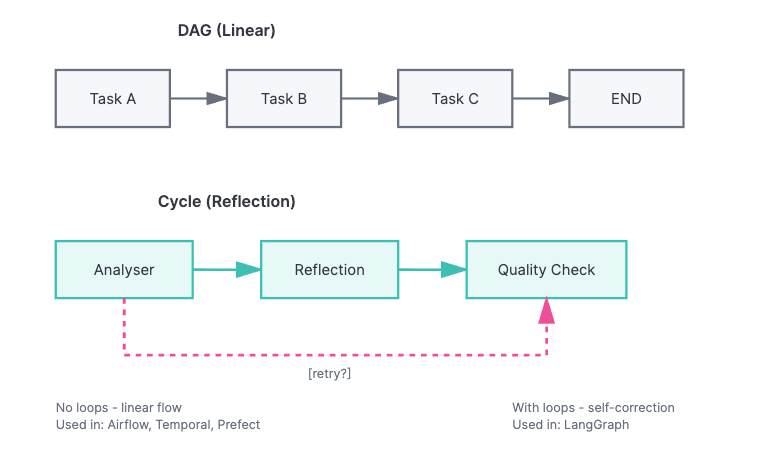
- Enables feedback cycles: Allows the workflow to return to the AnalyserAgent multiple times, something impossible in traditional engines that only support linear flows (DAGs).
- Ensures conflict-free coordination: Each agent executes in turn, receives the updated state, and passes the result forward deterministically.
Without orchestration, we would have 3 isolated agents with no capacity to collaborate. With LangGraph, we have a coordinated multi-agent system where each agent contributes to the final goal: generating a high-quality incident analysis.
Benefits of this approach:
Each agent focuses on a specific responsibility, allowing individual optimization. Agents can be swapped independently, facilitating maintenance and upgrades. Quality control happens through dedicated reflection, ensuring reliable outputs. Additionally, the system improves over time by learning from past decisions stored in long-term memory.
The role of persistent storage:
Multi-agent systems need three types of memory:
| Type | Scope | Managed By | Duration |
|---|---|---|---|
| Short-term (Context Window) | Current conversation | LLM | During chat |
| Working (State) | Between agents in the workflow | LangGraph | During execution |
| Long-term (Database) | Past decisions, patterns | Elasticsearch | Permanent |
In this tutorial, we use Elasticsearch for long-term memory because it provides semantic search (ELSER), hybrid queries, and natural integration with logs/metrics.
2. Orchestration: The cyclical reflection pattern (LangGraph)
In the previous section, we saw that our system has 3 specialized agents and that LangGraph coordinates their execution. Now, let's understand why we need a specific tool for orchestration and how it implements the reflection pattern.
AI agent orchestration has unique requirements that traditional tools do not meet:
- Feedback cycles: Agents need to repeat tasks based on quality evaluations
- Conditional routing: The next action depends on the result of the previous action (not a fixed flow)
- Mutable shared state: Multiple agents read and modify the same context
- Durability: The system needs to survive failures and resume from where it left off
Unlike DAGs (Directed Acyclic Graphs) - linear flows without loops, AI agents need cycles to implement reflection (where the agent critiques its own output), perform retries with feedback, and conduct multi-turn reasoning.
Using LangGraph for the workflow
LangGraph (from LangChain) was designed specifically for agent workflows, offering native cyclical flows, conditional routing based on agent outputs, and built-in state management.
The Reflection Pattern: self-correction loops
Without quality control, LLMs can produce incomplete or hallucinated outputs:
User: "Analyze this database timeout"
AnalyserAgent (without reflection):
"The database timed out. You should check the logs."
Problems:
- No root cause identified
- No impact quantification
- Vague recommendations
- No evidence from actual logs
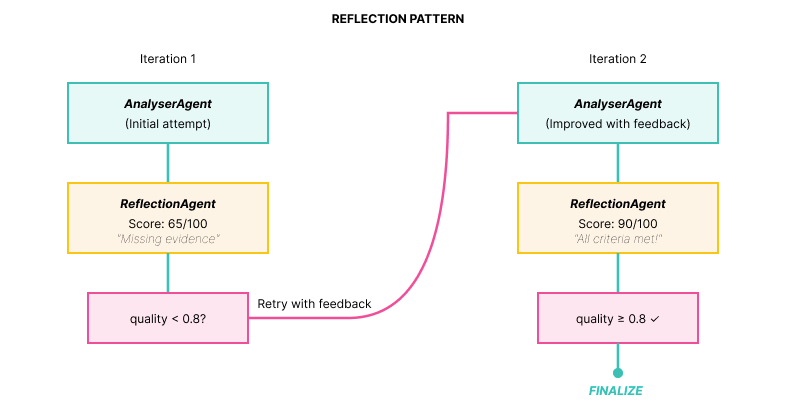
The solution is to add a reflection loop where a specialized agent evaluates the quality of the output:
Implementation: The three components
1. ReflectionAgent: Critique with scoring
def reflection_agent(state: IncidentState) -> IncidentState:
    """
    ReflectionAgent: Evaluates analysis quality

    Quality Criteria:
    - Completeness (all aspects covered?)
    - Evidence (based on data?)
    - Actionability (clear actions?)
    - Precision (logical conclusions?)

    Score: 0.0 to 1.0
    """
    logger.info(f"ReflectionAgent (iteration {state['iteration']})")

    analysis = state["analysis"]

    llm = get_llm(temperature=0.2)

    prompt = f"""You are a technical analysis critic.

**Analysis to evaluate:**
{analysis}

**Task:**
Evaluate the analysis quality using these criteria:
1. **Completeness**: Does it cover root cause, impact, actions? (0-25 points)
2. **Evidence**: Is it based on concrete data from logs? (0-25 points)
3. **Actionability**: Are recommended actions clear and specific? (0-25 points)
4. **Precision**: Are conclusions logical and well-founded? (0-25 points)

**Response format (IMPORTANT - follow exactly):**
SCORE: 80
FEEDBACK: [your detailed critique and improvement suggestions]

The SCORE must be a single number between 0-100 on the same line as "SCORE:".
Do NOT use markdown formatting in the SCORE line (no asterisks, bold, etc.).
Example: "SCORE: 75" or "SCORE: 75/100" are acceptable.
Example of WRONG format: "**SCORE:** 75" or "SCORE: **75**"

Be critical but constructive.
"""

    messages = [
        SystemMessage(content="You are a rigorous technical critic."),
        HumanMessage(content=prompt)
    ]

    response = llm.invoke(messages)
    reflection_text = response.content

    # Parse score
    try:
        score_line = [line for line in reflection_text.split('\n') if 'SCORE:' in line][0]
        score_str = score_line.split(':')[1].strip()

        # Remove markdown formatting (**, *, etc.) and extra spaces
        score_str = re.sub(r'\*+', '', score_str)  # Remove asterisks
        score_str = score_str.strip()

        # Extract first number found (handles cases like "80/100", "80", "** 80", etc.)
        numbers = re.findall(r'\d+', score_str)
        if not numbers:
            raise ValueError("No number found in score")

        score_value = int(numbers[0])

        # If format is "80/100", use the denominator; otherwise assume out of 100
        if '/' in score_str and len(numbers) > 1:
            score = score_value / int(numbers[1])
        else:
            # If number > 1, assume it's already 0-100 scale; if <= 1, assume 0-1 scale
            score = score_value / 100.0 if score_value > 1 else score_value

        # Ensure score is in valid range [0, 1]
        score = max(0.0, min(1.0, score))

        logger.info(f"Parsed score: {score:.2f} from line: {score_line}")
    except Exception as e:
        logger.warning(f"Failed to parse score: {e}")
        logger.warning(f"Reflection text (first 200 chars): {reflection_text[:200]}")
        logger.warning(f"Defaulting to 0.5")
        score = 0.5  # Default if parsing fails

    # Update state
    state["reflection"] = reflection_text
    state["quality_score"] = score
    state["messages"].append(AIMessage(content=f"[ReflectionAgent] Score: {score:.2f}\n{reflection_text}"))

    logger.info(f"Reflection completed (score: {score:.2f})")

    return state
2. Router: conditional logic
def decisor_router(state: IncidentState) -> Literal["increment", "finalize"]:
    """
    Decisor Router: Defines next step in Reflection cycle

    Logic:
    - quality_score >= QUALITY_THRESHOLD -> finalize (success)
    - iteration >= max_iterations -> finalize (limit reached)
    - otherwise -> increment -> analyser (new iteration)

    QUALITY_THRESHOLD comes from environment variable (default: 0.8)
    """
    quality = state["quality_score"]
    iteration = state["iteration"]
    max_iter = state["max_iterations"]

    logger.info(f"Router: quality={quality:.2f}, iteration={iteration}/{max_iter}")

    # Check quality threshold
    if quality >= float(os.getenv("QUALITY_THRESHOLD", "0.8")):
        logger.info("Quality threshold met -> finalize")
        return "finalize"

    # Check max iterations
    if iteration >= max_iter:
        logger.info("Max iterations reached -> finalize")
        return "finalize"

    # Continue reflection loop
    logger.info("Quality below threshold -> retry")
    return "increment"
3. LangGraph: The cyclical flow
def create_reflection_graph() -> StateGraph:
    """
    Creates StateGraph with Reflection Pattern

    Flow:
    START → search → analyser → reflection → decisor_router
                        ↑                         │
                        │                    [increment]
                        └───── increment ─────────┘
                                  │
                             [finalize]
                                  ↓
                              finalize → END

    Note: SearchAgent runs ONCE at the start.
          Reflection loop iterates only on analyser → reflection.
    """
    # Initialize graph
    workflow = StateGraph(IncidentState)

    # Add nodes (3 specialized agents + utility nodes)
    workflow.add_node("search", search_agent)        # Hybrid search
    workflow.add_node("analyser", analyser_agent)    # LLM analysis
    workflow.add_node("reflection", reflection_agent) # Quality evaluation
    workflow.add_node("increment", increment_iteration)
    workflow.add_node("finalize", finalize_output)

    # Add edges
    workflow.set_entry_point("search")              # Start with search
    workflow.add_edge("search", "analyser")         # search → analyser
    workflow.add_edge("analyser", "reflection")
    workflow.add_edge("increment", "analyser")      # Loop back to analyser (NOT search)

    # Conditional edge (reflection → increment OR finalize)
    workflow.add_conditional_edges(
        "reflection",
        decisor_router,
        {
            "increment": "increment",  # Retry (increment first)
            "finalize": "finalize"     # Approved
        }
    )

    workflow.add_edge("finalize", END)

    return workflow
Workflow visualization:
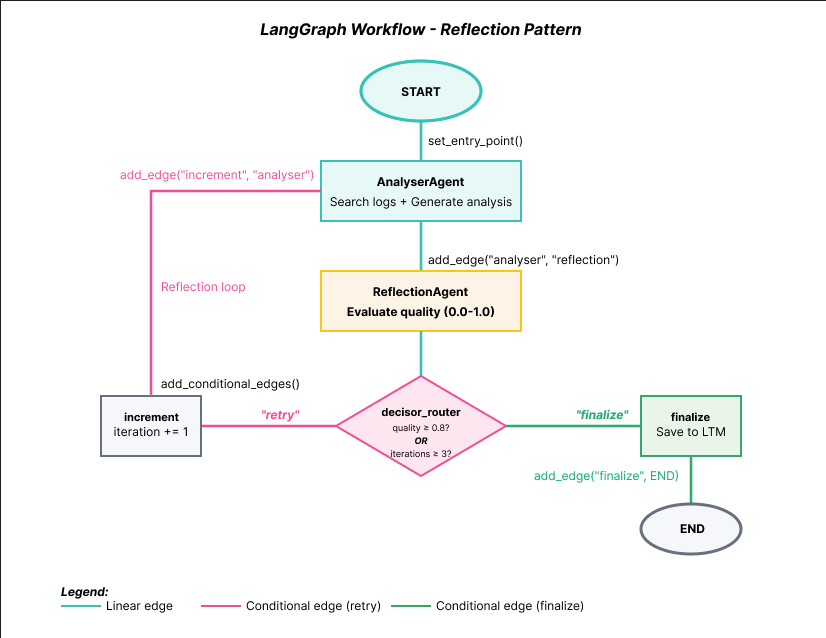
The diagram above shows the complete LangGraph workflow structure. Note the key elements:
- START → AnalyserAgent: Entry point defined via set_entry_point()
- AnalyserAgent → ReflectionAgent: Linear edge via add_edge()
- ReflectionAgent → decisor_router: Conditional decision
- decisor_router → increment: When quality < 0.8 (increments counter and retries)
- increment → AnalyserAgent: Closes the reflection loop (feedback edge marked in pink in the diagram)
- decisor_router → finalize: When quality ≥ 0.8 or max iterations
- finalize → END: Workflow conclusion
This feedback edge (highlighted in pink in the diagram for easy visualization) creates the reflection cycle that differentiates this pattern from traditional DAGs.
Results: quality improvement over iterations
Execution example:
ITERATION 1
******
AnalyserAgent:
"Database timeout detected in logs."

ReflectionAgent:
 SCORE: 65/100
 FEEDBACK:
- Missing root cause (WHY timeout?)
- No impact quantification
- No specific actions
Router: 0.65 < 0.8 → RETRY │
****
ITERATION 2 (with feedback)
 AnalyserAgent (improved):
 "Root Cause: Connection pool exhausted
 Evidence: 32 'pool timeout' errors
 Impact: 32 failed requests (10 min)
 Actions:
 1. Restart db-worker
 2. Increase pool size to 50
 3. Add monitoring at 80%"
 ReflectionAgent:
 SCORE: 90/100
 FEEDBACK: All criteria met!
 Router: 0.90 >= 0.8 → FINALIZE
3. The data layer: Elasticsearch as long-term memory and RAG
Multi-agent systems need persistent storage for two use cases:
- Long-Term Memory (LTM): Past decisions and learnings
- Retrieval Augmented Generation (RAG): Contextual data (logs, docs)
In this section, we will implement these capabilities using Elasticsearch.
The two indices of the system
The system uses two distinct indices in Elasticsearch, each with a specific purpose:
| Index | Purpose | Created By | Used For |
|---|---|---|---|
| incident-logs | Store incident logs | setup_elser.py | Hybrid search (SearchAgent) |
| agent-memory | Long-Term Memory (LTM) | System runtime | Save successful decisions |
Let's explore each index in detail, starting with the data source.
Long-term memory: Learning from past decisions
Without persistent memory, the system repeatedly solves the same incident from scratch:
# Day 1: Agent solves incident
AnalyserAgent: "Root cause: Connection pool exhausted"

# Day 30: Similar incident occurs
AnalyserAgent: "Let me analyze from scratch..."
# No memory of past solution
The solution is to save successful decisions in Elasticsearch for future retrieval:
def save_to_long_term_memory(
    es: Elasticsearch,
    agent_name: str,
    memory_type: str,
    content: str,
    success: bool,
    metadata: dict = None
):
    """
    Saves Long-Term Memory (LTM) to Elasticsearch

    Types: "decision", "lesson", "pattern"
    Used to improve agents over time
    """
    config = get_elastic_config()

    doc = {
        "memory_id": f"{agent_name}_{datetime.now().timestamp()}",
        "agent_name": agent_name,
        "memory_type": memory_type,
        "content": content,
        "timestamp": datetime.now().isoformat(),
        "success": success,
        "metadata": metadata or {}
    }

    es.index(index=config.index_memory, body=doc)
    logger.info(f"LTM saved: {agent_name} - {memory_type}")
Impact:
Without LTM:
Week 1: Solve incident → Forget
Week 2: Same incident → Solve from scratch
Week 3: Same incident → Solve from scratch
With LTM:
Week 1: Solve incident → Save to memory
Week 2: Same incident → Retrieve past solution → 50% faster
Week 3: Similar incident → Pattern recognition → Proactive fix
Hybrid search: Semantic (ELSER) + keyword (BM25)
Why hybrid search matters: Hybrid search combines the precision of keyword matching with the semantic understanding of ML models, ensuring you find both exact matches and conceptually related content that pure semantic search might miss.
Query: "database timeout problems"
# Keyword search (BM25):
- Finds: "ERROR: database timeout after 30s" (exact match)
- Misses: "ERROR: connection refused" (no "timeout")

# Semantic search (ELSER):
- Finds: "database timeout" + "connection refused" +
- "query execution slow" + "pool exhausted"

# Hybrid (both):
- Better ranking (combined scores)
- Higher recall (finds more relevant cases)
Configuring ELSER (Elasticsearch semantic model):
# Step 1: Create inference endpoint
es.inference.put(
    inference_id="elser-incident-analysis",
    task_type="sparse_embedding",
    body={"service": "elser"}
)

# Step 2: Create index with semantic_text field
es.indices.create(
    index="incident-logs",
    body={
        "mappings": {
            "properties": {
                "message": {"type": "text"},
                "content": {"type": "text"},
                # Special field: auto-generates ELSER embeddings
                "semantic_content": {
                    "type": "semantic_text",
                    "inference_id": "elser-incident-analysis"
                }
            }
        }
    }
)
Implementation:
def hybrid_search(query, size=15):
    """Combines semantic (ELSER) + keyword (BM25) search"""
    return es.search(
        index="incident-logs",
        body={
            "query": {
                "bool": {
                    "should": [
                        # Semantic search
                        {
                            "semantic": {
                                "field": "semantic_content",
                                "query": query
                            }
                        },
                        # Keyword search
                        {
                            "multi_match": {
                                "query": query,
                                "fields": ["message^2", "content"]
                            }
                        }
                    ]
                }
            }
        }
    )
Index 1: incident-logs (Data Source for RAG)
This is the index where the incident logs that the system analyzes are stored. It contains the special semantic_text field that automatically generates ELSER embeddings:
# Index mapping
{
"mappings": {
"properties": {
"message": {"type": "text"}, # Keyword search (BM25)
"content": {"type": "text"}, # Keyword search (BM25)
"semantic_content": { # Semantic search (ELSER)
"type": "semantic_text",
"inference_id": "elser-incident-analysis"
},
"timestamp": {"type": "date"},
"severity": {"type": "keyword"}
}
}
}
Index 2: agent-memory (continuous learning)
Stores successful analyses for future retrieval (Long-Term Memory). Each document is a "memory" that the system can query:
# Structure of a saved memory
{
"agent": "AnalyserAgent", # Which agent generated this decision
"content": "Root Cause: Connection pool exhausted...", # Complete analysis (semantically indexed)
"quality_score": 0.90, # Score from ReflectionAgent (0-1)
"timestamp": "2025-01-21T10:30:00Z", # When it was resolved
"success": true, # Only successful solutions
"iteration_count": 2, # How many attempts it took
"logs_analyzed": 5 # How many logs were used
}
How the system uses these memories:
1. Semantic search on the content field: Finds similar solutions even with different words
2. Filters by quality_score >= 0.80: Only learns from high-quality decisions
3. Orders by _score (relevance) + timestamp: Prioritizes recent and relevant solutions
4. Injects top 3 into the AnalyserAgent's prompt: Accelerates analysis using past solutions as a template
Result: Recurring incidents are resolved faster, usually in 1 iteration.
How semantic search retrieves memories
When a new incident arrives, the system searches for similar memories by comparing concepts, not just words.
Code retrieval example:
1. Retrieval function (hybrid semantic search)
def retrieve_past_solutions(es: Elasticsearch, query: str, top_k: int = 3) -> List[dict]:
   """
   Retrieves similar past solutions from Long-Term Memory using semantic search

   Uses hybrid search (semantic + keyword) to find similar solutions even with different words.
   Only retrieves solutions with quality_score >= QUALITY_THRESHOLD and success=True.
   Uses QUALITY_THRESHOLD from environment (default: 0.8).

   Example:
       Query: "database timeout"
       Finds: "connection pool exhaustion" (different words, same concept)
   """
   config = get_elastic_config()
   quality_threshold = float(os.getenv("QUALITY_THRESHOLD", "0.8"))

   try:
       result = es.search(
           index=config.index_memory,
           body={
               "query": {
                   "bool": {
                       "should": [
                           # Semantic search (ELSER) - finds similar concepts
                           {
                               "semantic": {
                                   "field": "semantic_content",
                                   "query": query
                               }
                           },
                           # Keyword search (BM25) - finds exact word matches
                           {
                               "match": {
                                   "content": {
                                       "query": query,
                                       "boost": 1.0
                                   }
                               }
                           }
                       ],
                       "minimum_should_match": 1,  # At least one should match
                       "filter": [
                           {"term": {"success": True}},
                           {"range": {"metadata.quality_score": {"gte": quality_threshold}}}
                       ]
                   }
               },
               "sort": [
                   {"_score": {"order": "desc"}},
                   {"timestamp": {"order": "desc"}}
               ],
               "size": top_k
           }
       )

       solutions = []
       for hit in result["hits"]["hits"]:
           source = hit["_source"]
           solutions.append({
               "content": source.get("content", ""),
               "score": hit["_score"],
               "quality_score": source.get("metadata", {}).get("quality_score", 0),
               "timestamp": source.get("timestamp", ""),
               "iterations": source.get("metadata", {}).get("iterations", 0)
           })

       logger.info(f"Retrieved {len(solutions)} past solutions (threshold: {quality_threshold})")
       return solutions

   except Exception as e:
       logger.warning(f"Could not retrieve past solutions: {e}")
       return []
2. Where it is called (inside the AnalyserAgent)
    # Retrieve past solutions from LTM
    es = get_elastic_client()
    past_solutions = retrieve_past_solutions(es, query, top_k=3)

    # Format past solutions for prompt
    past_context = ""
    if past_solutions:
        past_context = "\n\n**SIMILAR PAST INCIDENTS (for reference):**\n"
        for i, sol in enumerate(past_solutions, 1):
            past_context += f"\n{i}. (Quality: {sol['quality_score']:.2f}, Iterations: {sol['iterations']})\n"
            past_context += f"{sol['content']}\n"
        past_context += "\n(Use these as templates, but analyze current logs independently)\n"
3. How it is used in the prompt
  prompt = f"""You are an IT incident analysis expert.
**User query:** {query}
**Logs found:**
{context}
{feedback_context}
{past_context}
**Task:**
Analyze the logs and provide:
1. Root cause
2. Impact
3. Recommended actions
Be specific and base your analysis only on the provided logs."""
Measurable gain: In recurring incidents, the system is faster, resolving in 1 iteration instead of 3, by using past solutions as a template.
Elasticsearch provides two capabilities (LTM, RAG) in a unified system. Hybrid search uses keyword matching (BM25) to pre-filter and reduce the search space, then applies semantic search (ELSER) on the filtered results—combining speed with semantic understanding. Optimization for time series allows efficient management of workflow history over time. Natural integration with observability logs and metrics means you can unify agents and operational data on the same platform. Finally, with ELSER semantically indexing all data, the agents themselves can query logs and past decisions using natural language—enabling them to retrieve contextually relevant information.
4. Running the demo
Quick setup
If you haven't already set up the environment, refer back to the Prerequisites section at the beginning of the article.
Run the DEMO
Run the analysis:
After confirming that Ollama is running and the model is downloaded, execute:
python elastic_reflection_poc.py "database connection timeout"Actual output (with annotations):
INFO:__main__:======================================================================
INFO:__main__:MULTI-AGENT ORCHESTRATION - REFLECTION PATTERN
INFO:__main__:======================================================================
INFO:__main__:Starting analysis: 'database connection timeout'
INFO:__main__:
INFO:__main__:SearchAgent: Performing hybrid search
INFO:elastic_config:Connecting to Elasticsearch: https://serverless-oct-search-dc80c0.es.us-central1.gcp.elastic.cloud:443
INFO:elastic_transport.transport:HEAD https://serverless-oct-search-dc80c0.es.us-central1.gcp.elastic.cloud:443/ [status:200 duration:0.744s]
INFO:elastic_transport.transport:GET https://serverless-oct-search-dc80c0.es.us-central1.gcp.elastic.cloud:443/ [status:200 duration:0.148s]
INFO:elastic_config:Connected to Elasticsearch Cloud
INFO:elastic_config:   Cluster: dc80c0ec021b46c996d59d9053745153
INFO:elastic_config:   Version: 8.11.0
INFO:elastic_config:   Status: N/A (Serverless - cluster.health not available)
INFO:elastic_config:Checking indices...
INFO:elastic_transport.transport:HEAD https://serverless-oct-search-dc80c0.es.us-central1.gcp.elastic.cloud:443/incident-logs [status:200 duration:0.152s]
INFO:elastic_transport.transport:HEAD https://serverless-oct-search-dc80c0.es.us-central1.gcp.elastic.cloud:443/agent-memory [status:200 duration:0.151s]
INFO:elastic_config:All indices ready
INFO:elastic_transport.transport:POST https://serverless-oct-search-dc80c0.es.us-central1.gcp.elastic.cloud:443/incident-logs/_search [status:200 duration:0.309s]
INFO:__main__:Hybrid search found 15 results
INFO:__main__:Search completed: 15 logs found
INFO:__main__:AnalyserAgent (iteration 1)
INFO:elastic_transport.transport:POST https://serverless-oct-search-dc80c0.es.us-central1.gcp.elastic.cloud:443/agent-memory/_search [status:200 duration:0.150s]
INFO:__main__:Retrieved 0 past solutions (threshold: 0.80)
INFO:__main__:Using Ollama model: llama3.1:8b
INFO:httpx:HTTP Request: POST http://localhost:11434/api/chat "HTTP/1.1 200 OK"
INFO:__main__:Analysis completed (15 logs analyzed)
INFO:__main__:ReflectionAgent (iteration 1)
INFO:__main__:Using Ollama model: llama3.1:8b
INFO:httpx:HTTP Request: POST http://localhost:11434/api/chat "HTTP/1.1 200 OK"
INFO:__main__:Parsed score: 0.65 from line: SCORE: 65
INFO:__main__:Reflection completed (score: 0.65)
INFO:__main__:Router: quality=0.65, iteration=1/4
INFO:__main__:Quality below threshold -> retry
INFO:__main__:Incrementing iteration to 2
INFO:__main__:AnalyserAgent (iteration 2)
INFO:elastic_transport.transport:POST https://serverless-oct-search-dc80c0.es.us-central1.gcp.elastic.cloud:443/agent-memory/_search [status:200 duration:0.147s]
INFO:__main__:Retrieved 0 past solutions (threshold: 0.80)
INFO:__main__:Using Ollama model: llama3.1:8b
INFO:httpx:HTTP Request: POST http://localhost:11434/api/chat "HTTP/1.1 200 OK"
INFO:__main__:Analysis completed (15 logs analyzed)
INFO:__main__:ReflectionAgent (iteration 2)
INFO:__main__:Using Ollama model: llama3.1:8b
INFO:httpx:HTTP Request: POST http://localhost:11434/api/chat "HTTP/1.1 200 OK"
INFO:__main__:Parsed score: 0.85 from line: SCORE: 85
INFO:__main__:Reflection completed (score: 0.85)
INFO:__main__:Router: quality=0.85, iteration=2/4
INFO:__main__:Quality threshold met -> finalize
INFO:__main__:Finalizing output
INFO:elastic_transport.transport:POST https://serverless-oct-search-dc80c0.es.us-central1.gcp.elastic.cloud:443/agent-memory/_doc [status:201 duration:0.452s]
INFO:__main__:LTM saved: AnalyserAgent - decision
INFO:__main__:Output finalized (iterations: 2)
INFO:__main__:
INFO:__main__:======================================================================
INFO:__main__:ANALYSIS COMPLETE
INFO:__main__:======================================================================
INFO:__main__:Quality Score: 0.85
INFO:__main__:Iterations: 2
INFO:__main__:

======================================================================
RESULTS
======================================================================

**Incident Analysis Report**

**Root Cause:** The root cause of the incident is a missing index on the `orders.created_at` column in the PostgreSQL database, which caused sequential scans leading to 15s query times, resulting in connection pool exhaustion and subsequent cascading failures.

**Evidence:**

* Log entry [ERROR] 2025-10-31T09:26:25.446312+00:00 from service `reporting-service` indicates a slow query on the `orders` table with a missing index on `created_at`.
* Log entry [CRITICAL] 2025-10-31T09:41:25.446312+00:00 from service `monitoring` confirms that database connection pool exhaustion is due to slow queries on the unindexed `orders.created_at` column.
* Log entry [INFO] 2025-10-31T09:44:25.446312+00:00 from service `database-admin` confirms the root cause analysis and identifies the missing index as the primary cause.

**Impact:** The incident resulted in a 100% failure rate for payment processing, with an estimated revenue impact of $28,500 and approximately 1,200 affected users.

**Recommended Actions:**

1. **Recreate Index:** Recreate the index on `orders.created_at` to prevent sequential scans and improve query performance.
2. **Monitor Database Performance:** Monitor database performance metrics, such as query execution time, connection pool utilization, and slow query count, to detect potential issues before they escalate.
3. **Review Query Plans:** Review query plans for queries that access the `orders` table to identify opportunities for optimization and index creation.
4. **Implement Index Maintenance:** Implement a regular schedule for reviewing and maintaining database indexes to prevent similar issues in the future.

**Timeline:**

* The issue started on 2025-10-31T09:26:25.446312+00:00, when the first slow query was detected on the `orders` table.
* The connection pool exhaustion occurred around 2025-10-31T09:41:25.446312+00:00, causing cascading failures and business impact.
* The root cause was identified by 2025-10-31T09:44:25.446312+00:00.

**Context:** The missing index on `orders.created_at` was likely dropped during a migration or database maintenance operation, leading to the performance issues.

======================================================================
Quality: 85% | Iterations: 2 | Logs analyzed: 15
======================================================================
Complete execution flow
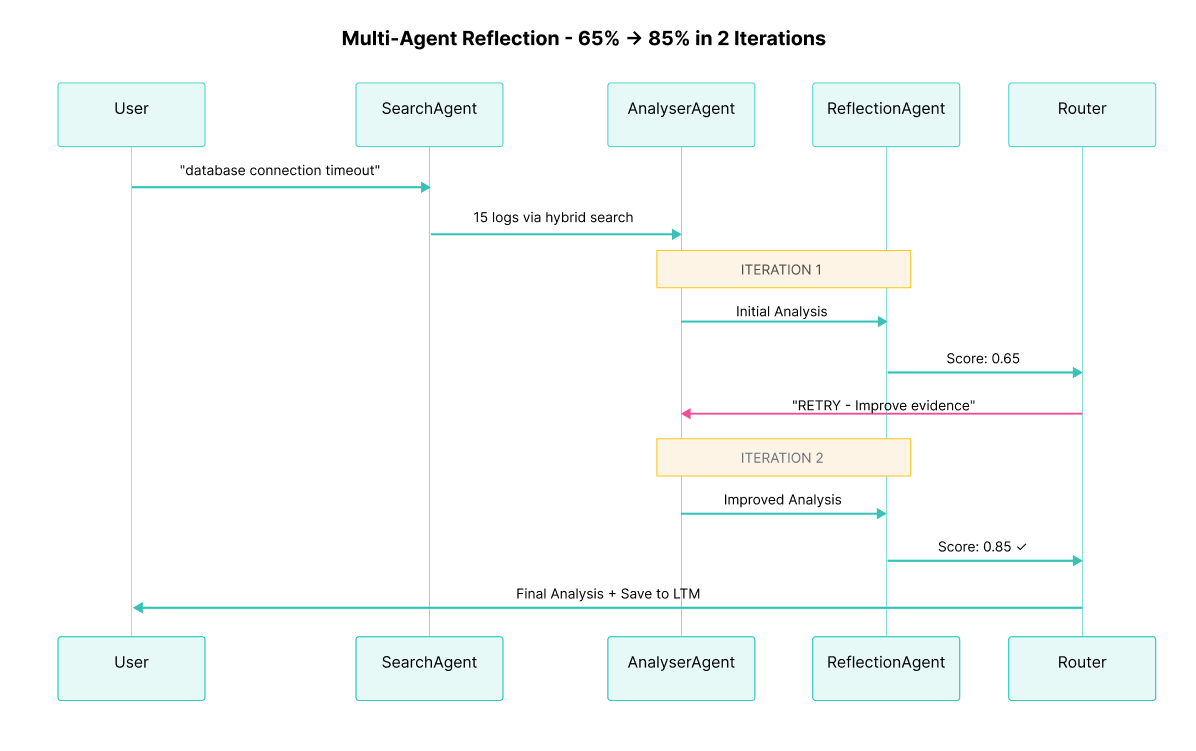
The diagram above shows the interaction between User, SearchAgent, AnalyserAgent, ReflectionAgent, and Elasticsearch during the 2 iterations. Observe how:
- The SearchAgent queries Elasticsearch only once at the beginning of the workflow (15 logs found via hybrid search)
- The AnalyserAgent reuses these logs and generates analysis 2 times (successfully improving from iteration 1 to iteration 2 based on reflection feedback)
- The ReflectionAgent evaluates quality 2 times (providing critical feedback in iteration 1 and approval in iteration 2)
- The Router decides between "increment" (retry) and "finalize" after each reflection
- In iteration 2, the quality score (0.85) exceeds the threshold (0.80), triggering automatic finalization
- The final high-quality result is saved in the agent-memory index for long-term memory, enabling faster resolution of similar future incidents
Conclusion
We built a self-correcting multi-agent system that demonstrates a new way of designing AI applications. Instead of relying on single LLM calls that can produce inconsistent outputs, we implemented a reflection pattern where specialized agents collaborate, critique, and iteratively improve their results.
The pillars of this system are equally important. The Reflection Pattern provides the self-correction mechanism through structured feedback loops. LangGraph orchestrates cyclical workflows that go beyond the limitations of traditional DAGs. And Elasticsearch unifies semantic search and long-term memory.
The complete code is available on GitHub. Experiment with your own data, adjust the quality criteria for your domain, and explore how the reflection pattern can improve your AI systems.
References:
- LangGraph Docs
- ELSER
- Elasticsearch Serverless
- Agentic Retrieval-Augmented Generation: A Survey on Agentic RAG
Ready to try this out on your own? Start a free trial.
Want to get Elastic certified? Find out when the next Elasticsearch Engineer training is running!
Related content

March 23, 2026
Using Elasticsearch Inference API along with Hugging Face models
Learn how to connect Elasticsearch to Hugging Face models using inference endpoints, and build a multilingual blog recommendation system with semantic search and chat completions.
March 27, 2026
Creating an Elasticsearch MCP server with TypeScript
Learn how to create an Elasticsearch MCP server with TypeScript and Claude Desktop.
March 17, 2026
The Gemini CLI extension for Elasticsearch with tools and skills
Introducing Elastic’s extension for Google's Gemini CLI to search, retrieve, and analyze Elasticsearch data in developer and agentic workflows.

March 16, 2026
Agent Skills for Elastic: Turn your AI agent into an Elastic expert
Give your AI coding agent the knowledge to query, visualize, secure, and automate with Elastic Agent Skills.
March 18, 2026
AI agent memory: Creating smart agents with Elasticsearch managed memory
Learn how to create smarter and more efficient AI agents by managing memory using Elasticsearch.