Connect Elasticsearch to the GitHub Copilot SDK in roughly five lines of C# and your agent retrieves from your actual data instead of guessing. Copilot handles planning and orchestration; Elasticsearch handles retrieval over your logs, documents and proprietary records. The result: no hallucinations from stale training data, just answers grounded in what's actually in your system. This post walks through the full setup using the Elastic.Extensions.AI bridge.
Why RAG agents hallucinate without a retrieval layer
Without a retrieval layer, AI agents generate responses from training data alone, which means they hallucinate when asked about your logs, documents or proprietary systems. The GitHub Copilot SDK gives you a production-tested orchestration engine. Elasticsearch gives you fast, accurate retrieval over your own logs, documents, and operational data. When you connect them, your agent stops guessing.
In this post, we explore how to make that connection using the Elastic.Extensions.AI bridge library, with a complete .NET code example, so you can create a working retrieval augmented generation (RAG) agent that plans with Copilot’s engine and retrieves it from Elasticsearch.
Core stack overview: GitHub Copilot SDK and Elastic AI Ecosystem
The GitHub Copilot SDK handles orchestration and planning; Elasticsearch handles retrieval and context. Here's how each component contributes.
GitHub Copilot SDK
The GitHub Copilot SDK is a multi-platform toolset currently in technical preview. It supports Python, TypeScript, Go, .NET, and Java. Architecturally, the SDK communicates with a Copilot command line interface (CLI) server via JSON Remote Procedure Call (JSON-RPC), managing the process lifecycle automatically. It handles the heavy lifting of agentic behavior: planning complex tasks, invoking tools, and managing model interactions.
Elastic AI Ecosystem
On the other side of the stack, Elastic provides two primary AI components:
- Elastic AI Assistant: A specialized tool for Observability and Security that helps with query construction, troubleshooting, and threat investigation.
- Elastic Agent Builder: A framework for creating custom agents grounded in Elasticsearch data. It uses a visual chat interface and supports skills and tools powered by Elasticsearch Query Language (ES|QL).
The functional split: In this integration, GitHub Copilot is the orchestrator (the “brain” that plans and decides), while Elasticsearch is the context provider (the “memory” and “library” that contain your logs, docs, and proprietary data).
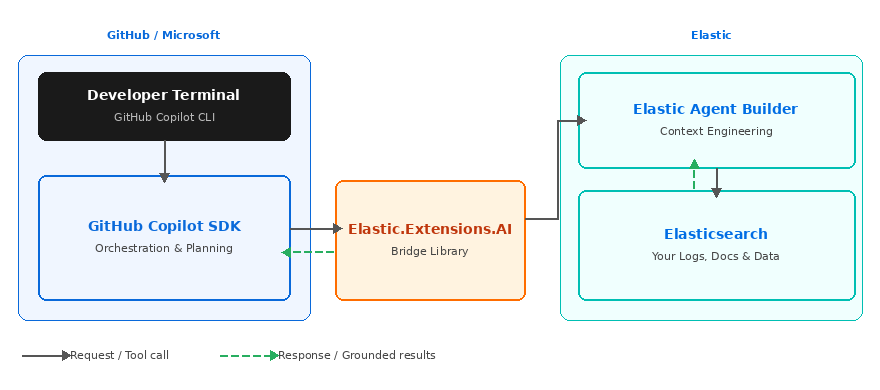
Figure 1: How the GitHub Copilot SDK and Elastic components interact.
Architectural patterns for Elasticsearch and Copilot integration
There are three primary ways to bridge Elasticsearch with the GitHub Copilot SDK.
| Use case | Key protocol/Library | Developer benefit |
|---|---|---|
| RAG / Hybrid search | Microsoft.Extensions.AI / Elastic.Extensions.AI | Ground agents in private docs, logs, and tickets with “five lines of code” simplicity. |
| Cluster management ops | Elasticsearch management APIs / SDK tools | Natural language control of cluster health and reindexing. (Note: Index lifecycle management [ILM] is high complexity.) |
| Agent interoperability | Model Context Protocol (MCP) / Agent2Agent (A2A) Protocol | Native invocation of prebuilt Elastic agents without writing new tool functions. |
Architectural nuance: The reality of ops
Although exposing Elasticsearch management APIs as Copilot tools reduces context-switching for site reliability engineers (SREs), developers should distinguish between easy and complex operations. Basic tasks, like checking cluster health or triggering a reindex, are straightforward. However, managing ILM policies via natural language is much more difficult due to the inherent complexity of the policy logic. A senior architect should prioritize health and discovery tools before attempting full policy automation.
Step-by-step guide: Building an Elasticsearch-powered Copilot agent
Step 1: Prerequisites and environment setup
- GitHub Copilot subscription: Required unless using Bring Your Own Key (BYOK).
- Copilot CLI: Installed and available in your PATH.
- Elasticsearch cluster: An active instance (Elasticsearch Serverless or Elastic Cloud).
Step 2: Installing the SDK
The SDK supports Python, TypeScript, Go, .NET, and Java (in progress). The examples in this post use .NET, where the Elastic.Extensions.AI bridge provides the tightest integration. To install the .NET packages:
dotnet add package GitHub.Copilot.SDK
dotnet add package Elastic.Clients.Elasticsearch
dotnet add package Elastic.Extensions.AI
Step 3: Registering Elasticsearch as a native tool
The integration runs through the Elastic.Extensions.AI bridge, a library written by Martijn Laarman (former .NET client maintainer for Elastic) that connects Elastic Agent Builder to the GitHub Copilot SDK. The core pattern has four steps, expressed in roughly 20 lines of C# that reduce to five logical operations:
// 1. Initialize the Elasticsearch client
var client = new ElasticsearchClient(
    new Uri(Environment.GetEnvironmentVariable("ES_URL")!),
    new ApiKey(Environment.GetEnvironmentVariable("ES_API_KEY")!));


// 2. Decorate a search method as a Copilot tool
[Description("Search Elasticsearch for documents relevant to the query")]
async Task<string> SearchAsync(
    [Description("Natural-language search query")] string query)
{
    // 3. Define the schema: ask the LLM to drive query DSL via SearchAsync
    var response = await client.SearchAsync<JsonElement>(s => s
        .Index("your-index")
        .Query(q => q.Match(m => m.Field("content").Query(query))));
    return JsonSerializer.Serialize(response.Documents.Take(5));
}


// 4. Register the tool and run via the Elastic.Extensions.AI bridge
var agent = CopilotAgent.Create(new CopilotAgentOptions());
agent.AddTool(AIFunctionFactory.Create(SearchAsync));
await agent.StartAsync();
Step 4: Implementing guardrails and privacy
The Copilot SDK includes a built-in security model where users must confirm tool usage (unless the --allow-all-tools flag is used).
Regarding data privacy: Elastic does not use customer data (prompts, queries, or event data) for model training. For teams wanting zero-configuration AI, Elastic-managed large language models (LLMs) are available via the Elastic Inference Service (EIS), providing immediate access to generative features, though these incur additional costs based on Elastic Cloud pricing. If you’re using EIS, data is processed by your chosen third-party LLM provider.
Getting started: Building your Elasticsearch RAG agent with GitHub Copilot SDK
Grounding with your own data solves the hallucination problem. By connecting Elasticsearch to the GitHub Copilot SDK via the Elastic.Extensions.AI bridge, you give your agent access to your data with minimal boilerplate. Copilot handles planning and orchestration; Elasticsearch handles fast, accurate retrieval. The result is an agent that reasons over what’s actually in your system, not what a model was trained on months ago.
Next steps: set up your Elasticsearch RAG agent
- Explore the source: Review the
elastic-ingest-dotnet repositoryfor the Elastic.Extensions.AI bridge. - Review the cookbook: Consult the GitHub Copilot SDK Cookbook for multi-language recipes.
- Implementation warning: Start with easy tools, like Cluster Health. ILM management is significantly more complex and should be approached with caution in agentic workflows.
Technical note: The GitHub Copilot SDK is currently in technical preview. Expect potential breaking changes before it reaches general availability.
Additional resource: You can read more about using Elasticsearch and Microsoft Agent Framework together in this blog.
Ready to try this out on your own? Start a free trial.
Want to get Elastic certified? Find out when the next Elasticsearch Engineer training is running!
Related content
May 26, 2026
Cutting agent costs with pre-computed context
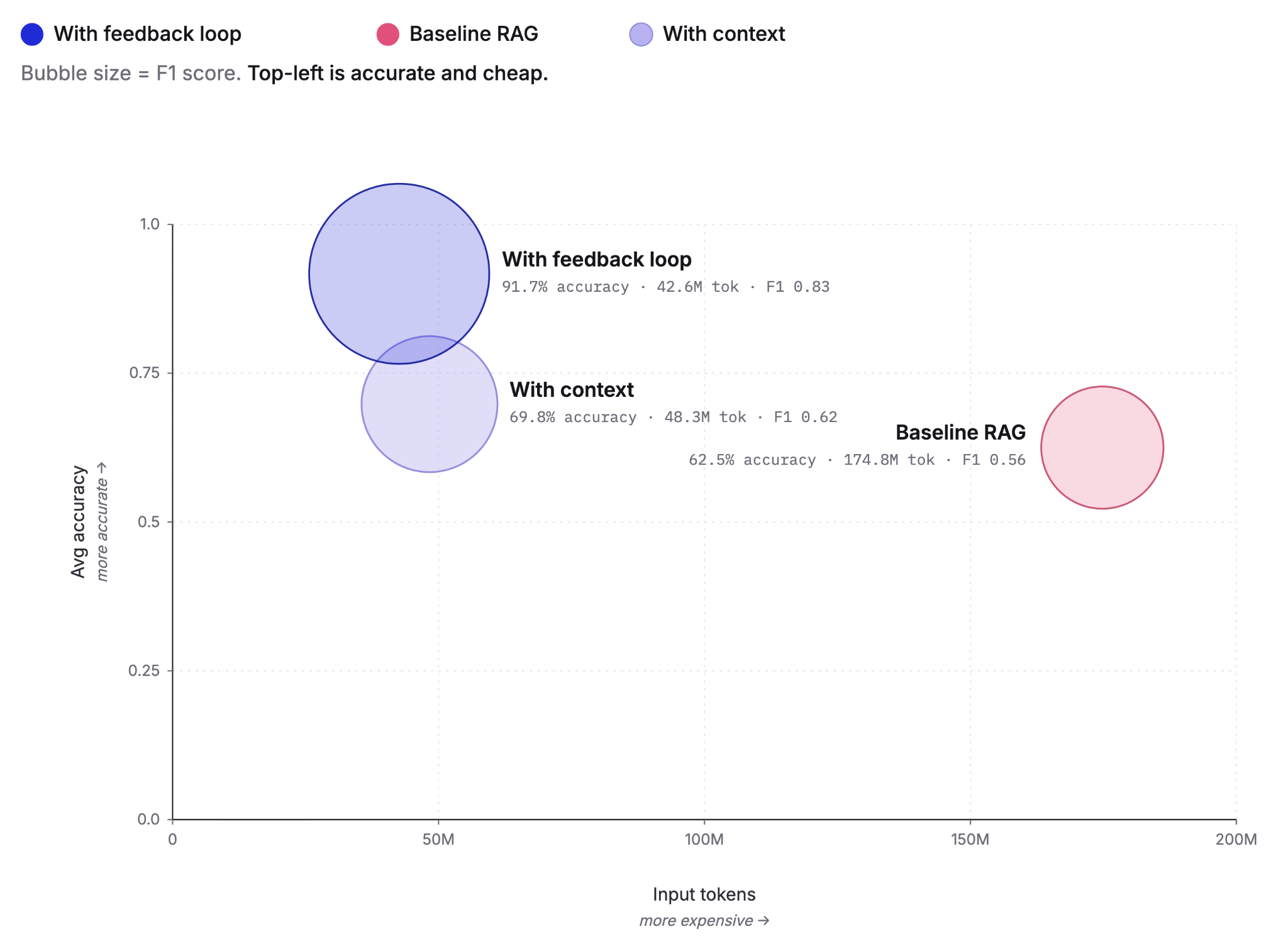
Pre-computing context as Knowledge Indicators reduces LLM agent token costs by up to 75% and improves answer accuracy from 60% to 92%. This post covers the extraction, retrieval and feedback loop that make it work, tested against the BrowseComp-Plus benchmark.
May 5, 2026
Elastic Agent Builder: How we taught AI agents to manage their own context
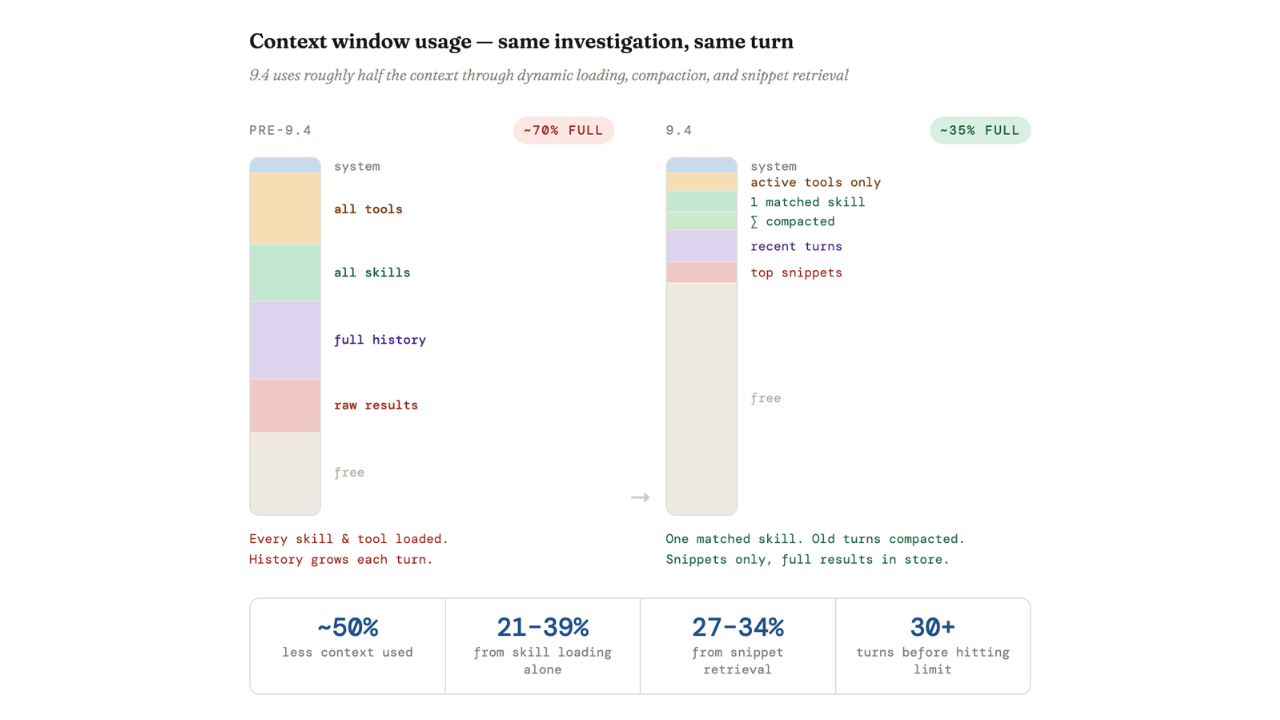
Agent Builder in Elasticsearch 9.4 ships dynamically loaded skills, a conversation context store, selective compaction, and external connectors to cut token costs by 40% and let agents handle their own context management.

April 29, 2026
Elastic-caveman: Cutting AI response tokens by 64% without losing the best of Elastic
Learn how to use elastic-caveman to cut AI response tokens while keeping the Elastic agentic brilliance.
April 8, 2026
How to build agentic AI applications with Mastra and Elasticsearch
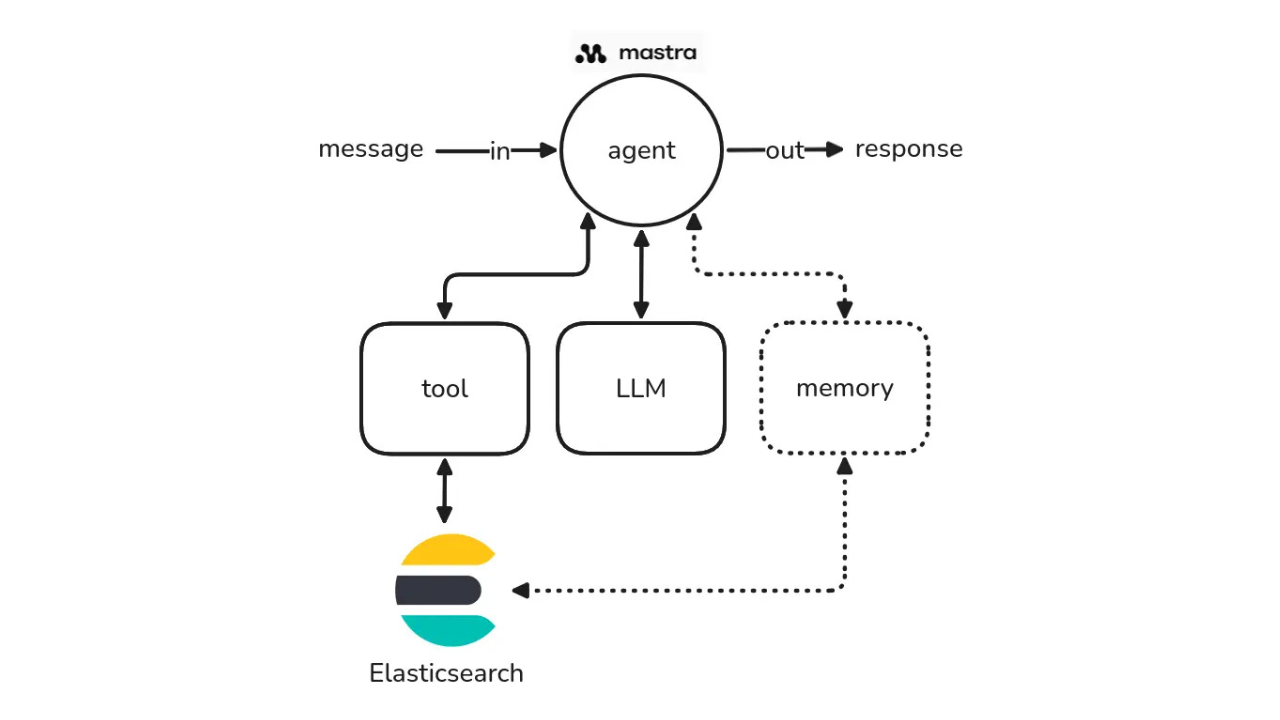
Learn how to build agentic AI applications using Mastra and Elasticsearch through a practical example.

March 23, 2026
Using Elasticsearch Inference API along with Hugging Face models
Learn how to connect Elasticsearch to Hugging Face models using inference endpoints, and build a multilingual blog recommendation system with semantic search and chat completions.