Elasticsearch vector database now stores and automatically chunks embeddings from the mistral-embed model, with native integrations to the open inference API and the semantic_text field. For developers building RAG applications, this integration eliminates the need to architect bespoke chunking strategies, and makes chunking with vector storage as simple as adding an API key.
Mistral AI provides popular open-source and optimized LLMs, ready for enterprise use cases. The Elasticsearch open inference API enables developers to create inference endpoints and use machine learning models of leading LLM providers. As two companies rooted in openness and community, it was only natural for us to collaborate!
In this blog, we will use Mistral AI’s mistral-embed model in a retrieval augmented generation (RAG) setup.
Get started: mistral-embed model with Elastic
To get started, you’ll need a Mistral account on La Plateforme and an API key generated for your account.
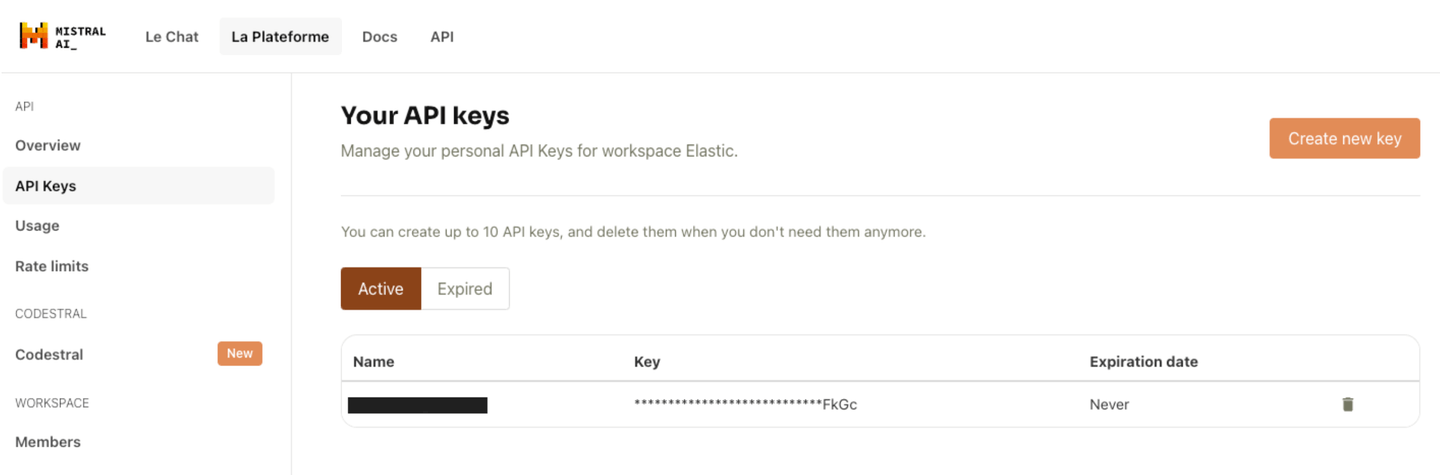
Generate a usage key on Mistral AI’s La Plateforme.
Now, open your Elasticsearch Kibana UI and expand the dev console for the next step.
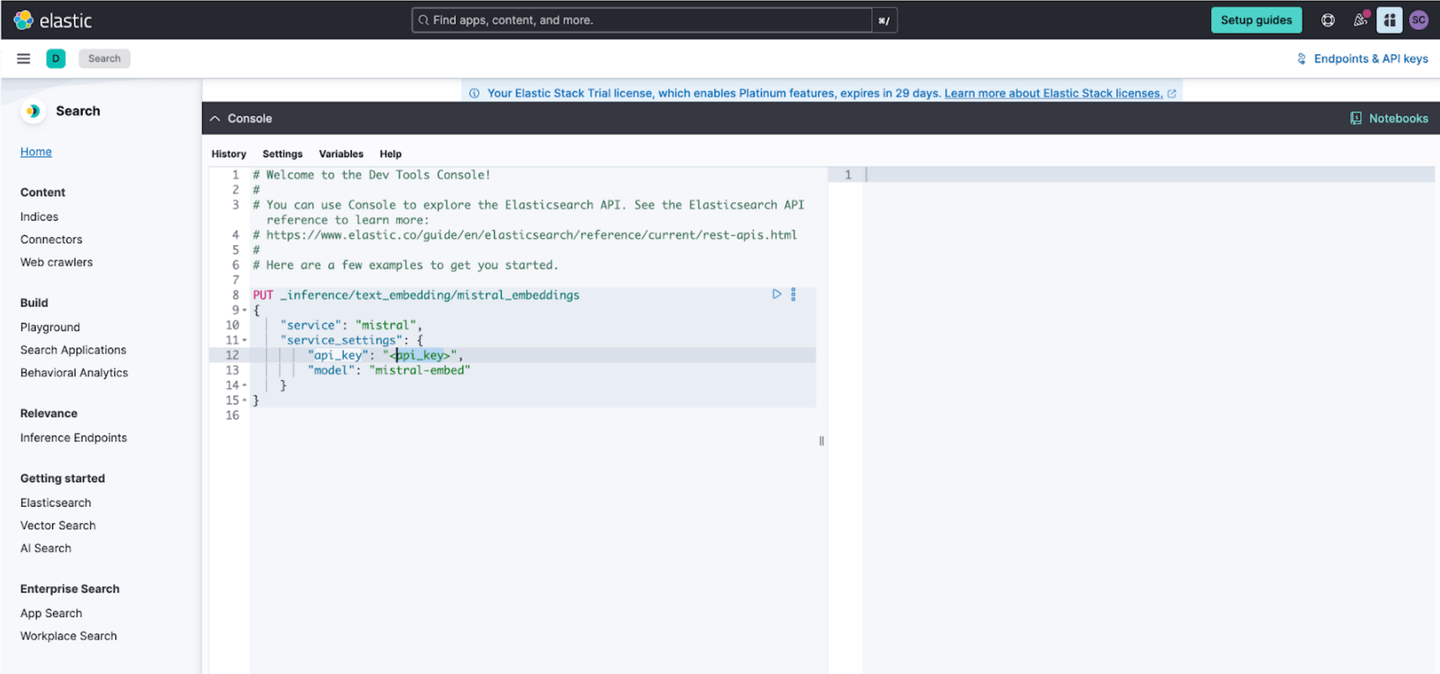
Replace the highlighted API key with the key generated in the Mistral Platform.
You’ll create an inference endpoint by using the create inference API and providing your API key, and the name of the Mistral embedding model. As part of the configuration for an inference endpoint, we will specify the mistral-embed model to create a “text_embedding” endpoint named “mistral_embeddings”
PUT _inference/text_embedding/mistral_embeddings
{
    "service": "mistral",
    "service_settings": {
        "api_key": "<api_key>",
        "model": "mistral-embed"
    }
}
You will receive a response from Elasticsearch with the endpoint that was created successfully:
{
    "model_id": "mistral_embeddings",
    "task_type": "text_embedding",
    "service": "mistral",
    "service_settings": {
        "model": "mistral-embed",
        "dimensions": 1024,
        "similarity": "dot_product",
        "rate_limit": {
            "requests_per_minute": 240
        }
    },
    "task_settings": {}
}
Note that there are no additional settings for model creation. Elasticsearch will automatically connect to the Mistral platform to test your credentials and the model, and fill in the number of dimensions and similarity measures for you.
Next, let’s test our endpoint to ensure everything is set up correctly. To do this, we’ll call the perform inference API:
POST _inference/text_embedding/mistral_embeddings
{
  "input": "Show me some text embedding vectors"
}
The API call will return vthe generated embeddings for the provided input, which will look something like this:
{
    "text_embedding": [
        {
            "embedding": [
                0.016098022,
                0.047546387,
                … (additional values) …
                0.030654907,
                -0.044067383
            ]
        }
    ]
}
Automated chunking for vectorized data
Now that we have our inference endpoint all set up and verified that it works, we can use the Elasticsearch semantic_text mapping with an index to use it to automatically create our embeddings vectors when we index. To do this, we’ll start by creating an index named “mistral-semantic-index” with a single field to hold our text named content_embeddings:
PUT mistral-semantic-index
{
  "mappings": {
    "properties": {
      "content_embeddings": {
        "type": "semantic_text",
        "inference_id": "mistral_embeddings"
      }
    }
  }
}
Once that is set up, we can immediately start using our inference endpoint simply by indexing a document. For example:
PUT mistral-semantic-index/_doc/doc1
{
  "content_embeddings": "These are not the droids you're looking for. He's free to go around"
}
Now if we retrieve our document, you will see that internally when the text was indexed our inference endpoint was called and text embeddings were automatically added to our document as well as some additional metadata about the model used for the inference. Under the hood, the semantic_text field type will automatically provide chunking to break larger input text into manageable chunks on which it will perform the inference.
GET mistral-semantic-index/_search

{
  …
  "hits": {
    …
    "hits": [
      {
        "_index": "mistral-semantic-index",
        "_id": "doc1",
        "_score": 1,
        "_source": {
          "content_embeddings": {
            "text": "These are not the droids you're looking for. He's free to go around",
            "inference": {
              "inference_id": "mistral_embeddings",
              "model_settings": {
                "task_type": "text_embedding",
                "dimensions": 1024,
                "similarity": "dot_product",
                "element_type": "float"
              },
              "chunks": [
                {
                  "text": "These are not the droids you're looking for. He's free to go around",
                  "embeddings": [
                    -0.039367676,
                    0.022644043,
                    -0.0076675415,
                    -0.020507812,
                    0.039489746,
                    0.0340271,
        …
Great! Now that we have that setup and we’ve seen it in action, we can load our data into our index. You can use whatever method you like. We prefer the bulk indexing API. While your data is indexing, the ingest pipeline will use our inference endpoint to perform inference on the content_embedding field data across to the Mistral API.
Semantic Search powered by Mistral AI
Finally, let’s run a semantic search using our data. Using the semantic query type, we’ll search for the phrase “robots you’re searching for”.
GET mistral-semantic-index/_search
{
  "query": {
    "semantic": {
      "field": "content_embeddings",
      "query": "robots you're searching for"
    }
  }
}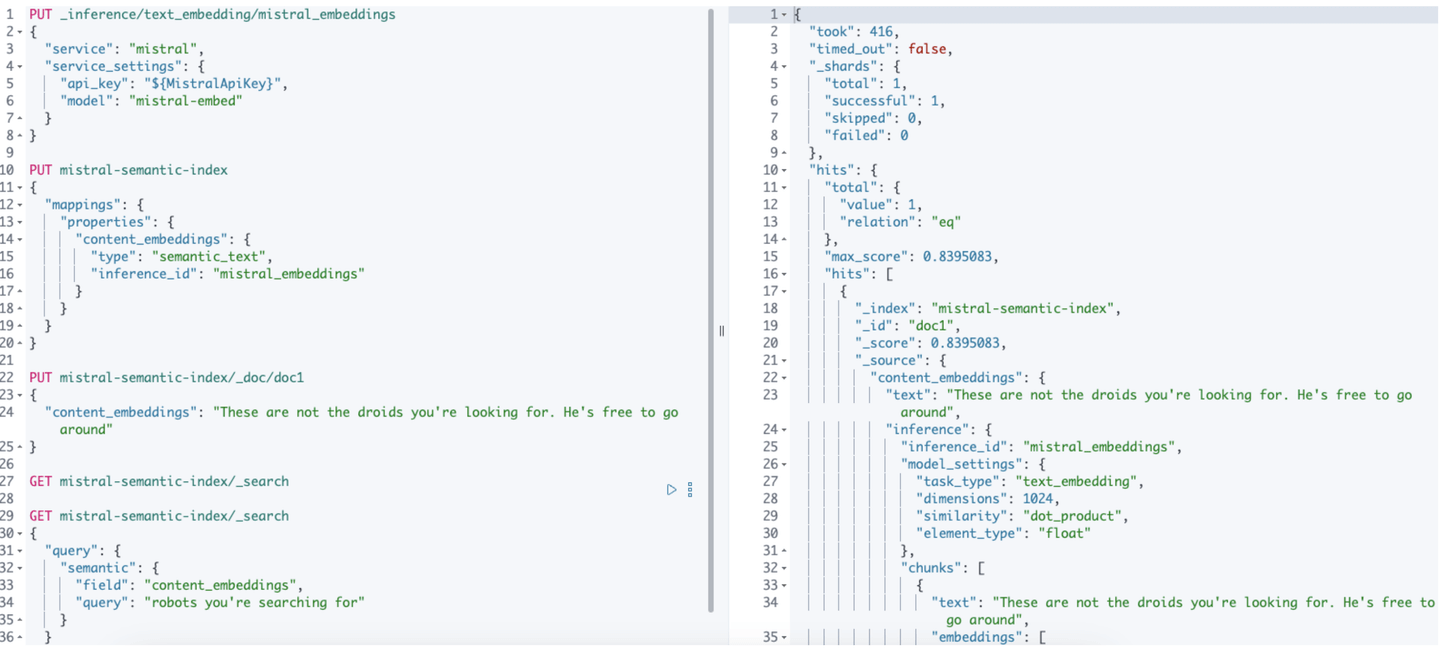
That’s it! When the query is run, Elasticsearch’s semantic text query will use our Mistral inference endpoint to obtain the query vector and use that under the hood to search across our data on the “content_embeddings” field.
We hope you enjoy using this integration, available with Elastic Serverless, or soon on Elastic Cloud Hosted with version 8.15. Head over to the Mistral AI page on Search Labs to get started.
Happy searching!
Ready to try this out on your own? Start a free trial.
Want to get Elastic certified? Find out when the next Elasticsearch Engineer training is running!
Related content

November 25, 2025
Top Elastic Agent Builder projects and learnings from Cal Hacks 12.0
Explore the top Elastic Agent Builder projects from Cal Hacks 12.0 and dive into our technical takeaways on Serverless, ES|QL, and agent architectures.
December 5, 2025
Build a financial AI search workflow using LangGraph.js and Elasticsearch
Learn how to use LangGraph.js with Elasticsearch to build an AI-powered financial search workflow that turns natural language queries into dynamic, conditional filters for investment and market analysis.

November 24, 2025
Creating an LLM agent newsroom with A2A protocol and MCP in Elasticsearch: Part II
Discover how to build a specialized hybrid LLM agent newsroom using A2A Protocol for agent collaboration and MCP for tool access in Elasticsearch.

November 18, 2025
You Know, for Context - Part II: Agentic AI and the need for context engineering
Learn how the evolution of LLMs towards agentic AI increases the need for context engineering to solve RAG context limits and memory management.

November 17, 2025
How to build a multi-agent system using Elasticsearch and LangGraph
Discover how to build a multi-agent LLM system using Elasticsearch and LangGraph, and implement the reflection pattern for self-correcting agents powered by hybrid search and ELSER embeddings.