In a previous article, we explored alternatives to OpenAI's Contrastive Language–Image Pre-training (CLIP) for multimodal search, including Jina CLIP v1. In this article, we take it further with Jina CLIP v2, a multilingual, multimodal embedding model that lets you search an image collection in 89 languages using the same Elasticsearch index and the same model. We'll also look at Matryoshka Representations, a v2 feature that lets you reduce your index size by 75%.
Prerequisites
- Elasticsearch 9.x cluster (start a free trial)
- Python 3.9+
- Jina API key (free at jina.ai with 100K free tokens, enough for this demo)
You can follow along with the full notebook for the complete code.
Jina CLIP v1 versus v2
Before writing any code, it's worth understanding what changed. The headline feature is multilingual support, but there are several other meaningful improvements:
| Feature | Jina CLIP v1 | Jina CLIP v2 |
|---|---|---|
| Languages | English only | 89 languages |
| Max image resolution | 224x224 | 512x512 |
| Text encoder | JinaBERT | Jina XLM-RoBERTa |
| Matryoshka Representations | No | Yes |
| Embedding dimensions | 768 | 1024 |
| Max text length | 512 tokens | 8192 tokens |
The text encoder upgrade from JinaBERT to Jina XLM-RoBERTa is what enables multilingual support. You can now write a query in French and retrieve English-tagged images; the model maps both into the same embedding space.
With v2, queries up to 8,192 tokens are embedded in full; anything beyond that is truncated if the truncate option is enabled.
Setup
Elasticsearch as a vector database allows us to store and search dense embeddings natively. We use a dense_vector field with 1024 dimensions and cosine similarity, which is the right choice for CLIP-style embeddings, since cosine similarity normalizes vectors at index time:
INDEX_NAME = "clip-v2-stock-images"

if es_client.indices.exists(index=INDEX_NAME):
    es_client.indices.delete(index=INDEX_NAME)

es_client.indices.create(
    index=INDEX_NAME,
    mappings={
        "properties": {
            "image_embedding": {
                "type": "dense_vector",
                "dims": 1024,
                "index": True,
                "similarity": "cosine",
            },
            "tags": {
                "type": "text",
                "fields": {"keyword": {"type": "keyword"}},
            },
        }
    },
)
Jina Embeddings API
We use the Jina Embeddings API, a REST API that handles both text and image inputs with the same model:
import requests
import base64
from io import BytesIO

JINA_API_URL = "https://api.jina.ai/v1/embeddings"
JINA_HEADERS = {
    "Content-Type": "application/json",
    "Authorization": f"Bearer {JINA_API_KEY}",
}


def image_to_base64(image, max_size=512):
    """Convert a PIL image to a base64 data URL, resizing to max_size."""
    image = image.copy()
    image.thumbnail((max_size, max_size))
    buffer = BytesIO()
    image.save(buffer, format="PNG")
    b64 = base64.b64encode(buffer.getvalue()).decode("utf-8")
    return f"data:image/png;base64,{b64}"


def encode_texts(texts, dimensions=1024):
    """Encode a list of text strings using Jina CLIP v2."""
    data = {
        "input": [{"text": t} for t in texts],
        "model": "jina-clip-v2",
        "dimensions": dimensions,
    }
    response = requests.post(JINA_API_URL, headers=JINA_HEADERS, json=data)
    response.raise_for_status()
    return [item["embedding"] for item in response.json()["data"]]


def encode_images(images, dimensions=1024):
    """Encode a list of PIL images using Jina CLIP v2."""
    data = {
        "input": [{"image": image_to_base64(img)} for img in images],
        "model": "jina-clip-v2",
        "dimensions": dimensions,
    }
    response = requests.post(JINA_API_URL, headers=JINA_HEADERS, json=data)
    response.raise_for_status()
    return [item["embedding"] for item in response.json()["data"]]
The dimensions parameter controls the output size and is key to Matryoshka support, which we'll cover at the end of this article. For now, we use the full 1024 dimensions.
Load the dataset
We use the StockImages-CC0 dataset, which contains around 4,000 CC0-licensed stock photos with descriptive tags. Images are 1200px wide, well above CLIP v2's 512x512 input size, so we resize them during embedding.
We select 20 diverse images covering different categories to keep the demo fast and the results easy to interpret:
from datasets import load_dataset

full_dataset = load_dataset("KoalaAI/StockImages-CC0", split="train")
print(f"Total images: {len(full_dataset)}")

selected_indices = [
    0,   # technology: smartphone, macbook
    8,   # coastal landscape: driftwood, sea, ocean
    34,  # waterfall: rock, waterfall, creek
    40,  # fashion: highheel, shoe, red
    61,  # vineyard: vine, wine, fruit
    82,  # fruit: raspberry, berry
    90,  # night sky: milky way, stars
    95,  # music: acoustic guitar
    111, # town: hot air balloon
    120, # vehicle: vw van, vintage
    150, # city: eiffel tower, paris
    153, # animal: puppy, canine
    191, # sport: skateboard, kickflip
    197, # drink: tea, honey
    286, # wildlife: brown bear
    305, # architecture: palace, cathedral
    312, # coffee: latte, cappuccino
    317, # flowers: tulip, bouquet
    371, # nature: waterfall, river, cascade
    418, # pet: kitten, cat
]

dataset = full_dataset.select(selected_indices)
print(f"Selected {len(dataset)} images")
Generate image embeddings
The following diagram illustrates the two-step pipeline: First, images are embedded with CLIP v2 and stored in Elasticsearch; and then, a text or image query is embedded with the same model and used for k-nearest neighbor (kNN) similarity search:
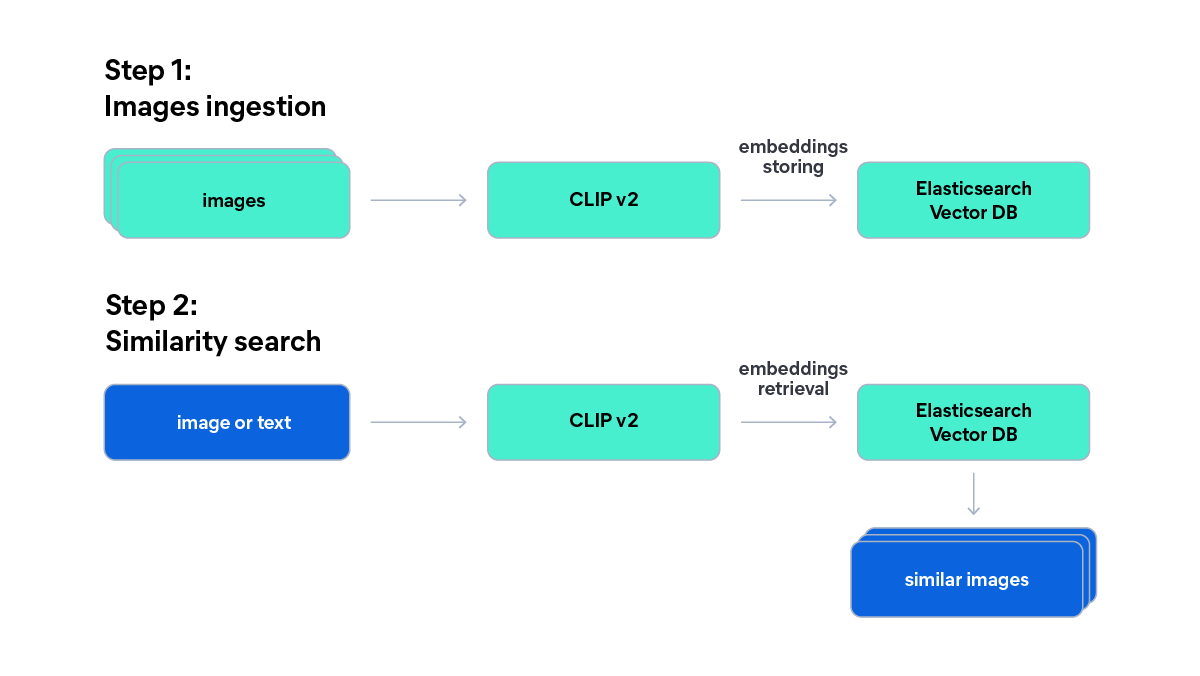
We encode all 20 images in a single API call. CLIP v2 models embed images and text into the same vector space, which is what makes text-to-image search possible:
images = [item["image"].convert("RGB") for item in dataset]

image_embeddings = encode_images(images)
print(f"Generated {len(image_embeddings)} embeddings of {len(image_embeddings[0])} dimensions")
# Generated 20 embeddings of 1024 dimensions
Index documents
We use the Elasticsearch bulk helper to index all documents in one call:
from elasticsearch import helpers


def build_bulk_actions(dataset, image_embeddings, index_name):
    for i, item in enumerate(dataset):
        yield {
            "_index": index_name,
            "_id": i,
            "_source": {
                "image_embedding": image_embeddings[i],
                "tags": item.get("tags", ""),
            },
        }


success, failed = helpers.bulk(
    es_client,
    build_bulk_actions(dataset, image_embeddings, INDEX_NAME),
    refresh=True,
)

print(f"Indexed {success} documents")
# Indexed 20 documents
Multilingual text-to-image search
We encode a text query using the clip-v2 model we used for the images and then run a kNN search against the image embeddings. Because Jina CLIP v2 maps text from all supported languages and images into the same embedding space, queries in different languages retrieve the same images:
import matplotlib.pyplot as plt


def search_by_text(query, k=3):
    """Encode a text query and search Elasticsearch."""

    query_embedding = encode_texts([query])[0]
    results = es_client.search(
        index=INDEX_NAME,
        knn={
            "field": "image_embedding",
            "query_vector": query_embedding,
            "k": k,
            "num_candidates": 50,
        },
    )

    return results["hits"]["hits"]
We test with three query sets, each translated into English, Spanish, French, and Portuguese:
multilingual_queries = [
    {
        "English": "a cat sleeping",
        "Spanish": "un gato durmiendo",
        "French": "un chat qui dort",
        "Portuguese": "um gato dormindo",
    },
    {
        "English": "red flowers",
        "Spanish": "flores rojas",
        "French": "fleurs rouges",
        "Portuguese": "flores vermelhas",
    },
    {
        "English": "waterfall in nature",
        "Spanish": "cascada en la naturaleza",
        "French": "cascade dans la nature",
        "Portuguese": "cascata na natureza",
    },
]

for query_set in multilingual_queries:
    print(f"\n{'='*60}")

    for lang, query in query_set.items():
        print(f'\n{lang}: "{query}"')
        hits = search_by_text(query, k=3)
        display_results(hits, query=f"[{lang}] {query}") # Function to display the images
As you can see in the images below, all four language variants of each query return the same top results. The ranking scores are nearly identical across languages:
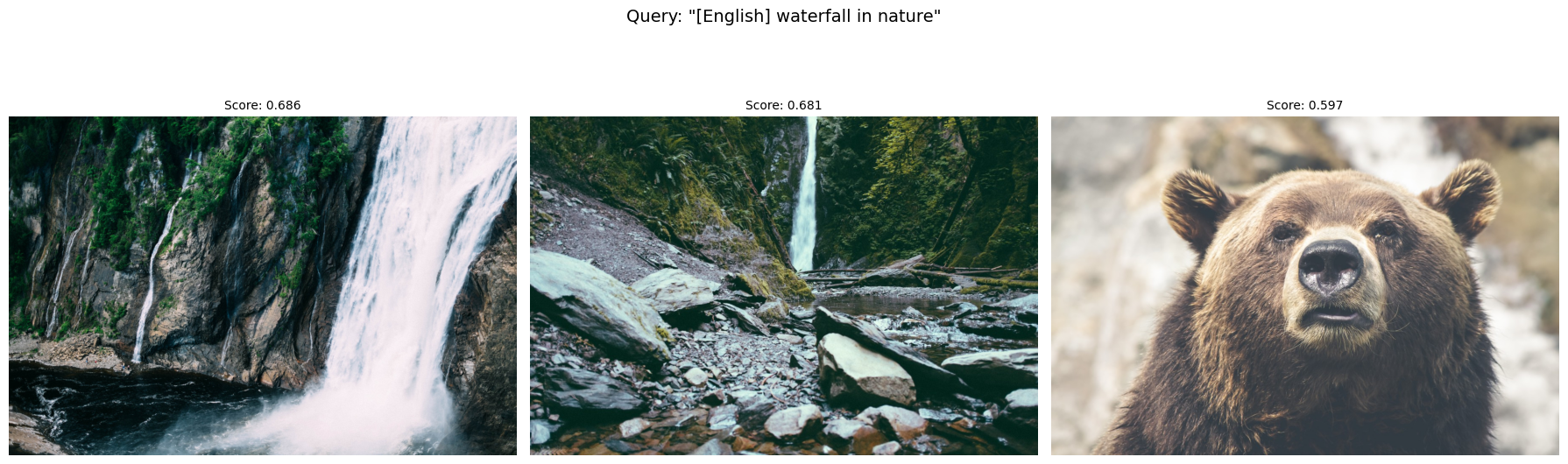
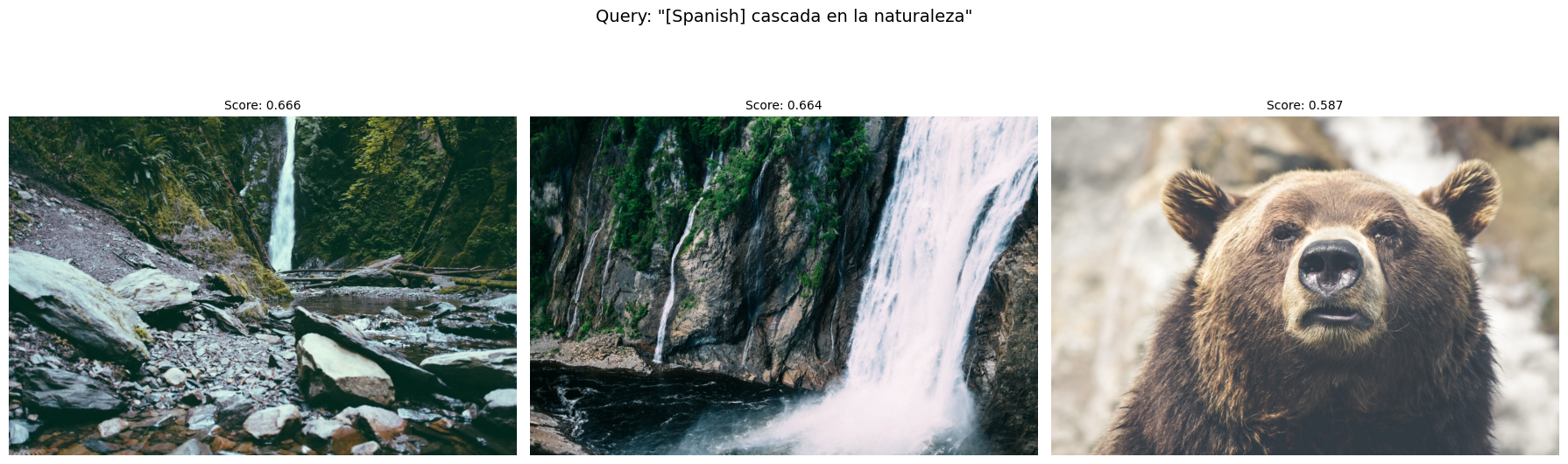
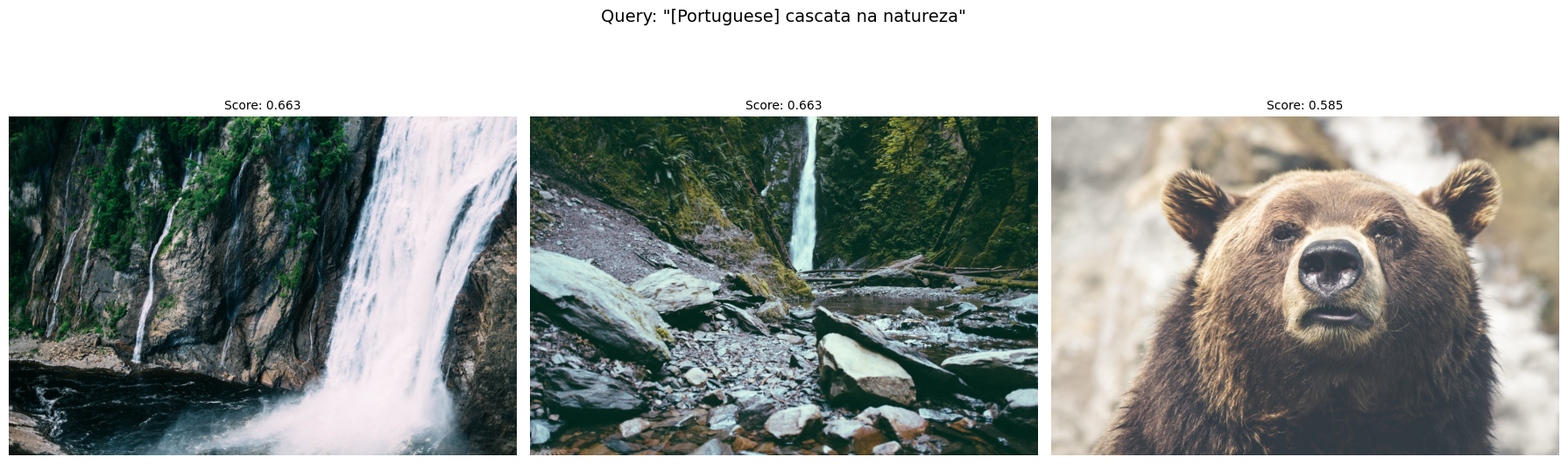
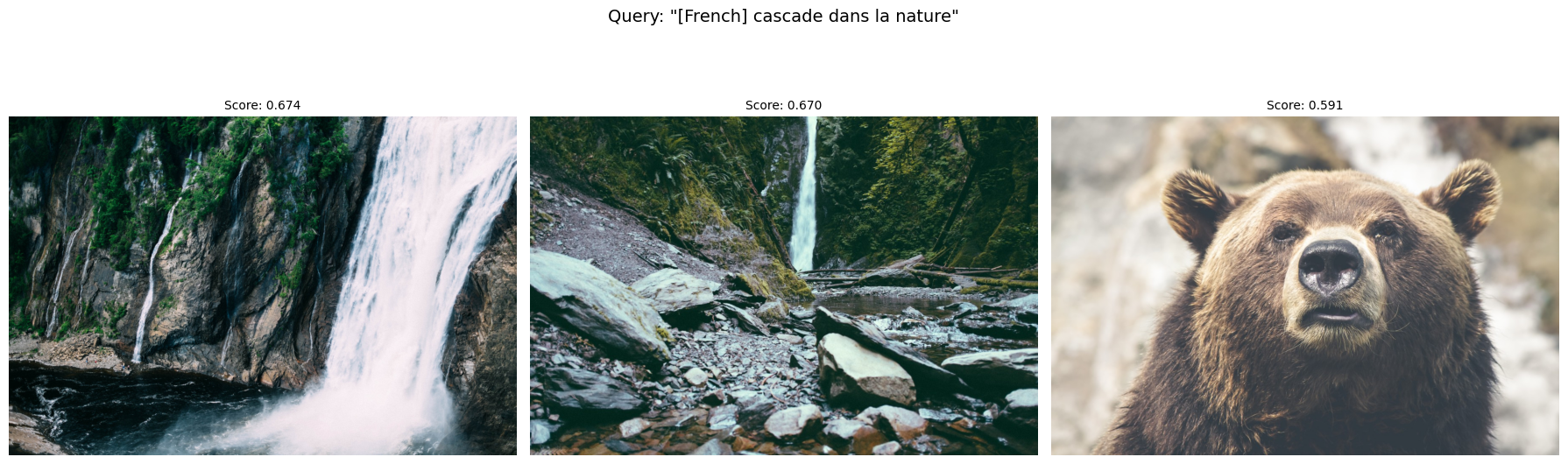
Image-to-image search
Beyond text queries, you can use an image as the query to find visually similar images. The approach is the same: Encode the query image into the embedding space, and run kNN search:
def search_by_image(image, k=5):
    """Encode an image and search Elasticsearch."""

    query_embedding = encode_images([image])[0]
    results = es_client.search(
        index=INDEX_NAME,
        knn={
            "field": "image_embedding",
            "query_vector": query_embedding,
            "k": k,
            "num_candidates": 50,
        },
    )

    return results["hits"]["hits"]


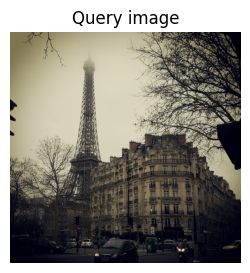
# Use image at index 10 (Eiffel Tower) as query
query_image = dataset[10]["image"]
hits = search_by_image(query_image)
display_results(hits, query="Similar to query image")
Let’s try an image search using the following image of the Eiffel Tower:
Results:
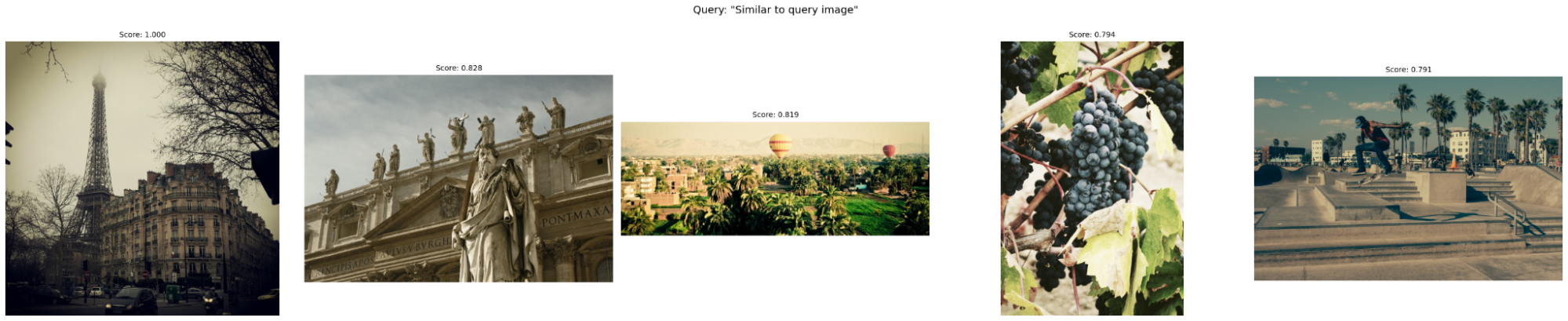
Using the Eiffel Tower as the query, the model returns the image itself, followed by a cathedral and a town with a hot air balloon; both are visually and semantically adjacent to an urban landmark. The vineyard and skatepark are less obvious matches; with only 20 images in the index, kNN always returns k results regardless of relevance.
Matryoshka Representations
Jina CLIP v2 supports Matryoshka Representation Learning (MRL). The idea is that the model is trained so that the first N dimensions of an embedding already capture most of the information, and you can truncate the rest. You get smaller vectors with minimal quality loss.
The Jina API exposes this directly via the dimensions parameter, which accepts any integer between 64 and 1024.
According to Jina's benchmarks, reducing from 1024 to 256 dimensions maintains over 99% of retrieval quality across text, image, and cross-modal tasks.
To use a reduced dimension, create a separate Elasticsearch index with dims set to your target size. Elasticsearch's dense_vector field is fixed at index creation; you can't query with a 256-dim vector against a 1024-dim index:
MATRYOSHKA_DIMS = 256
MATRYOSHKA_INDEX = "clip-v2-stock-images-256d"

if es_client.indices.exists(index=MATRYOSHKA_INDEX):
    es_client.indices.delete(index=MATRYOSHKA_INDEX)

es_client.indices.create(
    index=MATRYOSHKA_INDEX,
    mappings={
        "properties": {
            "image_embedding": {
                "type": "dense_vector",
                "dims": MATRYOSHKA_DIMS,
                "index": True,
                "similarity": "cosine",
            },
            "tags": {
                "type": "text",
                "fields": {"keyword": {"type": "keyword"}},
            },
        }
    },
)

# Generate 256-dim embeddings
image_embeddings_256 = encode_images(images, dimensions=MATRYOSHKA_DIMS)
print(f"Generated {len(image_embeddings_256)} embeddings of {len(image_embeddings_256[0])} dimensions")

# Index documents
success, _ = helpers.bulk(
    es_client,
    build_bulk_actions(dataset, image_embeddings_256, MATRYOSHKA_INDEX),
    refresh=True,
)
print(f"Indexed {success} documents in {MATRYOSHKA_INDEX}")
Now compare results between the 1024-dim and 256-dim indices:
query = "a cat sleeping"

print("Results with 1024 dimensions:")
hits_1024 = search_by_text(query, k=3)
display_results(hits_1024, query=f"{query} (1024 dims)")

print("\nResults with 256 dimensions:")
query_embedding_256 = encode_texts([query], dimensions=MATRYOSHKA_DIMS)[0]
hits_256 = es_client.search(
    index=MATRYOSHKA_INDEX,
    knn={
        "field": "image_embedding",
        "query_vector": query_embedding_256,
        "k": 3,
        "num_candidates": 50,
    },
)["hits"]["hits"]
display_results(hits_256, query=f"{query} (256 dims)")

ids_1024 = [hit["_id"] for hit in hits_1024]
ids_256 = [hit["_id"] for hit in hits_256]
print(f"1024d ranking: {ids_1024}")
print(f" 256d ranking: {ids_256}")
print(f"Same top results: {ids_1024 == ids_256}")
These are the results:
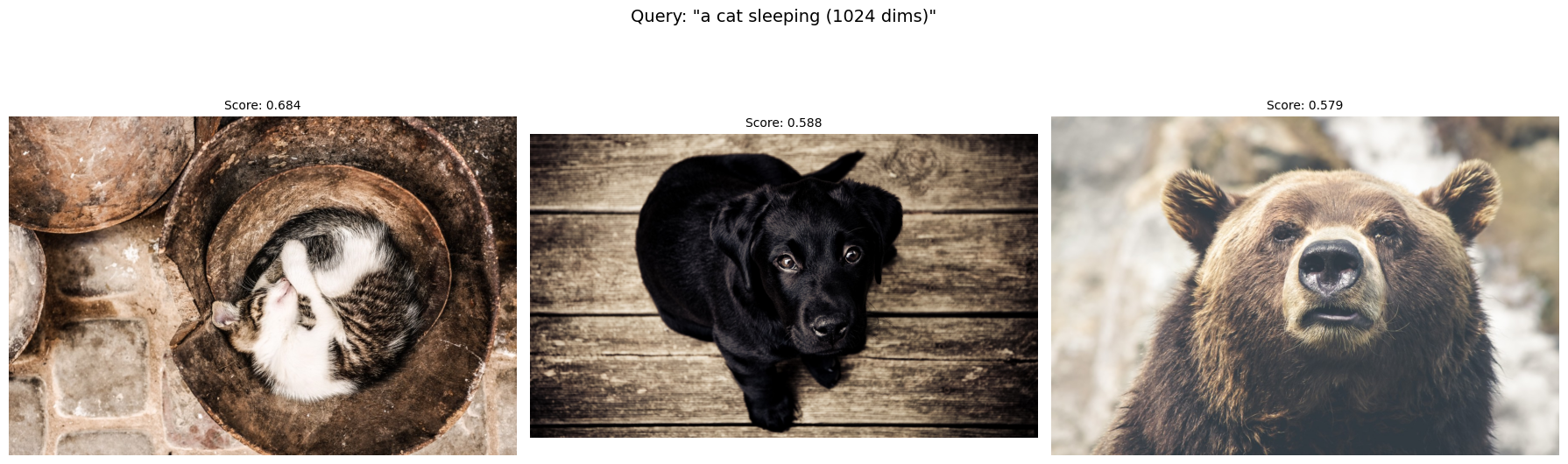
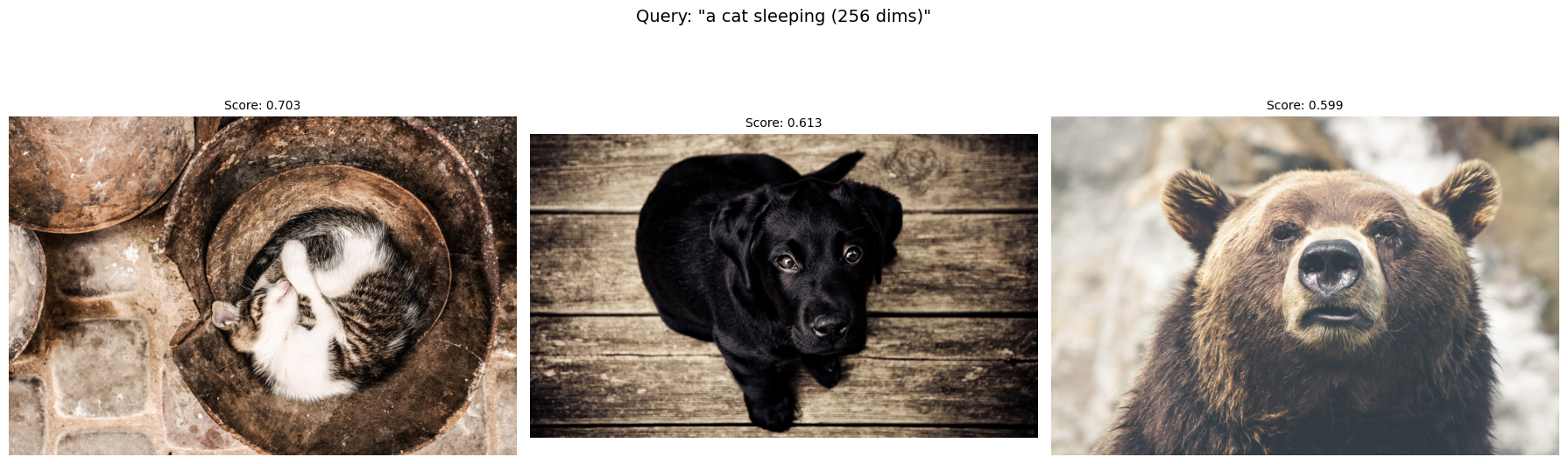
The top results are the same at 256 and 1024 dimensions. In larger-scale deployments, 256-dim embeddings will reduce storage and query latency proportionally, making Matryoshka a practical optimization for production systems where index size matters. It’s important to always measure retrieval quality in your specific dataset.
The multimodal gap
It's worth noting that CLIP-style dual-encoder models have a known limitation called the multimodal gap: Text and image embeddings form separated clusters in vector space, which can make cross-modal similarity scores less reliable. Jina addressed this in jina-embeddings-v4 by replacing the dual-encoder architecture with a unified model, and a multimodal v5 is in development. If cross-modal alignment is critical for your use case, keep an eye on these newer models.
Conclusion
Jina CLIP v2 extends v1 with multilingual support across 89 languages, larger embeddings, higher image resolution, and Matryoshka embeddings that let you trade index size for a small quality loss. The API is similar, so you can use this model in the same way as the first version.
Next steps
- Read the Jina models guide on Search Labs for an overview of all Jina models available with Elasticsearch.
- Check the Elasticsearch kNN search documentation for filtering, hybrid search, and rescoring options.
- See multimodal search with SigLIP-2 for a different CLIP-alternative approach.
- Learn about multilingual embedding model deployment in Elasticsearch for text-only cross-lingual retrieval.
- Review mapping embeddings to Elasticsearch field types for guidance on choosing between
dense_vector,semantic_text, andsparse_vector.
Ready to try this out on your own? Start a free trial.
Elasticsearch has integrations for tools from LangChain, Cohere and more. Join our advanced semantic search webinar to build your next GenAI app!
Related content

June 1, 2026
Build a RAG agent with Elasticsearch and GitHub Copilot SDK
Wire Elasticsearch into the GitHub Copilot SDK as a RAG tool in five lines of C#, grounding your agent in your own logs, docs and data instead of model training data.
May 26, 2026
Kibana dashboards as code: GitOps, drift detection and Terraform for Kibana dashboards in Elastic 9.4
Elastic 9.4 ships a typed Dashboards API and a native Terraform resource that bring drift detection, PR-reviewable diffs and git-based rollback to Kibana dashboards for the first time.

May 11, 2026
Bringing Fire to Elasticsearch: Adding Native Prometheus API Support
Query Elasticsearch directly from Prometheus-compatible clients via native PromQL, discovery, and metadata endpoints. Send data to Elasticsearch with Prometheus Remote Write.

March 23, 2026
Using Elasticsearch Inference API along with Hugging Face models
Learn how to connect Elasticsearch to Hugging Face models using inference endpoints, and build a multilingual blog recommendation system with semantic search and chat completions.
March 27, 2026
Creating an Elasticsearch MCP server with TypeScript
Learn how to create an Elasticsearch MCP server with TypeScript and Claude Desktop.